
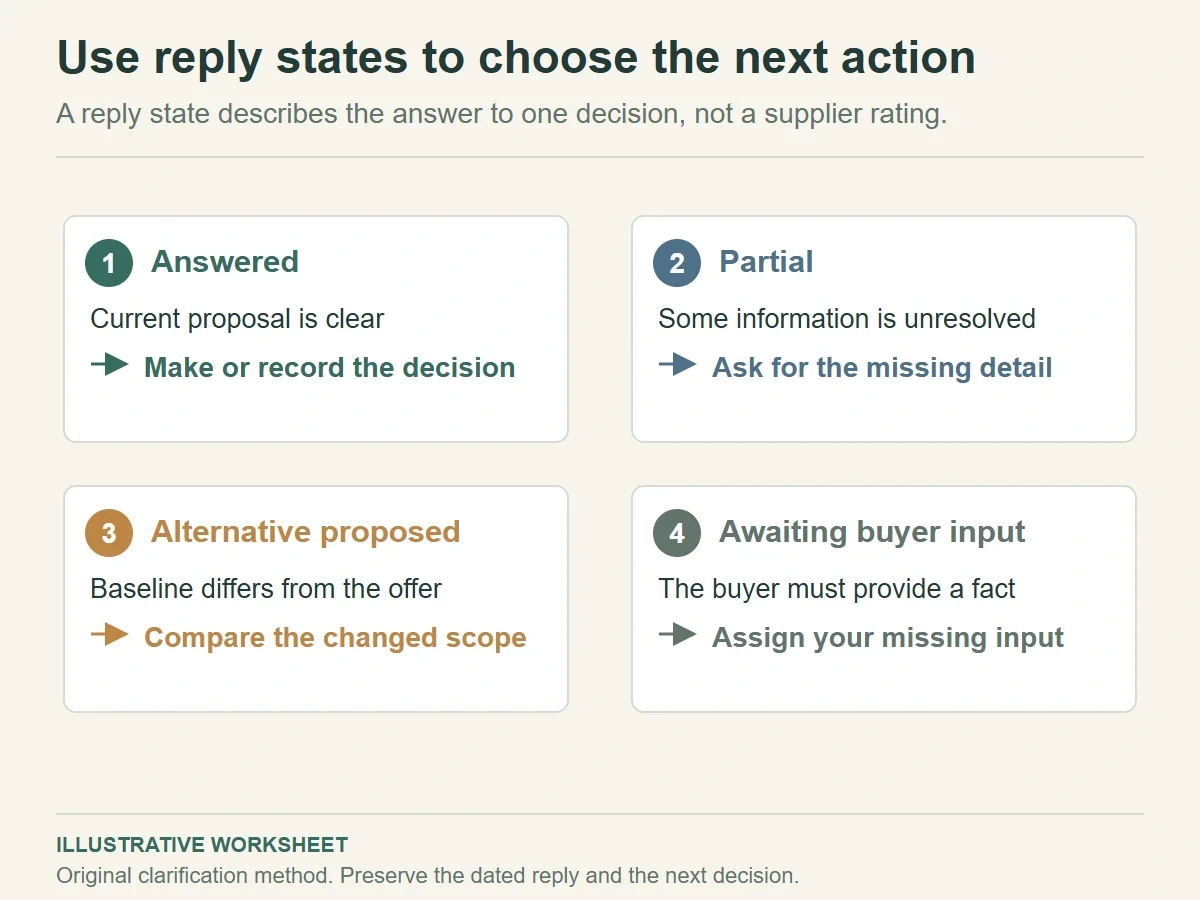
A packaging supplier clarification matrix places your question, the supplier’s exact proposal, the unresolved detail and the next decision in separate fields. Use it when replies arrive across emails, messages or quotation files. A row is ready for comparison when it answers the requested scope with a dated reference, rather than a broad statement such as “customizable.”
The aim is to make the next exchange shorter and more precise. A supplier can answer a well-defined question quickly, while a buyer can see whether that answer changes the package. Keep the original reply alongside your working interpretation so the distinction stays visible.
Give each question a decision it must support
Start with the current brief revision and a supplier identifier. Use the same baseline when you want to compare proposals. If a supplier offers an alternative, keep that alternative in a separate column or row so it can be considered on its own terms.
Ask a question because you need to make a decision. “Can you customize this box?” may produce a general yes. “Can the proposed insert hold the named pendant in the shown position, and what sample is needed to check removal?” asks for a proposal and an evidence path.
Keep each row narrow enough for a clear reply. Material, artwork and delivery belong in different rows, even when they appear in one supplier message. A complete answer on board construction should remain visible if the carton packing question is still unanswered.
Use the supplier brief essentials to establish the baseline. This matrix then records the exchange after that first brief, particularly where a supplier interprets a requirement differently or proposes a substitution.
Set an owner for every open question. Product dimensions may need someone on your team to measure an item; material feasibility may need a supplier response. Assigning all open rows to the supplier can delay a project when the missing input is actually yours.
Classify replies by what they resolve
Use four working states: answered, partial, alternative proposed and awaiting buyer input. These describe the reply’s usefulness for the particular decision. They are an editorial method, not a rating of the supplier as a business.
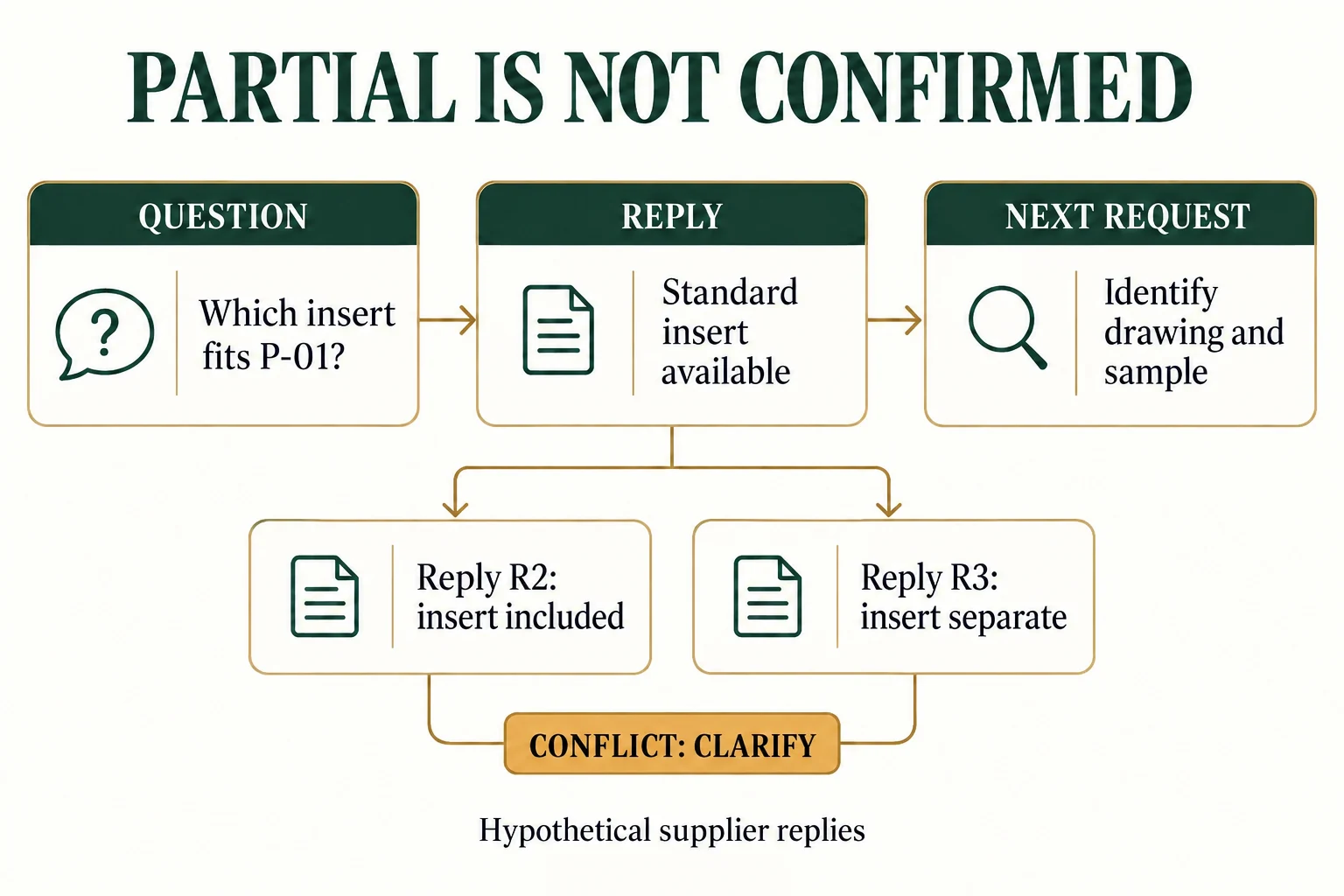
“Standard insert available” is partial if the decision concerns a custom pendant fit. It becomes more useful when the supplier identifies the insert, gives its drawing reference and explains which product dimensions it needs. Preserve both replies with their dates.
This illustrative matrix shows how a buyer can turn broad replies into targeted follow-ups.
Swipe the table to view all fields.
| Decision | Reply received | Unresolved detail | Next question | Working state |
|---|---|---|---|---|
| Select insert proposal | Standard insert available | Cavity layout and contact areas | Send the proposed drawing for product P-01 | Partial |
| Compare printed colour | Can match brand colour | Approval reference and viewing method | Identify the proposed colour reference and proof | Partial |
| Plan packing work | Box can ship flat | Assembly steps and included parts | Send delivered-state photos and assembly instructions | Partial |
| Evaluate material change | Different board recommended | Effect on fold and finish | Describe construction and evidence needed | Alternative proposed |
Each follow-up asks for a missing fact or a reviewable proposal. Avoid adding unrelated questions to the same row. The result should tell you which decision can move forward after the next reply.
Preserve the difference between a promise and evidence
Write the supplier’s description faithfully. If the reply says “approximately,” retain that qualifier. If it lists a material without a grade or thickness, keep those fields open. Filling gaps from a different proposal would create an answer the supplier never gave.
Attach a quotation, drawing or proof reference where available. A file name alone can be ambiguous when it gets reused, so add its revision and date. Keep a short excerpt of the relevant reply and the original message or document in your project folder.
Colour offers a useful example. The ICC color management introduction describes profiles that relate device colour data to a standard colour space. Your matrix still needs the project’s agreed reference, proposed material, proof type and viewing conditions before someone can approve a printed colour.
A supplier’s colour statement may answer feasibility while leaving acceptance open. Put those in separate fields. Ask how the proposal will be demonstrated and who will review the proof, rather than changing a general “match” claim into an agreed pass criterion.
Compare prices after the important rows are answered. The quote comparison checklist covers the commercial scope. The clarification matrix helps obtain that scope by showing exactly which information is missing from each offer.
An alternative can be worth considering even when it differs from the baseline. Label its changed fields and request the resulting cost, sample and timing implications. Keep it outside the like-for-like comparison until you decide whether to revise the common brief.
Keep a contradictory reply open until the source resolves it
Use this fictional exchange to distinguish partial information from a conflict. Q-04 asks whether the specified insert IN02 and its assembly are included for brief B-03. A reply that names only a standard insert leaves the drawing and commercial scope open.
Scroll horizontally if columns extend beyond the view.
| Reply reference | Exact fictional reply | What it resolves | What remains open |
|---|---|---|---|
| R1 | Standard insert available | A general option is proposed | Which drawing, material, quantity and sample apply? |
| R2 | IN02 is included in the set price | A component and price claim are stated | Assembly inclusion and applicable quote revision |
| R3 | Insert charged separately | Contradicts R2 if it concerns the same offer | Which dated quote supersedes the other? |
The next request can say: “For B-03 and IN02, please identify the current quote revision and state whether insert pieces and insert fitting are included, separately charged or excluded. R2 and R3 appear inconsistent.” Preserve all three replies. Do not pick the later sentence merely because it is convenient; first establish which configuration and offer it covers. A resolved answer should update the comparison baseline and identify what decision can now proceed.
Send a short clarification round and close the loop
Choose the few open rows that block the next decision. Send them with their identifiers and the current brief revision. A focused round about structure and delivered state is easier to answer than a copied history of every unresolved detail.
For example, a buyer choosing between two folding boxes might send rows Q-04 and Q-07: confirm the delivered state, then identify assembly steps and included adhesive parts. Colour approval can wait until those answers establish which construction will be sampled.
When a reply arrives, update its row and record the date. If it contradicts an earlier answer, mark the conflict and ask which reference now applies. Keep the superseded reply so the change can be understood later.
Close a clarification row with a decision, not only with a response. “Drawing received” is progress; “select drawing D-02 for the structural sample, subject to fit review” states the action it enables. Some answered rows will remain pending while you compare options.
Before the next stage, prepare the selected answers as a brief update. A matrix with all the information can still fail if the sample request uses an old specification. Name the current version in both records.
Bring that updated brief and the remaining open rows to Packrivo’s packaging inquiry. A useful clarification round ends with a clearer decision and a traceable proposal, while unresolved questions remain assigned to the person who can answer them.
Keep the current record with the project brief
Download the supplier reply resolution CSV. It contains field definitions, clearly hypothetical examples and a blank actual-project row. Replace invented values with your own supported records; keep unknown fields open.
Packrivo coordinates packaging sourcing and project questions with independent suppliers. The worksheet is a discussion aid, not a confirmed quotation, manufacturing promise or sample approval. The published starting MOQ is 500 pieces per product/design; actual component, design and commercial scope require confirmation.
Source scope: Original communication method; ICC supports the limited device/profile distinction, not supplier replies or approvals. Public references checked 16 October 2026. All new illustrations are AI-assisted concepts. No real customer, test, shipment, stock, savings or production outcome is represented.