
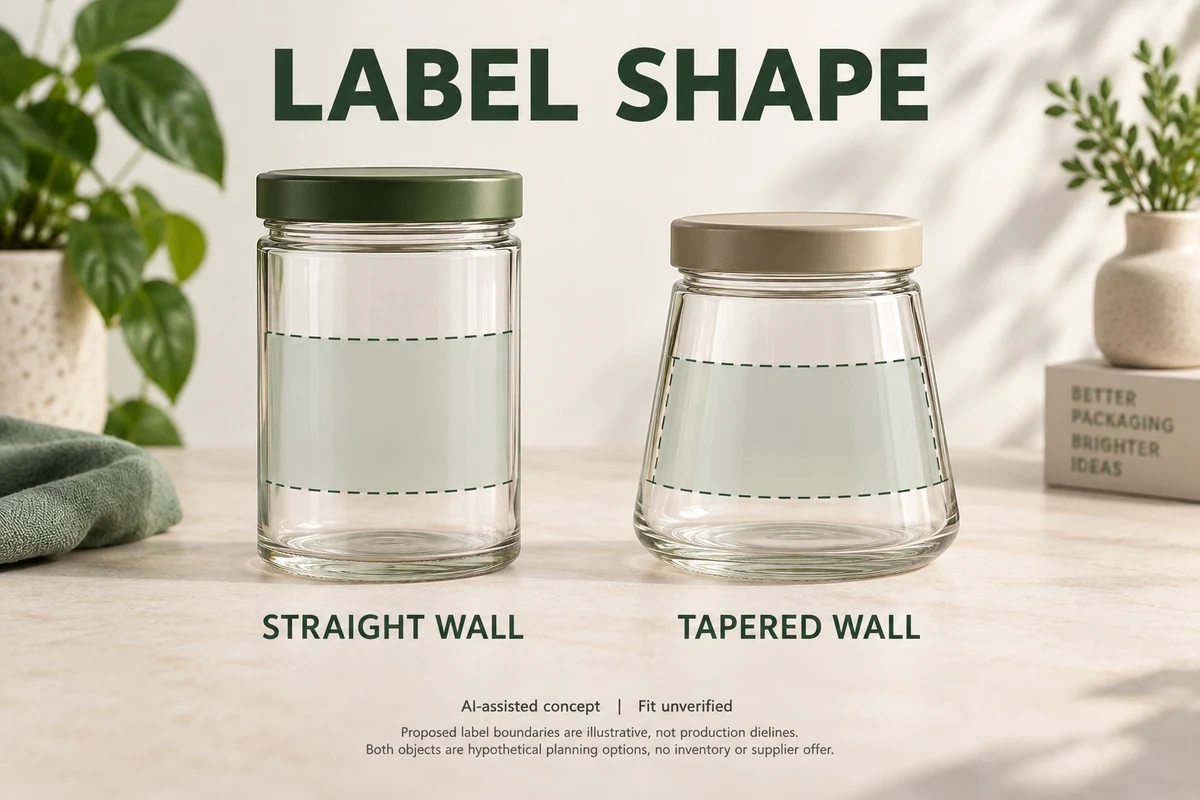
A label can look perfectly straight in an artwork file and still sit crookedly on a tapered jar. When a container becomes wider or narrower across the intended label area, the upper and lower edges of a wrap label follow different paths. A flat rectangular outline may no longer produce the intended appearance.
Before approving artwork for a tapered container, identify the actual container profile, define the usable label area and ask the label converter to review a shape-specific outline. A physical wrap trial should confirm how that proposed outline fits the real container. A screen proof alone cannot answer that question.
Identify the Profile Where the Label Will Sit
Start with the container you intend to order, not a generic bottle silhouette.
Look at the wall within the proposed label area. Does it remain straight-sided, gradually taper, curve outward, narrow into a waist or change direction near a shoulder? A jar may have a tapered upper section but a nearly straight lower section. The overall container shape does not necessarily describe the surface the label will cover.
Identify the container version and the proposed upper and lower label boundaries. Note any change in curvature within that band so the converter can assess the flat outline against the surface it must cover.
For a round container, the circumferences at the intended upper and lower label edges may help describe the taper. Ask the converter which measurements, units and reference points it needs. Those measurements are inputs to a technical review, not a complete label-cutting instruction.
A cone template applies to a particular geometry, not every tapered-looking container.
OnlineLabels’ guide to tapered containers distinguishes its cone-based approach from other shapes, including bottles with necks. A waisted, bulbous or otherwise irregular container may require different profile information and a more specific evaluation.
If the profile is uncertain, keep the label outline provisional rather than making the artwork fit an assumed cone.
Define the Usable Label Area Before Choosing a Shape
Container height is not the same as usable label height.
Mark the area where the label is intended to make contact with the wall. Identify shoulders, base transitions, raised decoration and other features that could interrupt that area. These boundaries should be reviewed on the actual container rather than established through a universal clearance rule.
Next, decide how much of the container the label needs to cover:
- A front-only label occupying a limited visible panel
- A partial wrap extending around part of the container
- A wider wrap covering most or all of the intended circumference
These are different shape requirements, even when the printed information is identical.
A smaller front label positioned on a suitable area may avoid some of the geometry involved in a wider wrap. Alternatively, the converter may propose a curved die-cut outline to follow a tapered surface.
OnlineLabels describes smaller labels and custom tapered labels as different possible approaches. Neither should be selected without checking the actual container and intended coverage.
If reducing the label area would remove necessary product information, return that limitation to the brand’s artwork owner. Do not treat a smaller label as an automatic solution.
Compare Flat Artwork With Applied Fit
Consider a hypothetical small candle brand using similar branding on two containers.
Container A has a straight-sided cylindrical label panel. Container B is wider near the bottom of its proposed label area. Both are hypothetical planning options. No supplier offer, available stock or physical test is represented.
| Decision | Straight-sided container A | Tapered container B |
|---|---|---|
| Container profile | Nearly constant circumference across the proposed label height | Circumference changes between the proposed label boundaries |
| Flat label outline | A rectangle may be a reasonable starting candidate | A rectangle needs review; a shaped outline may be proposed |
| Usable artwork area | Defined by the selected panel and wrap coverage | Must also account for the changing profile |
| Physical evidence needed | Applied fit of the proposed outline | Applied fit comparing the proposed outline with the actual taper |
| Current decision | Fit not yet verified | Shape and fit not yet verified |
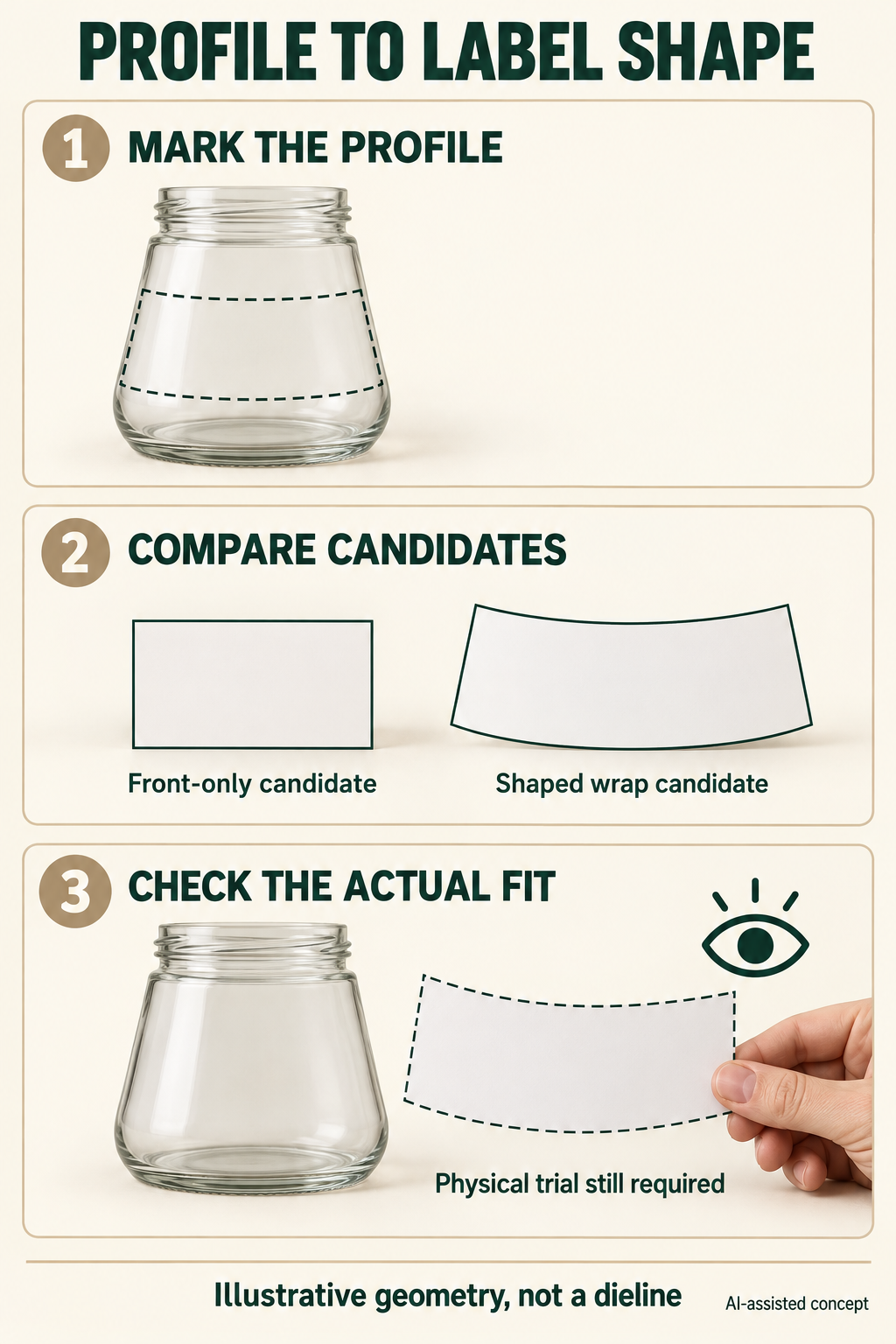
For container A, a rectangular label may follow the intended panel without requiring a special tapered outline. That possibility still requires an applied check.
For container B, the converter may recommend a curved flat outline. Such an outline can look unusual when laid flat but produce a more suitable visual boundary when wrapped around the container.
AWT Labels & Packaging explains why tapered containers require shape-specific measurements and communication between the container supplier, designer, label printer and application owner.
The buyer should not choose the final contour by visual guesswork. The practical decision is whether a proposed flat outline has been demonstrated to fit the selected container.
Separate a Paper Shape Check From a Labelled Physical Trial
A paper mockup is a useful early screening tool.
With an identified candidate outline, print a correctly scaled paper version, cut it out and position it on the actual container. Observe whether the proposed boundaries follow the intended area and whether the apparent front view matches the design intention.
OnlineLabels’ Tapered Label Generator recommends checking a printed paper shape against the container before proceeding with a custom label request. Its generated template should not be assumed suitable for a different or more complex container profile.
A paper outline does not establish how a finished pressure-sensitive label will behave when applied.
For the next stage, ask the label converter to propose an identified dieline and explain how a labelled physical trial can be arranged. The trial should use the agreed container version, proposed label outline and applicable label construction. Confirm the availability and scope of that trial for the specific project.
Compare the proposed flat outline with the same outline after application. Check how its upper and lower boundaries follow the marked band, whether the wrap edges meet as intended, and whether the artwork area remains usable. Record any slant, buckling or gap that affects that shape comparison.
Use the result to compare a rectangular candidate, reduced coverage or a shaped outline. An observed shape conflict does not, by itself, identify an adhesive or print defect. If the contour or coverage changes, review the revised candidate rather than carrying forward acceptance of the earlier outline.
Send the Converter a Shape-Specific Evidence Request
Before requesting a final dieline, prepare these inputs:
- Identify the container and its version, and provide a physical reference where available.
- Show the container profile across the intended upper and lower label boundaries, with views that reveal its changing circumference.
- Mark the proposed location and coverage, with measurements, units and identifiable reference points.
- Include the current flat artwork, desired visible area and any preliminary paper-shape observations.
- Ask the converter to compare a rectangular candidate, reduced coverage and a shaped flat outline for the marked area.
Ask the converter to confirm which additional measurements or physical references are necessary. Do not substitute a nominal container capacity for the actual profile.
A practical evidence request is:
Please review container V1 and the marked label area against artwork A1. Confirm whether the profile can be represented by the proposed shape, provide a referenced dieline or alternative outline, and explain the available physical wrap-trial method. Show the proposed flat outline beside the applied candidate, including its upper, lower and wrap-edge relationship, and identify unresolved geometry questions before shape approval.
Keep the returned drawing and physical trial under matching references. If a physical trial is unavailable, record that limitation and agree what additional evidence is needed before proceeding.
Carry the Confirmed Shape Into the Packaging Brief
The outcome is a container-specific choice of usable coverage and flat outline, supported by the agreed evidence of applied fit.
For separate guidance on locating a label relative to vessel features, see Packrivo’s candle label placement guide. For the broader range of label directions, visit Packrivo Labels.
Packrivo coordinates packaging sourcing and project communication rather than operating an owned label factory. Its published MOQ baseline is 500 pieces per product/design. Label shape feasibility, sample arrangements, price and delivery timing require confirmation for the actual project.
Bring the marked container views, proposed artwork and unresolved shape question to the Packrivo packaging inquiry.
A label shape is ready for approval only when the agreed evidence answers how it fits the container being ordered.
Sources accessed 9 October 2026. OnlineLabels’ tapered-label article was updated 26 August 2024. The AWT article was published 1 December 2021 and updated 8 March 2025. The linked generator is a cone-based paper-screening aid; it does not validate its algorithm for every profile, finished-label adhesion, machine application or this hypothetical packaging proposal.
Keep both circumferences tied to the same label band
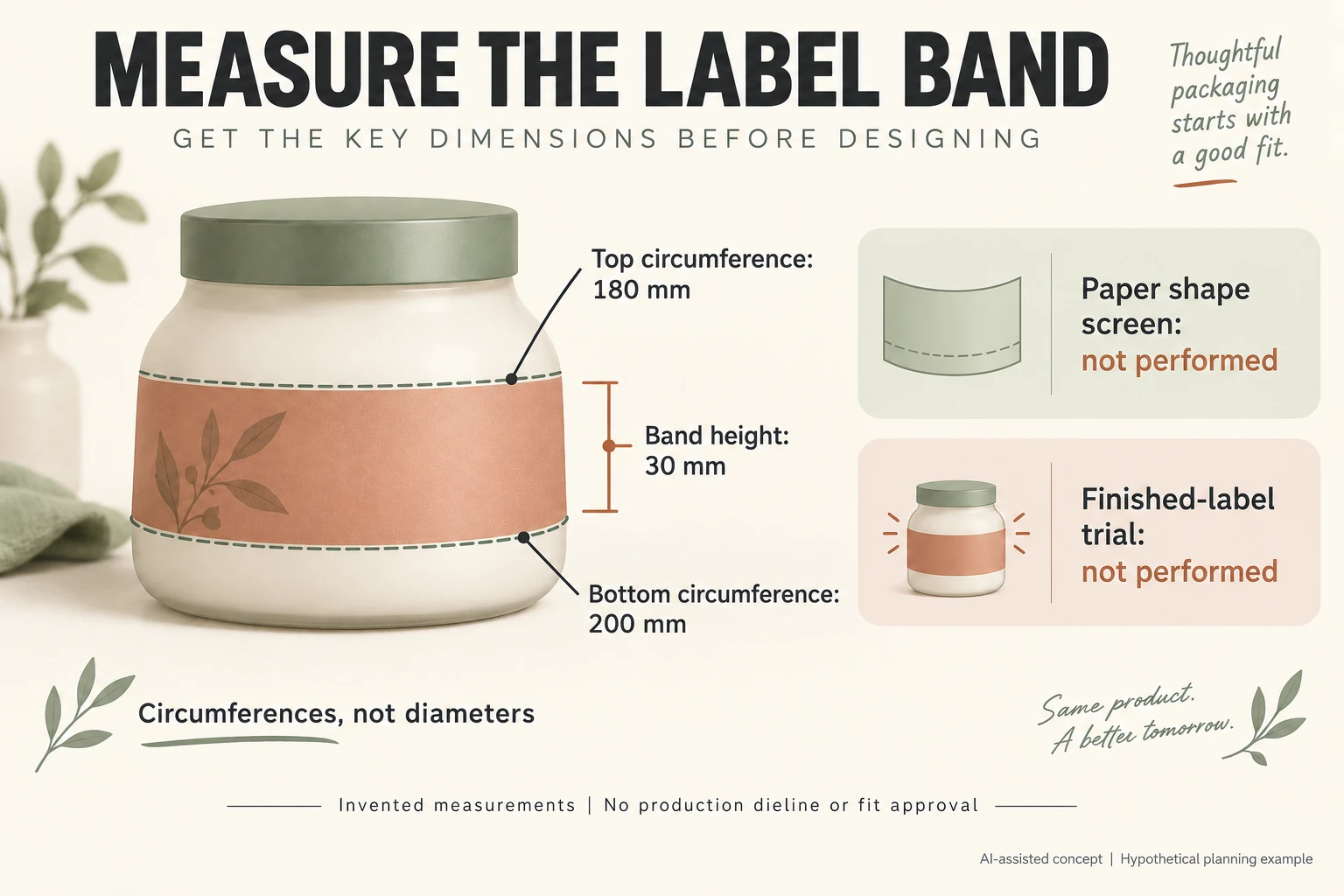
Invented container V1 has proposed upper band circumference 180 mm, lower circumference 200 mm and vertical band height 30 mm. These are assumed inputs, not supplier measurements. Their 20 mm circumference difference is not a finished label width, overlap or cutting allowance.
Scroll horizontally if columns extend beyond the view.
| Input or stage | Invented entry | Does not establish |
|---|---|---|
| Upper boundary | Circumference 180 mm | Diameter or label width |
| Lower boundary | Circumference 200 mm | Wrap overlap or cutting length |
| Same boundaries | Vertical height 30 mm | Universal usable height |
| Paper screen | Not performed | Finished-label behaviour |
| Finished-label trial | Not performed | Fit or machine acceptance |
Mark both boundaries on the same container reference. The diagram's dashed paths define the band; the orange printed area is illustrative. Its non-scale geometry and two circumference values do not validate a cone model. A shoulder, waist or changing curvature may need further converter measurements.
Keep coverage, outline revision and actual output scale beside the paper-screen record. Leave observations blank until the screen happens. Carry that outline identity into a separate finished-label trial; paper fit cannot establish adhesive behaviour. OnlineLabels requests circumference, height and other inputs for its tapered-label tool, within its stated geometry. This worksheet neither validates the algorithm nor generates a production dieline.
Download the labels for tapered containers record (.csv). HYPOTHETICAL rows are invented examples. Use ACTUAL_BLANK for permitted project inputs; replace that row label only when recording actual facts. Empty evidence, observation and date fields mean unknown or not performed, never acceptance. Keep checkpoints and revisions separate.
Send the container identity, matched band measurements, intended coverage and separate paper versus finished-label evidence gaps. Prepare the identified scope for a Packrivo inquiry. Packrivo coordinates independent suppliers. These records establish no supplier offer, service availability or MOQ exception; its published baseline is 500 pieces per product/design.