
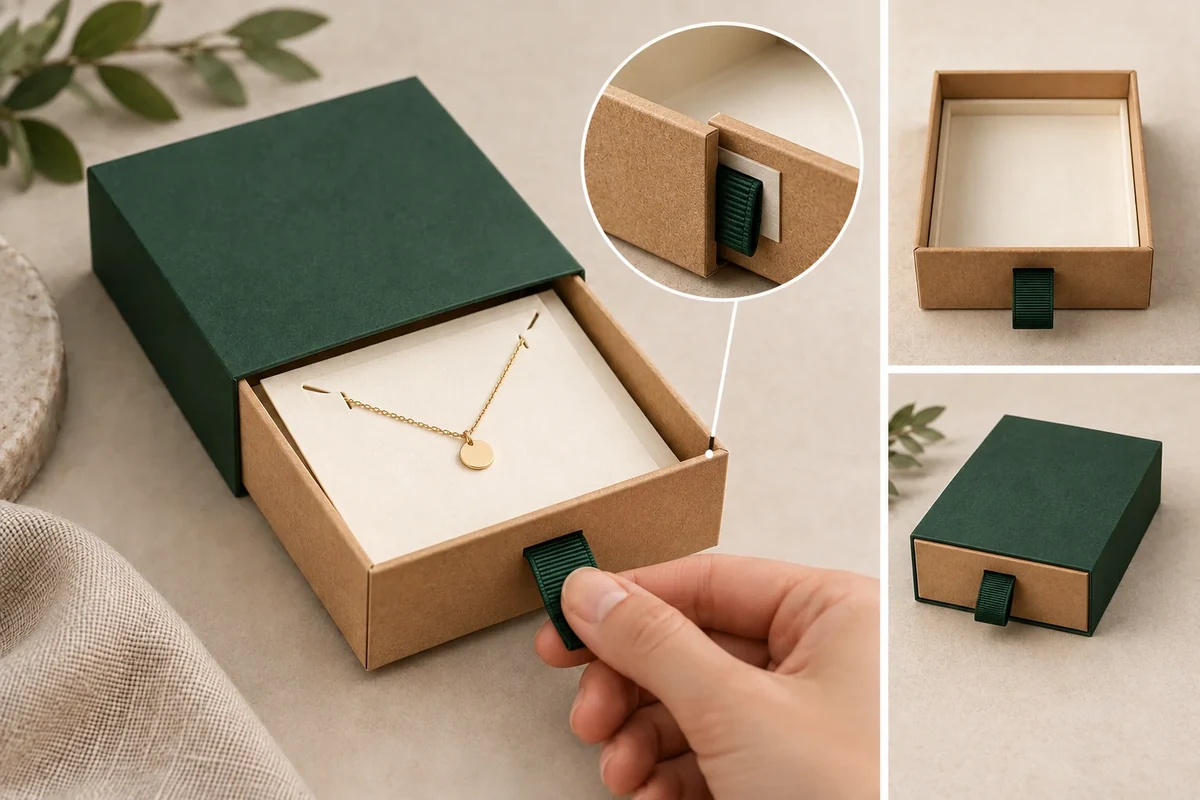
Review a drawer pull with the complete loaded tray and the proposed attachment present. Show where the hand grips, how the pull moves and which parts it contacts. A loose ribbon swatch or empty drawer can communicate appearance while leaving the attachment and loaded opening action unresolved.
Use the Drawer Jewelry Box to locate the proposed pull on the complete tray. Request the attachment detail and review access with the loaded contents; the concept does not establish pull strength or opening force.
The pull may be the first part a customer touches. Its position belongs in the opening brief, while its attachment needs a separate construction response. Keep both visible before approving a colour or decorative style.
Identify the pull and attachment separately
PackMojo’s rigid drawer catalogue distinguishes ribbon and thumb-notch variants. This supports treating the opening aid as a specified feature. It doesn’t establish your pull’s attachment method or a force rating.
Ask the supplier to show the pull outside and its proposed attachment inside the tray. Record the material, visible length or shape, attachment location and any lining that covers it. Do not infer a hidden joint from the external concept image.
State whether the pull remains available when the drawer is fully closed. If it folds into a recess or lies against another panel, show that starting position. The customer should not need a different unrecorded grip to begin opening.
The sample checklist covers the wider approval. This form focuses on one pull, one attachment and one opening action.
Review the action with complete contents
Load the actual product, holder and cards. Position the closed pack as intended for use. Record the hand location and pull direction before the drawer begins moving.
Observe whether the pull meets the sleeve edge, tray lining or product during the action. Keep a wider view showing the loaded configuration. A close view of the pull alone can hide what moved elsewhere.
Use the agreed opening behavior. If the tray is intended to stop while attached, review that end state; if it should slide free, include the final exit. A pull should not be treated as a travel stop unless the supplier confirms that separate function.
If the sample needs extra support or another grip, record the change. Don’t omit it from the review because the drawer eventually opened.
Use a pull and attachment review form
Keep the inside and outside images linked to the same sample. The fields below separate appearance, construction and action.
| Field | Input | Observation |
|---|---|---|
| Pull identity | Material and visible shape | Starting grip availability |
| Attachment | Supplier-confirmed location and method | Inside and outside views |
| Loaded state | Product, holder and card revisions | Contents position before action |
| Hand action | Grip, support and pull direction | Actual movement or changed grip |
| Contact | Pull-to-sleeve or other named interface | Location and stage |
| After view | Attachment and pull after action | Visible change or no change observed |
These are observation fields. They don’t create a pull-force test or a repeated-use rating; agree such requirements separately if the project needs them.
Follow a hypothetical ribbon-pull sample
Suppose a gift box contains a card-mounted pendant in a drawer. A green ribbon pull is proposed at the tray front. The buyer asks for the attachment view and records whether the lining covers the joint.
During the loaded opening action, the ribbon contacts the lower sleeve edge. The reviewer records that contact stage and the actual grip. The supplier can then discuss pull position, attachment or the sleeve interface against the same proposal.
If a revision changes ribbon length and attachment position, keep both changes in the record. Compare the same loaded action on the revised sample. A nicer outside photograph doesn’t close the hidden attachment question.
Keep hidden attachment and visible grip in one record
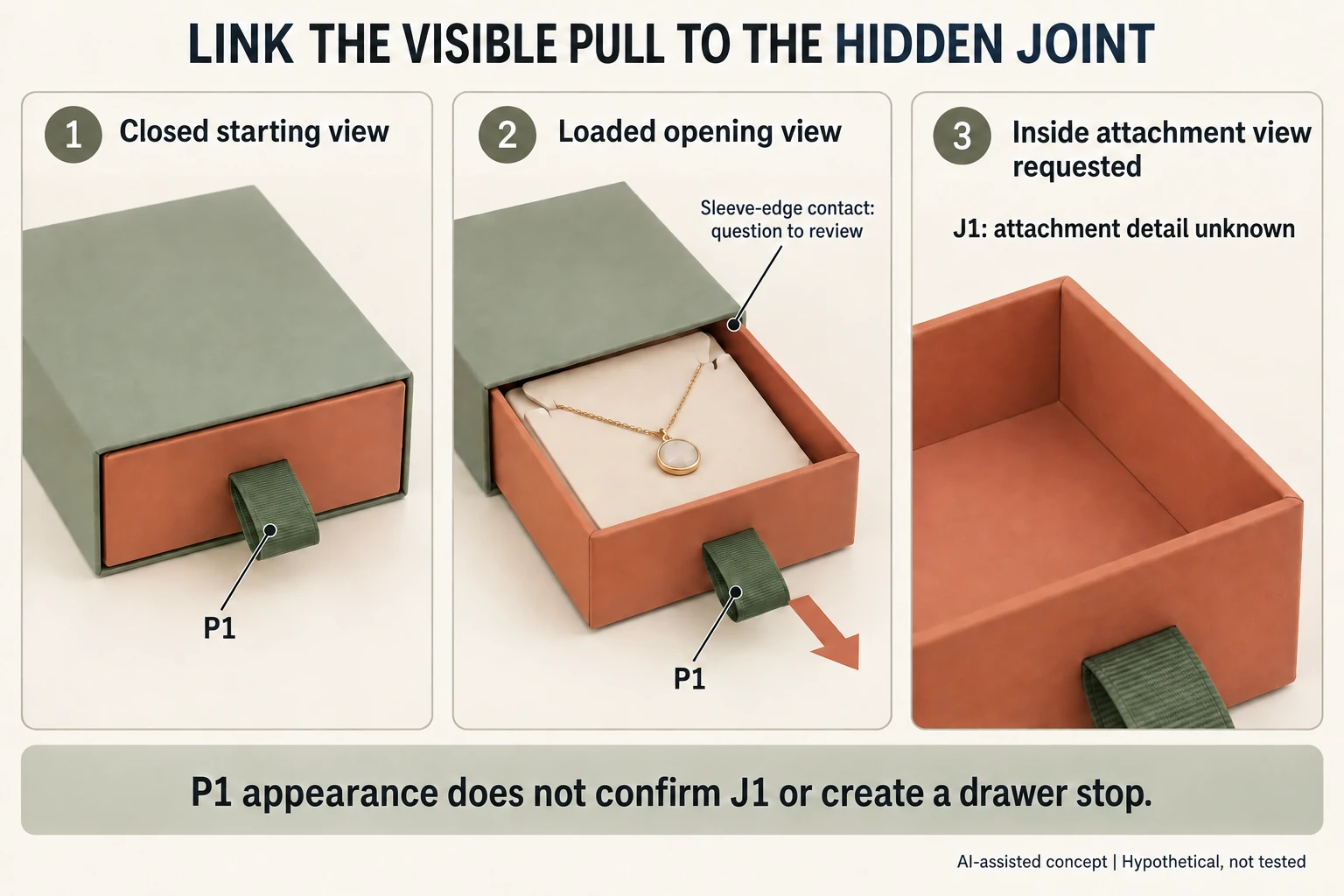
For the hypothetical pendant tray, call the outside ribbon P1 and the proposed inside joint J1. Save the closed starting view, loaded opening view and inside attachment view under the same sample ID. This makes an apparently simple colour or length revision traceable to the construction it uses.
Ask the supplier which layers cover J1 and whether the review sample represents the proposed attachment. A demonstration model may use a temporary joint. Record that limitation rather than presenting its opening action as evidence for the production proposal.
A useful request is: ‘Please confirm J1 for pull P1 on loaded tray T1 and review the contact at the sleeve edge.’ It joins the hidden detail to the visible action. A reply showing only a ribbon swatch leaves the joint and loaded interface unresolved.
If a later proposal changes the pull material, visible length or joint, record each changed field. Review the same starting grip and loaded travel. Keep visual appearance approval separate from any agreed functional acceptance. The form should let the buyer see what has been reviewed, what is still a concept and which part needs the next supplier response.
Bring the action and attachment evidence together
Send the loaded configuration, inside attachment view, starting grip and contact observations through Packrivo’s enquiry. Ask for the next proposal by named interface. Keep decorative approval separate from any functional acceptance or evaluation requirement.
Keep the three evidence views under one loaded-tray revision
For invented necklace drawer T1, outside pull P1 and hidden attachment J1 must remain one configuration question. The concept packet shows a closed view and a loaded opening direction, while the actual inside-attachment view is requested. The empty tray intentionally shows no joint method or confirmed joint location.
Scroll horizontally if columns extend beyond the view.
| View | Can frame the question | Missing actual evidence |
|---|---|---|
| Closed T1/P1 | Starting grip | Actual closed loaded photo |
| Loaded opening | Sleeve-edge interface | Actual action and support observation |
| Inside attachment | J1 construction request | Actual attachment view/method |
| Revised P2/J2 | Separate changed fields | Matching revised loaded review |
Do not close J1 from a ribbon colour swatch or a successful concept animation. Ask which layers conceal the proposed joint and whether the supplied sample represents it. No adhesive, stitch or fastener is prescribed by the illustration.
Use one sample revision across all three views. If P2 changes both visible length and J2 attachment, record both changes before comparing the loaded action. Keep end-of-travel behaviour separate: the pull is not evidence of a drawer stop. The CSV's actual photos, observations and dates remain blank; these generated concepts are not substitutes for sample evidence or a pull-force rating.
Download the drawer box pull tab record (.csv). HYPOTHETICAL rows are invented examples. Use ACTUAL_BLANK for permitted project inputs; replace that row label only when recording actual facts. Empty evidence, observation and date fields mean unknown or not performed, never acceptance. Keep checkpoints and revisions separate.
Send same-revision closed, loaded-action and inside-attachment evidence, with appearance and functional decisions kept separate. Packrivo coordinates independent suppliers. These records establish no supplier offer, service availability or MOQ exception; its published baseline is 500 pieces per product/design.