
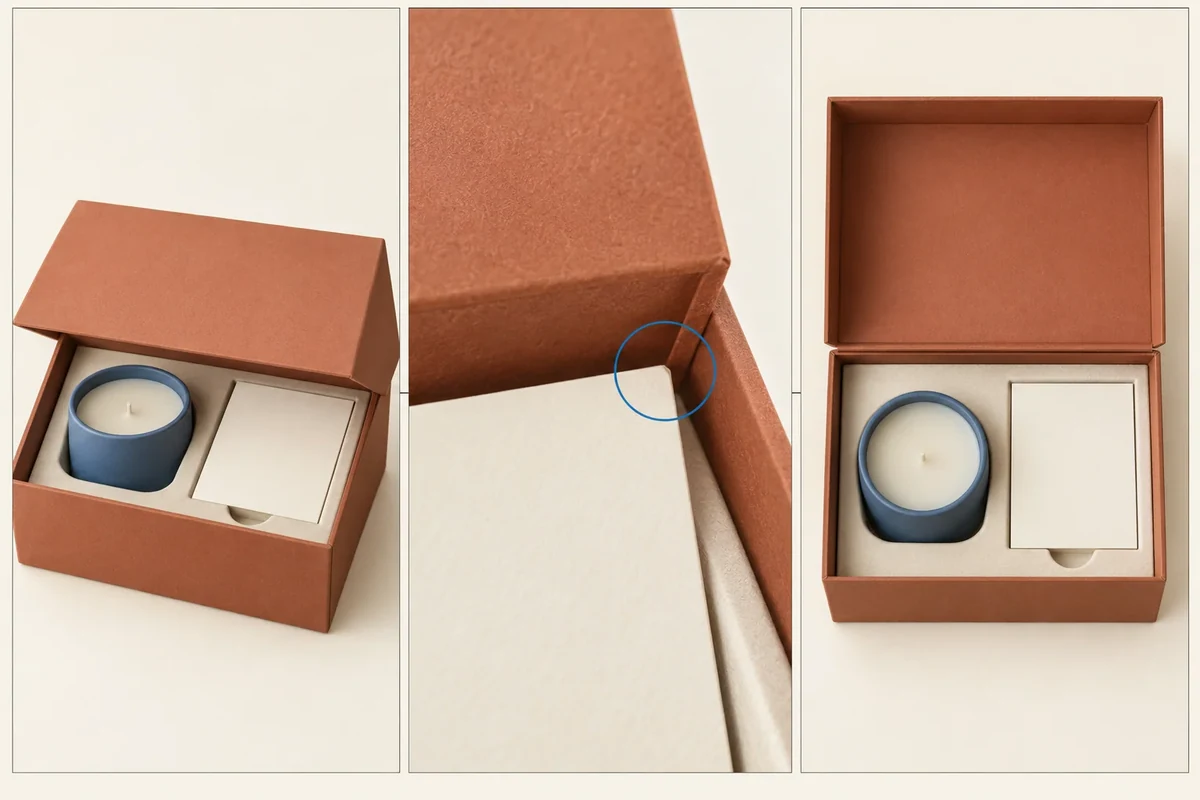
Capture three named views before requesting a packaging sample change: a wider front, a located interface and the complete loaded state. Link them to the same sample revision and state what each view is meant to show. A close-up without context can leave the supplier unable to find the issue on the actual component.
The front/interface/loaded-view record is a Packrivo original communication aid. It doesn’t make a photograph a measurement, diagnosis or proof of every construction detail.
Give the sample and each view an identity
Name the product, component and drawing revision first. Use the sample revision record to keep that identity attached to images. State whether the sample is final material, a substitute or another limited model.
Assign image IDs and keep the original files. A crop or marked copy can locate a feature, while its wider source view preserves context. Record the edit instead of presenting it as an unchanged image.
Request three different jobs from the images
The front view establishes orientation and the component being discussed. The interface view locates the actual meeting parts or visible condition. The loaded view shows the full product and added components that can affect that relationship.
Keep the same sample in all three. If another sample is needed for access to a hidden detail, label that limitation rather than combining the images as if one piece supplied every view.
| Named view | Purpose | Required context | Limit |
|---|---|---|---|
| Front | Find component and orientation | Sample ID and reference face | Does not reveal hidden joins |
| Interface | Locate the specific relationship | Parts and wider location link | Does not diagnose cause alone |
| Loaded | Show complete contents/state | Product, holder and cards | May conceal hidden detail |
| Image handling | Original plus marked/cropped copy | Edit and original reference | Do not alter apparent condition |
| Request | Change question by location | Relevant image IDs | Decision/evaluation remains separate |
Use the sample approval guide for the later response and decision. Taking three photos should not automatically mark the sample approved or rejected.
Follow a hypothetical lid contact
Suppose a gift-box lid meets a card when closing. The buyer takes a front view of the box, an interface close-up at the contact point and a loaded view showing the card and holder arrangement.
The source can locate the meeting parts and the contents involved. A close-up of the lid alone would leave the card position unclear. The record still keeps the cause open until responsible review.
If the next proposal moves the card, the new loaded view records that configuration. The earlier interface image remains history, not evidence that the revised sample has the same condition.
Write the photo request as a located question
Call the contact I1 and ask: ‘Please review I1 using front F1, interface I1 and loaded L1 for sample S2.’ The source can then request another view or measurement specifically.
Keep light, angle and relevant state consistent where comparison is intended. A changed camera position can alter what is visible without changing the component, which should remain a recorded limitation.
The tool supports an evidence request. It does not establish tolerances, process causes, test results or supplier capability from pixels alone.
Send the image purposes with the files
Bring authorized image references, the sample identity and the located question through Packrivo’s enquiry. The next response should address the actual view scope and identify further evidence if needed.
Separate the contact identifier from the view identifier
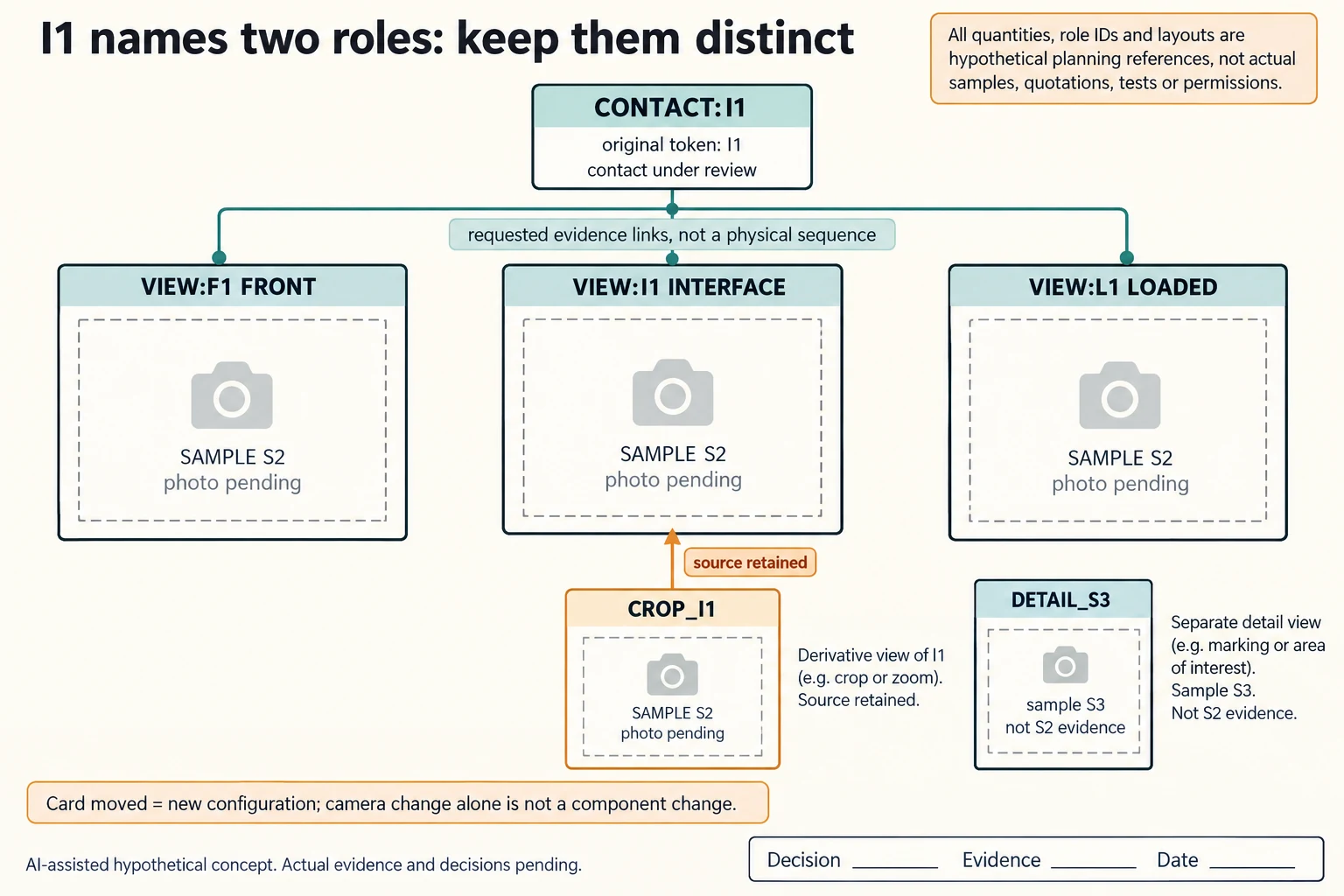
The original request intentionally uses I1 for two roles: the contact to review and the interface view. Keep that original wording intact. In the supporting record, qualify those roles as CONTACT:I1 and VIEW:I1 rather than silently changing the identifiers in earlier correspondence. VIEW:F1, VIEW:I1 and VIEW:L1 each request a different view of the same S2 configuration. These are record references, not photographs already obtained.
Scroll horizontally if columns extend beyond the view.
| Hypothetical configuration | Named object | Relationship | Input or next scope |
|---|---|---|---|
| NAMESPACE26 | CONTACT:I1 | has original token | I1 |
| NAMESPACE26 | VIEW:F1 | has original token | F1 |
| NAMESPACE26 | VIEW:F1 | requires same sample | S2 |
| NAMESPACE26 | VIEW:I1 | has original token | I1 |
| NAMESPACE26 | VIEW:I1 | requires same sample | S2 |
| NAMESPACE26 | VIEW:L1 | has original token | L1 |
| NAMESPACE26 | VIEW:L1 | requires same sample | S2 |
| OTHER_SAMPLE26 | DETAIL_S3 | belongs to | S3 |
| DERIVATIVE26 | CROP_I1 | requires parent | VIEW:I1 |
| CHANGED26 | S2_CARD_MOVED | requires | NEW_CONFIGURATION_AND_VIEWS |
Link each view to its job: front orientation, the named interface and the complete loaded state. The front view cannot stand in for a hidden joint; the interface close-up cannot establish the rest of the contents. A loaded view may hide the detail that prompted the question. If another sample S3 is used to expose hidden detail, retain that sample identity and say what it can illustrate instead of calling it an S2 observation.
Keep an annotated or cropped derivative linked to its unchanged source. CROP_I1 therefore requests VIEW:I1 as its parent, with the actual source file and observation still empty. A changed camera angle, light or crop can change what is visible without proving a component changed. Moving the card, by contrast, creates a new configuration whose views must be identified separately from the earlier S2 record.
This packet answers a reference question before a sample-change request: which image, sample and interface supports the observation? It does not diagnose why the lid meets the card or establish that a proposed correction works. Use the revision comparison for before/after functions and the transit incident record for received-state evidence; neither can replace this same-configuration view map.
Download the packaging photo identifier role mapping record (.csv). It includes the original table fields and scenarios alongside the added relationships. HYPOTHETICAL rows are editorial examples or required review scopes, not actual records. Actual quantity, configuration, component and file identities, materials, process, specification, copy, method, condition, observation, owner, decision, evidence and dates are blank. ACTUAL_BLANK is a separate empty starting row; enter permitted project evidence before using an actual record. A blank means unknown.
Use the Packaging Sample Revisions: Compare Versions Before Approval for its separate question. Use the Custom Packaging Sample: Approval Checks That Matter for its separate question. Use the Describe Transit Damage by Location and Pack Version for its separate question.
Source scope checked 16 October 2026. References cover only the named materials, processes or guidance. Added configurations and geometry are hypothetical, not supplier specifications, tests or production approval; they set no universal tolerances or machine limits. Confirm the actual material, process, drawing and formed sample for the project.
Discuss this packaging specification with Packrivo. We coordinate independent suppliers. MOQ: 500 pieces per product/design; illustrative quantities are not production offers. Confirm materials, samples, price and timing for your project.