

A gift-message correction must update both the relevant order data and the physical card before packing release. Follow the actual state: unprinted, printed but not packed, packed open or sealed. A saved edit in one system does not prove the fulfilment service has changed its output.
In this guide

Keep revision and gift identity together
Assign the current message a revision linked to its order and gift unit. Use the personalisation component guide to keep the changing card separate from stable box artwork.
Shopify warns that some apps may not recognise order edits. That documentation supports checking the actual integration; it doesn’t establish that every gift-message field is editable through every route.
Follow a fictional correction from R1 to R2
Assume order O1’s card has message revision R1 printed. The buyer requests R2. All identifiers and data are fictional.
Scroll horizontally if columns extend beyond the view.
| Physical state | Work to resolve the correction |
|---|---|
| Not printed | Confirm the print source now contains R2 before output |
| R1 printed, not inserted | Produce R2 and withdraw the obsolete R1 card |
| Gift open with R1 inserted | Replace the card and check the correct gift match |
| Gift sealed | Follow an authorised reopen-and-repack or other actual service route |
In every feasible route, obtain the fulfilment acknowledgment needed by the actual system. If the order view displays R2 while its import or print record still shows R1, keep release unresolved.
Withdraw the obsolete physical output
Marking a file superseded doesn’t remove a printed card from the bench. Identify and handle the old copy under the authorised workflow so it cannot enter this or another gift.
For an already sealed gift, record any replacement seal, ribbon or inspection work that the change requires. Don’t describe the correction as a free text edit when its physical state creates extra operations.
If the dispatch service can no longer change the physical gift, the responsible team must follow its stated customer policy. The article does not promise edits until dispatch or permit an unapproved change to the service.
Define the final change point from evidence
Establish the last state and available time at which your actual printing, acknowledgment and repacking route can finish. Keep that service limit visible to the buyer where appropriate.
The usable output is a current revision, a matching physical card and a confirmed packing instruction. Releasing only after those agree prevents a corrected order record from masking an unchanged gift inside the parcel.
Close the correction at the actual physical state
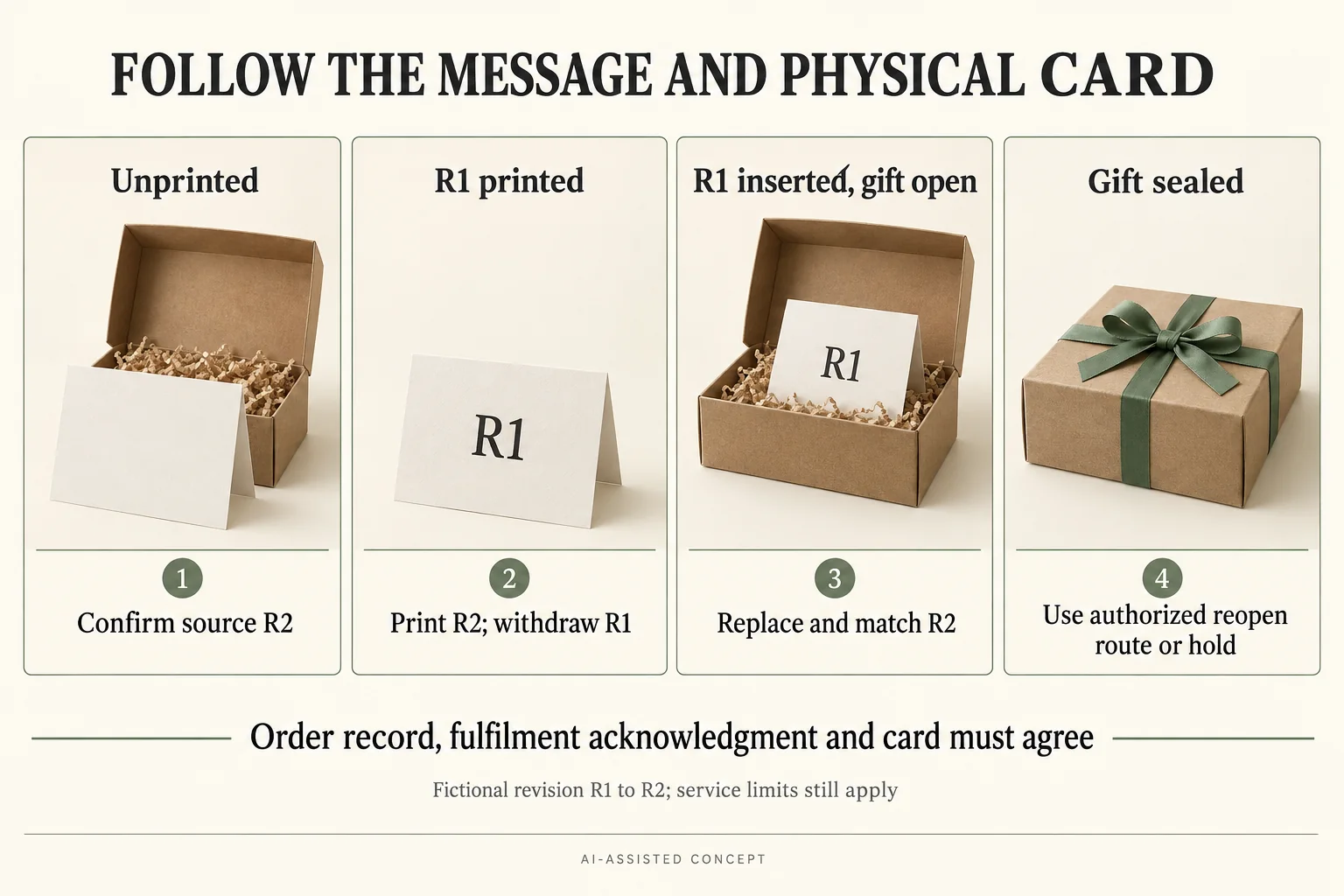
Give the correction request a state record as well as a new message revision. In the same fictional O1/G1 example, R2 can be present in the order record while the fulfilment print queue or the physical gift still contains R1. Keep each confirmation beside the state it actually describes.
Scroll horizontally if columns extend beyond the view.
| Physical state when request arrives | Evidence to obtain for R2 | Old output to control | Release boundary |
|---|---|---|---|
| Unprinted | Current receiving/print source acknowledged as R2 | Cancel an obsolete queued R1 where applicable | Check actual supported route before printing |
| R1 printed, not inserted | Replacement R2 output and gift match | Withdraw the R1 card | No R1 card in active work |
| R1 inserted; gift open | R2 in the identified gift with match checked | Remove the inserted R1 and any duplicate | Confirm current complete packing instruction |
| Gift sealed | Authorised service route and repack evidence, if available | Control old card and replaced seals or ribbon | Hold if the service cannot make the physical correction |
A sealed-gift request has a different workload from an unprinted record edit. The actual service may no longer permit reopening. Record that answer rather than promising a change merely because the order screen still has an edit button.
Ask for acknowledgment that names O1/G1, R2 and the physical action completed or still held. “Updated” without a gift, revision or operation can refer only to a screen. Keep the data update, replacement output and packing instruction consistent before closing the correction.
The initial gift message import test checks the first mapping; this record addresses later revisions. The personalisation component guide helps choose where changing content belongs. Neither establishes that a specific fulfilment service accepts edits up to dispatch, so set the real cutoff from its confirmed route and timing.
Download the gift message change cutoff record (.csv). It contains field definitions, clearly hypothetical examples and a blank actual-project row. Replace the invented entries; a blank field is unknown, not an approved result.
Send the specific open decision with the brief
Bring the current record, packaging configuration, actual evidence available and the unresolved question to Packrivo’s packaging inquiry. State who must answer and which next step remains on hold. Packrivo coordinates sourcing and project questions with independent suppliers; this record is not a manufacturing or fulfilment service commitment.
Sources and scope
Shopify Help Center supports the stated general concepts within this scope: Shopify order-edit and app-recognition limitations. Access checked 14 October 2026.
The worked scenario is original editorial analysis with assumed inputs, not a supplier offer, customer record or measured Packrivo result. Commercial feasibility and physical suitability remain project-specific.
What this changes in a packaging enquiry
Order common card stock separately from the personal wording release wherever the actual printing route allows it. Define which physical card and order identity must change when a message is corrected. A packaging supplier should not receive superseded personal copy or be assumed responsible for the order-data correction. A relevant configuration to compare is the Informational insert card; it is a concept reference, not confirmed suitability.