

Trigger a packaging reorder by comparing inventory position with demand during replenishment and an explicitly chosen reserve. Keep available, committed and incoming quantities separate. A box count at the shelf cannot show whether enough uncommitted packaging remains until the next suitable batch arrives.

Define the position before choosing the trigger
Start with approved usable stock. Deduct quantities already committed to orders or other named uses, then add only incoming supply that belongs in the planning scenario. Held or incompatible components need their own status.
For this worksheet, inventory position means usable physical stock minus outstanding commitments plus confirmed incoming quantities. It is a planning definition, not a claim that your software calculates packaging availability automatically.
The version-first reorder guide remains the upstream check. Replenishing a superseded sleeve or incompatible insert would solve the wrong stock problem even if the quantity calculation were correct.
Compare 400 units with a 410-unit trigger
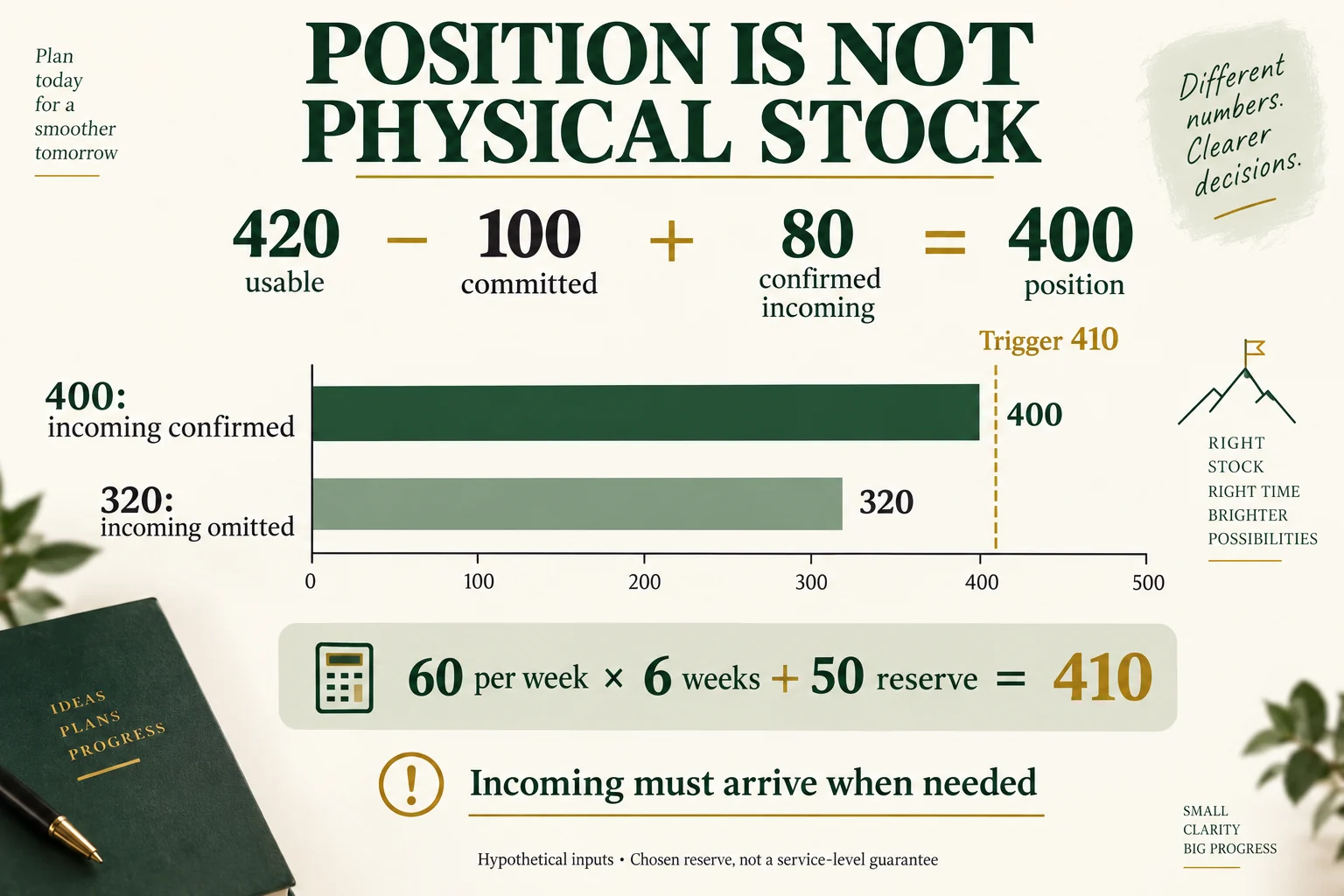
Assume usable physical stock is 420, existing commitments are 100, and a confirmed incoming batch contains 80 units. Planning position is 420 minus 100 plus 80, or 400.
Assume expected consumption is 60 units per week over a six-week replenishment interval. That requires 360 units. A separately stated reserve of 50 makes the trigger 410. Because position is 400, the scenario calls for a replenishment decision now.
Scroll horizontally if columns extend beyond the view.
| Scenario | Planning position | Demand plus named reserve | Trigger reached |
|---|---|---|---|
| Incoming 80 confirmed | 400 | 410 | Yes |
| Incoming 80 unconfirmed and omitted | 320 | 410 | Yes, with a larger gap |
| Consumption 40 per week instead | 400 | 290 | No under these assumptions |
All quantities and times are hypothetical. The reserve is a chosen input, not a statistically justified service level. Incoming stock also has to arrive at the needed time; adding it to position doesn’t make it immediately usable.
Keep the component consumption basis visible
A gift needing two cards consumes cards twice as quickly as gifts under a one-card definition. Use actual component requirements and sales mix rather than transferring the box trigger to every material.
If replenishment time changes, recalculate its demand interval. Separate ordering, production, transit and receiving release when they materially affect readiness. A supplier dispatch message alone does not close the interval.
Return a trigger, the component version and the demand assumptions to the person responsible for ordering. Review it when actual consumption or replenishment changes, instead of waiting for physical stock to reach zero.
Keep included incoming stock separate from its arrival date
The 400 position contains 80 incoming units; it is not 400 units ready on the shelf. Keep the incoming reference, usable version and expected release time beside that addition. If confirmation or timing is missing, the worksheet can show the 320 position scenario without relabeling the unconfirmed shipment as physically absent.
The 10-unitgap to the 410 trigger identifies a replenishment decision under the first assumed scenario, not an order quantity. A commercial minimum, purchase multiple, stock already on order and the needed arrival time remain separate inputs. Recheck those before turning the worksheet into a purchase request. Keep the 50 reserve as an explicit chosen amount rather than calling it a measured service-level guarantee.
Download this article’s project record (CSV). It includes field definitions, clearly hypothetical teaching rows and a blank actual-project row. Keep actual source evidence and unresolved fields with the record.
For a sourcing discussion, send the current component version, usable commitments and replenishment timing assumptions. Packrivo coordinates supplier questions; the responsible technical or commercial parties confirm the actual method, configuration and terms.
Sources and scope
Australian Government supports the stated general concepts within this scope: General inventory categories, reorder points and stocktake. Access checked 14 October 2026.
Shopify Help Center supports the stated general concepts within this scope: Shopify state definitions only. Access checked 14 October 2026.
The worked scenario is original editorial analysis with assumed inputs, not a supplier offer, customer record or measured Packrivo result. Commercial feasibility and physical suitability remain project-specific.
What this changes in a packaging enquiry
Before placing a packaging reorder, translate the trigger into separate order lines for each approved box, insert and card. Ask the supplier which quantity and delivery date it can confirm for those exact versions. A reorder calculation does not establish a supplier lead time or reserve stock.