

Gift-message data needs an explicit mapping from the order record to the fulfilment record and printed card. Test the initial import with non-sensitive example data and compare its actual output. A field visible in the storefront or order system is not automatically recognised by the packing service.
In this guide

Define the required information and its audience
Identify the gift unit, sender display name, message and selected presentation. The gift-ready order guide explains their physical role. Keep billing details separate from the recipient-facing message.
Request the actual import schema and supported fields from the service. A custom packing-slip layout can display selected order data, but it doesn’t establish another system’s import behaviour.
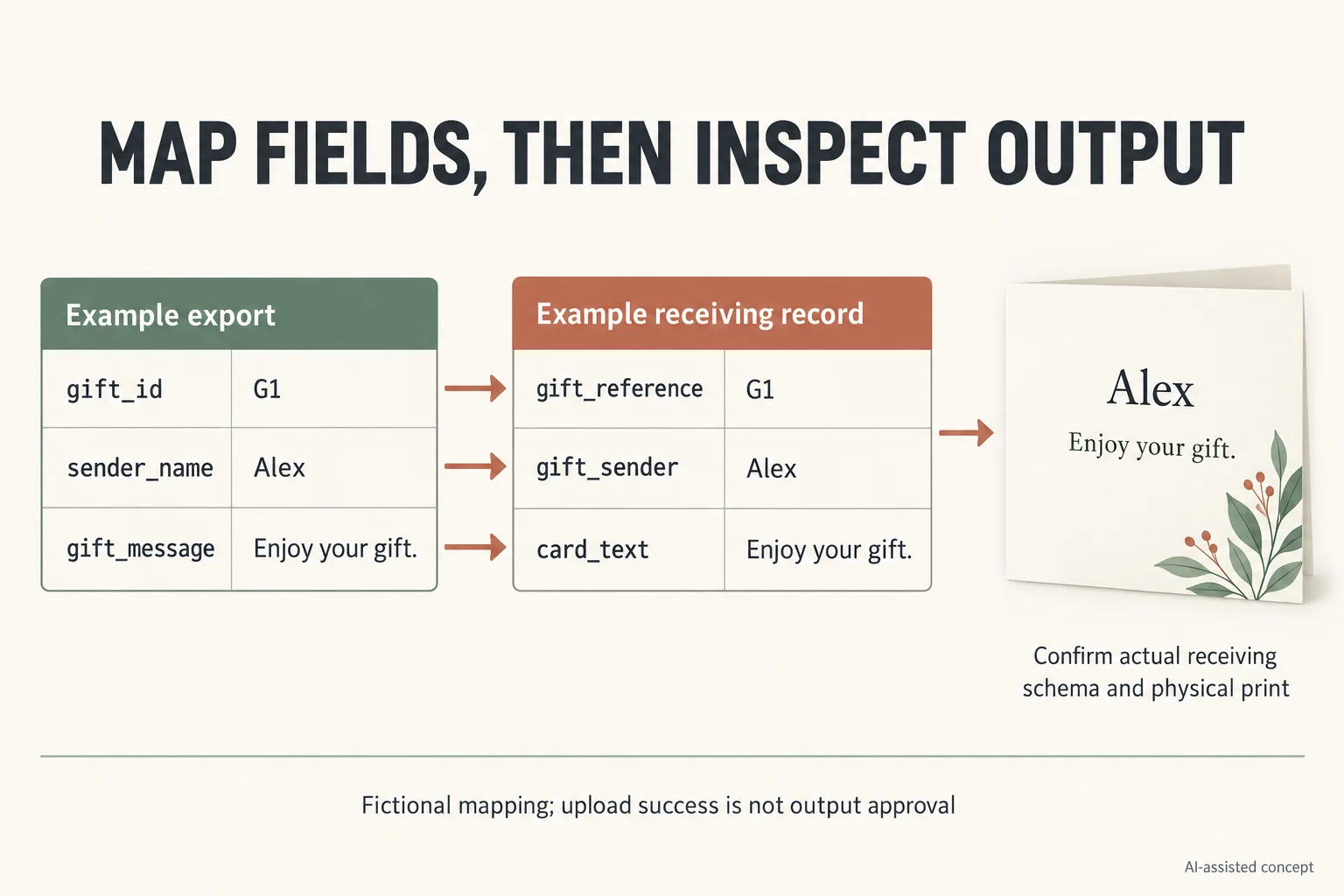
Follow one fictional order through the mapping
Assume test order O1 contains gift G1, sender “Alex” and message “Enjoy your gift.” These are fictional fields and content. The system names below are illustrative, not Shopify API fields or a particular 3PL specification.
Scroll horizontally if columns extend beyond the view.
| Required information | Example export field | Example receiving field | Output to inspect |
|---|---|---|---|
| Gift identity | gift_id | gift_reference | G1 stays linked to O1 |
| Sender | sender_name | gift_sender | Printed card shows Alex |
| Message | gift_message | card_text | Exact intended text appears |
| Presentation choice | gift_format | packing_route | Correct approved operation assigned |
If sender_name is ignored by the receiving system, the order may import successfully while its card remains incomplete. A successful file upload therefore isn’t the end of the test.
Test the awkward records
Use a missing sender, an empty message, a longer name and two gift units under one order. Establish whether the actual receiving model can represent each unit separately. Keep unsupported cases on an explicit route rather than silently merging their messages.
Check character handling and text layout at the actual print size. Imported text that appears complete on a screen can still be truncated or cramped on the card.
For private information, use only authorised processing arrangements. Public examples should remain fictional; this article doesn’t permit a real recipient file to be sent to an unreviewed service.
Retain the imported result
Save the mapping version, test input and actual received record within the approved workflow. Compare that record with the printed test card and selected packing operation. Later message corrections need a separate update-and-acknowledgment process; a correct first import doesn’t establish that subsequent edits synchronise.
Use a two-gift test that can expose a silent mapping error
Keep one row per gift unit when the service needs separate messages under one order. In this fictional test, order O1 contains G1 and G2. Sending a single order-level message does not prove that the receiving model can represent both cards independently.
Scroll horizontally if columns extend beyond the view.
| Fictional test input | Receiving record to inspect | Physical output or unresolved case |
|---|---|---|
| O1/G1; Alex; Enjoy your gift. | Same order and gift IDs; complete sender and text | Correct G1 card matched to its gift |
| O1/G2; Robin; Thank you. | Separate G2 entry, not overwritten G1 data | Correct G2 card; do not print G1 message twice |
| O2/G1; sender missing | Explicit missing-field result | Follow agreed exception route; do not copy billing name |
| O3/G1; message too long for agreed format | Full received text and layout decision | Actual-size print check or hold; no silent truncation |
The example fields in this article are invented names, not a Shopify API contract. Ask the actual service for its import schema and gift-unit model. Record mapping version M1 with the test input, actual received record and print template revision; then compare the physical test card at its intended size.
A confirmation that the file uploaded answers only that event. It does not prove the sender field was interpreted, that two gifts remained distinct or that the final print is readable. Record those outcomes separately, and leave unsupported gift combinations on an assigned exception route.
The gift-ready ecommerce service guide defines what the buyer should receive. This test verifies the first data handoff. Later corrections follow the message revision and packing state record; a successful initial import is not evidence that edits synchronise. Use synthetic data for these trials and obtain appropriate authorisation before processing any real recipient information.
Download the gift message fulfilment integration record (.csv). It contains field definitions, clearly hypothetical examples and a blank actual-project row. Replace the invented entries; a blank field is unknown, not an approved result.
Send the specific open decision with the brief
Bring the current record, packaging configuration, actual evidence available and the unresolved question to Packrivo’s packaging inquiry. State who must answer and which next step remains on hold. Packrivo coordinates sourcing and project questions with independent suppliers; this record is not a manufacturing or fulfilment service commitment.
Sources and scope
Shopify Help Center supports the stated general concepts within this scope: Shopify packing slip contents and Liquid customisation only. Access checked 14 October 2026.
Shopify Help Center supports the stated general concepts within this scope: Shopify order-edit and app-recognition limitations. Access checked 14 October 2026.
The worked scenario is original editorial analysis with assumed inputs, not a supplier offer, customer record or measured Packrivo result. Commercial feasibility and physical suitability remain project-specific.
What this changes in a packaging enquiry
Keep the variable-message workflow separate from the common packaging purchase. Specify the card's finished size, receiving print surface and insertion position, then confirm who supplies and checks each personal message. A successful order-field mapping does not approve the physical card, printer compatibility or any external data transfer. A relevant configuration to compare is the Informational insert card; it is a concept reference, not confirmed suitability.