
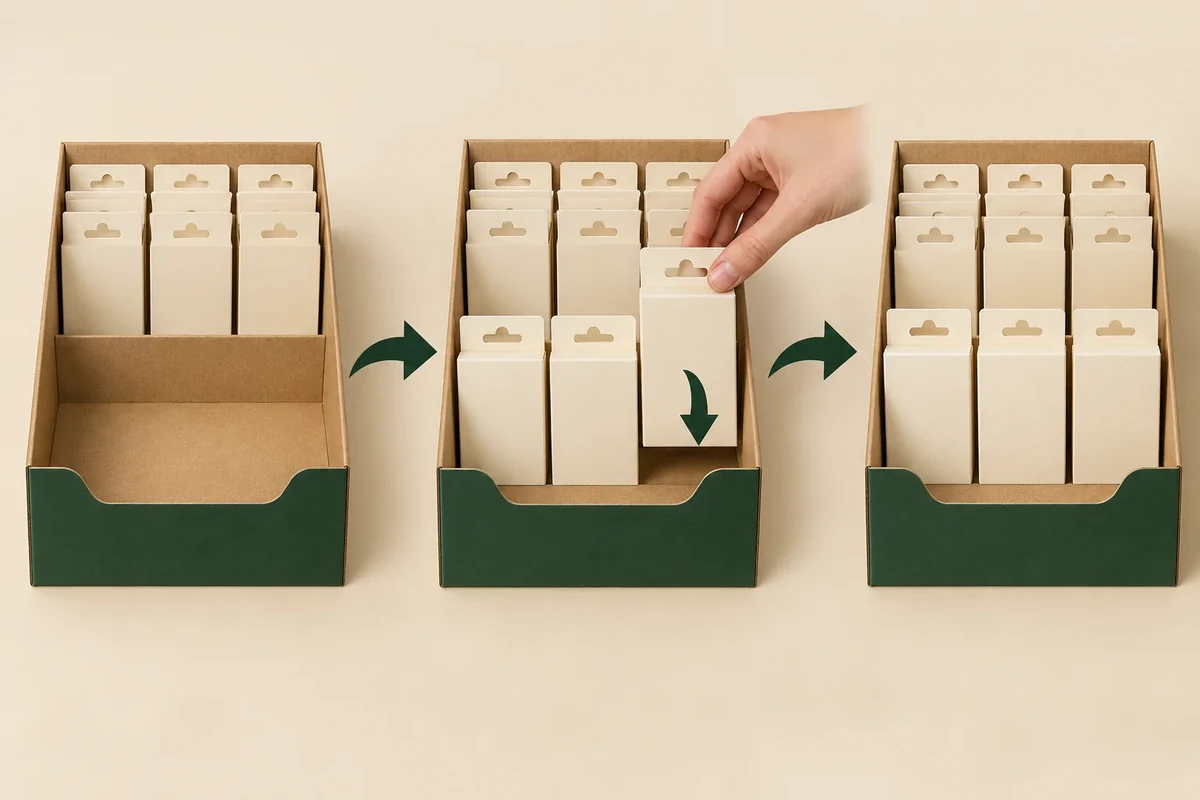
Plan refilling with the display partly stocked, then record the order used to add units and the final facing pattern. Keep customer removal and staff replenishment as separate actions. A successful loading demonstration on an empty tray can leave the actual retail refill job unresolved.
The useful output is a remaining-stock sketch and a short sequence. It shows the supplier which space and access route staff need while other units stay in place.
Choose the refill trigger and starting pattern
The retail display reference establishes the use context. Your project must define its own replenishment action. State whether staff refill after a row empties, after a chosen stock state or by replacing a whole component.
Photograph or sketch the starting pattern. Name which units remain and whether staff first move them forwards. A count alone does not describe their positions.
Record the complete unit envelope and facing direction. If new stock arrives in another wrap or orientation, include that preparation work rather than assuming it enters exactly like the original display fill.
For a tray floor display, one tray’s refill can differ from another’s. Keep the tray ID and neighbouring stocked trays in the starting record.
Write the replenishment sequence
Use one action per step, starting from the partly stocked view. State who performs it and from which side. Include any movement of remaining units as an action with its own resulting state.
Keep customer grip separate from staff entry. Both can use the same opening, yet the refill bundle may need more room or a different order than one-unit removal.
| Sequence field | Input | Evidence |
|---|---|---|
| Trigger | Chosen stock state | Starting layout image |
| Remaining units | IDs and positions | What stays during refill |
| Preparation | New stock envelope and orientation | Any unpacking or turning step |
| Entry action | Staff side and route | Partly loaded action view |
| Reset | Facing and row order | Final replenished layout |
| Changed component | Profile or divider revision | Impact linked to current instruction |
Use the change-control record if refill requires a revised profile, divider or fixture. The operation should stay linked to the structural change that enables it.
Work through a hypothetical card-pack refill
Suppose a counter display holds two rows of gift-card packs. The front row is empty while the rear row remains. The brand wants staff to refill the front without removing the rear stock.
The buyer records that starting pattern and asks a reviewer to add the new front units using the proposed route. If the reviewer first moves rear packs, that action goes into the sequence instead of being omitted.
A supplier can then discuss an opening profile, row spacing or another refill method against the same arrangement. The buyer doesn’t call every successful final full photo evidence of the original method.
Keep a useful exception record
Call the starting pattern R0 and the first entry action A1. If a bundle catches at one side, name the unit and display part. A located question such as ‘Can A1 add front units while R0 remains unchanged?’ gives the source a concrete task.
After a revision, begin again from R0 or explicitly record a revised starting pattern. Do not compare an empty revised tray with a partly full earlier tray as if only the profile changed.
The method records assembly and access observations. It does not predict sales, establish a refill-speed improvement or certify the fixture’s load. Those outcomes need separate evidence if required.
Send the starting and reset states
Bring the remaining-stock sketch, action sequence and final reset view to the packaging enquiry. The next supplier response should identify which structure or operation is being confirmed, then connect it to the actual refill instruction.
A full reset photo can conceal two different refill jobs
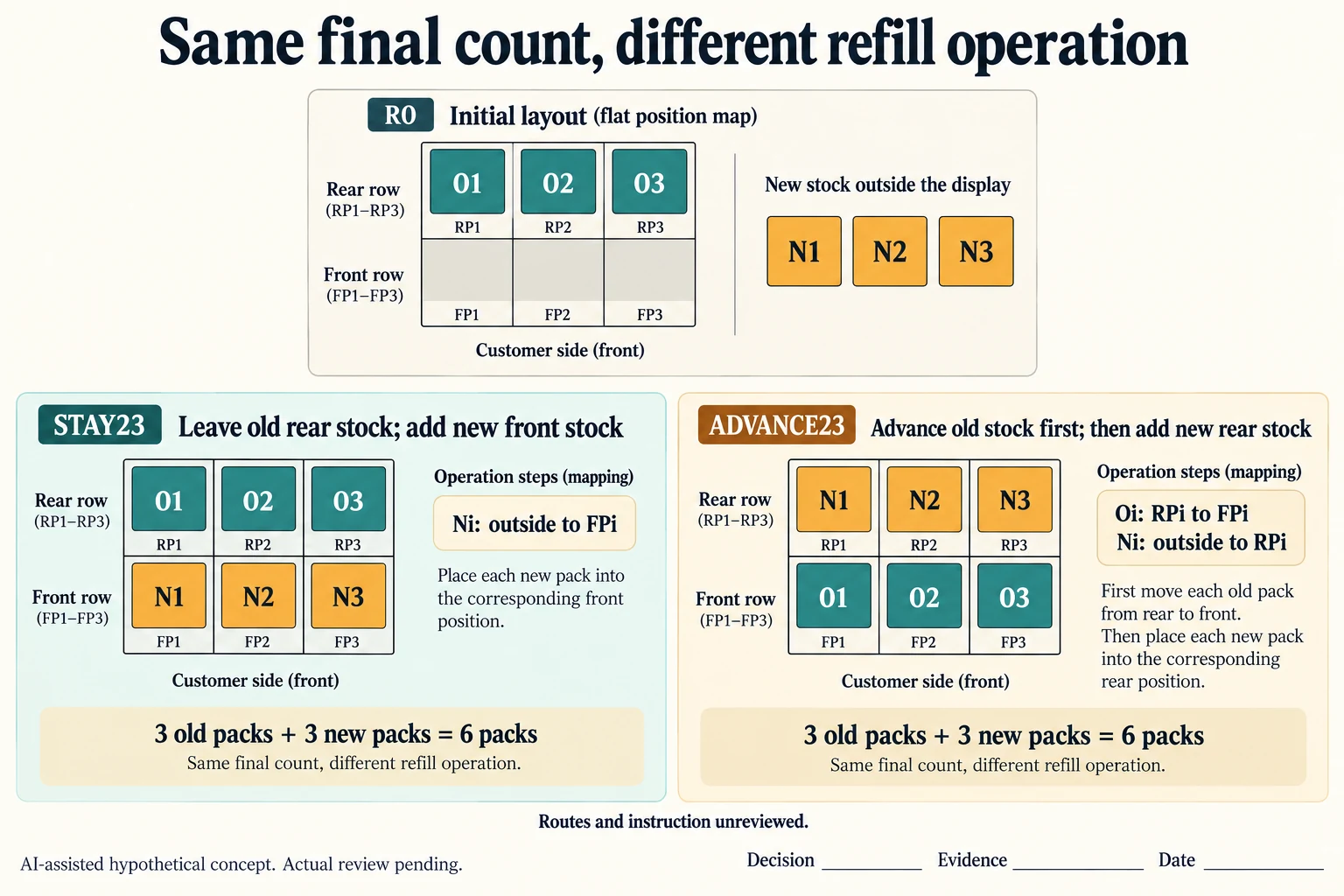
Extend R0 with explicit invented identities: old units O1, O2 and O3 occupy RP1, RP2 and RP3, while FP1–FP3 are empty. New units N1, N2 and N3 wait outside the display. STAY23 leaves each old unit at its rear position and adds its corresponding new unit to the front. ADVANCE23 first moves each old unit to the front, then adds new stock to the vacated rear positions. These are two proposed jobs starting from the same R0.
Scroll horizontally if columns extend beyond the view.
| Hypothetical configuration | Named object | Relationship | Input or next scope |
|---|---|---|---|
| STAY23 | O1 | maps to | RP1; 1 packs |
| STAY23 | O2 | maps to | RP2; 1 packs |
| STAY23 | O3 | maps to | RP3; 1 packs |
| STAY23 | N1 | maps to | FP1; 1 packs |
| STAY23 | N2 | maps to | FP2; 1 packs |
| STAY23 | N3 | maps to | FP3; 1 packs |
| STAY23 | FINAL_DISPLAY | calculated from | OLD+NEW; 6 packs |
| ADVANCE23 | O1 | maps to | FP1; 1 packs |
| ADVANCE23 | O2 | maps to | FP2; 1 packs |
| ADVANCE23 | O3 | maps to | FP3; 1 packs |
| ADVANCE23 | N1 | maps to | RP1; 1 packs |
| ADVANCE23 | N2 | maps to | RP2; 1 packs |
| ADVANCE23 | N3 | maps to | RP3; 1 packs |
| ADVANCE23 | FINAL_DISPLAY | calculated from | OLD+NEW; 6 packs |
Both arithmetic end states contain three old plus three new units, or six packs. The count does not make their assignments equivalent. The worksheet therefore carries six source-to-target rows for each method, including source position, final position, operation reference and one-pack quantity. An operator needs to know which stock moves and when, not merely that the final tray looks full. No stock-rotation rule is inferred from the labels old and new.
Before selecting either instruction, request its partly stocked entry evidence, new-unit preparation, staff side and final facing record. ADVANCE23 adds work and an intermediate state; the example does not claim that the rear entry route is physically available. STAY23 retains the original requirement to add front stock without removing rear stock, but still needs evidence that A1 can perform that action with the actual complete envelopes.
Keep a catching bundle tied to its unit, interface and action. If the supplier changes the profile or divider, begin the comparison from R0 again or identify the changed start explicitly. A final six-pack photograph alone cannot establish the sequence, refill speed, fixture load or accepted operating method. The blank decision and evidence fields remain open for the actual instruction owner.
Download the display refill unit mapping record (.csv). It includes the original table fields and scenarios alongside the added relationships. HYPOTHETICAL rows are editorial examples or required review scopes, not actual records. Actual quantity, configuration, component and file identities, materials, process, specification, copy, method, condition, observation, owner, decision, evidence and dates are blank. ACTUAL_BLANK is a separate empty starting row; enter permitted project evidence before using an actual record. A blank means unknown.
Use the Packaging Dieline Changes Need an Impact Record for its separate question. Use the Define Flat and Assembled Packaging Delivery Scope for its separate question. Use the A Counter Display’s Tipping Risk Depends on Its Footprint and Loaded Centre of Mass for its separate question.
Source scope checked 16 October 2026. References cover only the named materials, processes or guidance. Added configurations and geometry are hypothetical, not supplier specifications, tests or production approval; they set no universal tolerances or machine limits. Confirm the actual material, process, drawing and formed sample for the project.
Discuss this packaging specification with Packrivo. We coordinate independent suppliers. MOQ: 500 pieces per product/design; illustrative quantities are not production offers. Confirm materials, samples, price and timing for your project.