
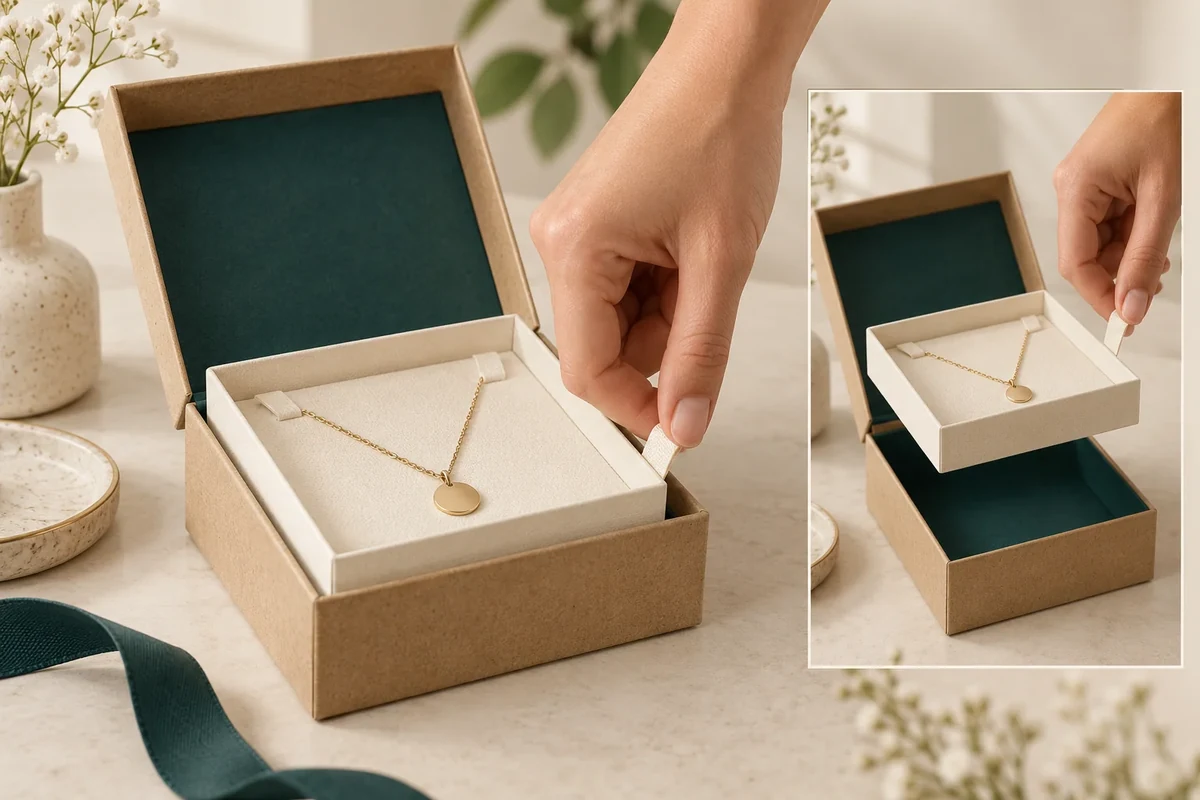
Place a proposed holder removal tab against the customer’s actual hand route in the complete pack. Show the product, holder, box opening and tab together. A tab on an isolated insert can be visible yet unreachable after the product and surrounding walls are in place.
This method creates an access layout for a proposed feature. Ask the supplier to confirm the tab and attachment construction; a general insert catalogue doesn’t prove that feature is included.
Name the part the tab is meant to move
The liner-insert reference establishes the component context. State whether the proposed tab lifts an entire holder, reveals an item or starts another agreed removal action. These are different requirements.
Mark the tab’s connection to the component it moves. If it is a loose decorative pull, keep that distinction visible. The source should identify the actual attachment or fold before a functional review.
Add the full product envelope and outer opening. The insert-fit guide handles the item’s location; this layout adds the hand and movement space needed after opening.
Draw the starting finger route
Choose the intended pack position and identify where fingers enter before anything is moved. Show any lid, rim, card or neighbouring item still present at that stage. Avoid drawing the hand through a wall or behind an inaccessible product.
Record the direction the tab should move and where the holder or item goes next. If another hand supports the pack, show that support. A staged three-handed demonstration may leave the customer action unanswered.
| Access field | Input to mark | Sample question |
|---|---|---|
| Target part | Holder or item moved by tab | Is the intended part identified? |
| Connection | Supplier-proposed attachment or fold | Does sample represent it? |
| Starting reach | Finger entry with full contents | Is tab available before movement? |
| Travel | Direction and surrounding parts | What meets during action? |
| Support | User grip and pack position | What other support is required? |
| After state | Moved holder/item position | Can next removal step occur? |
A visible tab and an accessible tab belong to different observation fields. Keep both rather than choosing only a close-up of the pull.
Work through a hypothetical holder lift
Suppose a jewelry gift uses a holder with a proposed paper tab near one corner. With the product loaded, the corner lies close to the outer wall. The buyer sketches finger entry and records whether the tab can be reached before the holder is lifted.
If a reviewer first shifts the product to expose the tab, that action is a deviation or a new proposed sequence. The source can discuss another tab position or access route against that actual layout.
A revised tab needs the same target part and full contents in its review. A loose sample tab being pulled on a desk doesn’t close the installed access question.
Ask the next question by interface
Call the removal tab RT1, holder H1 and adjacent wall W1 in the hypothetical map. Ask: ‘Please review RT1 access beside W1 with the complete H1 configuration.’ It gives the source a located task.
If the attachment or holder construction changes, keep that revision separate from the tab’s visual placement. Appearance, access and functional acceptance can be different statuses on one sample.
Any force, retention or repeated-use requirement needs a separately agreed method. The original layout records a proposed human action without claiming a universal easy-release result.
Send the starting and after states
Bring the target-part identity, connection proposal, finger route and action views to the packaging enquiry. The next supplier response should address the actual installed feature, followed by review with all contents present.
A product-first workaround does not establish initial tab access
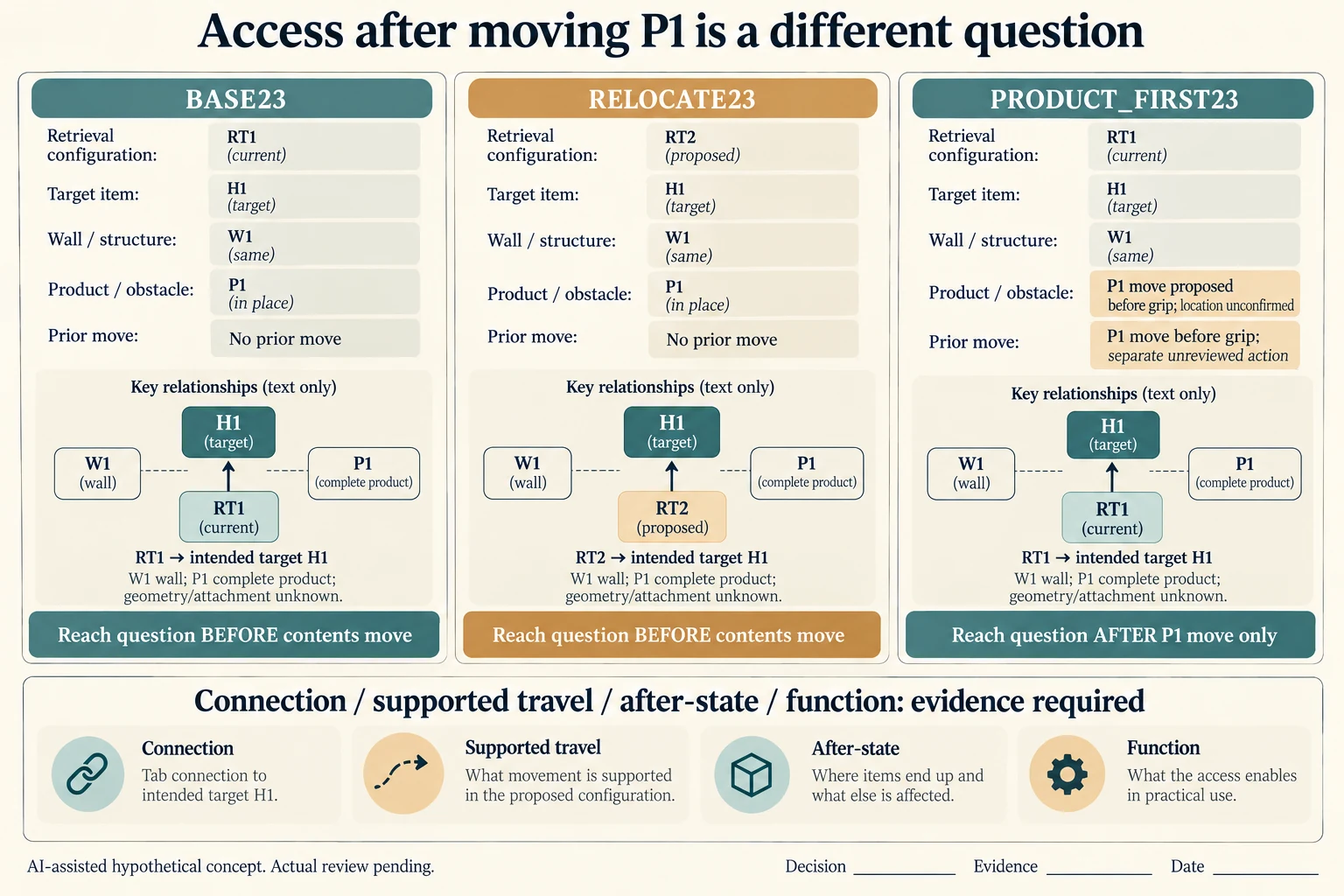
Name the complete starting arrangement before judging the tab. BASE23 uses RT1 proposed to connect to holder H1 beside wall W1 with product P1 present. RELOCATE23 proposes RT2 for the same holder, wall and product. PRODUCT_FIRST23 retains RT1 but introduces a separate movement of P1 before gripping it. The worksheet does not prescribe how P1 moves or establish that moving it is possible or permitted.
Scroll horizontally if columns extend beyond the view.
| Hypothetical configuration | Named object | Relationship | Input or next scope |
|---|---|---|---|
| BASE23 | BASE23 | uses tab | RT1 |
| BASE23 | BASE23 | uses pre action | NONE |
| BASE23 | RT1 | access question at | BEFORE_ANY_CONTENT_MOVES |
| RELOCATE23 | RELOCATE23 | uses tab | RT2 |
| RELOCATE23 | RELOCATE23 | uses pre action | NONE |
| RELOCATE23 | RT2 | access question at | BEFORE_ANY_CONTENT_MOVES |
| PRODUCT_FIRST23 | PRODUCT_FIRST23 | uses tab | RT1 |
| PRODUCT_FIRST23 | PRODUCT_FIRST23 | uses pre action | MOVE_P1_BEFORE_GRIP |
| PRODUCT_FIRST23 | RT1 | access question at | AFTER_P1_MOVE_ONLY |
Each candidate has independent initial-reach, target-connection, supported-travel, after-state, appearance-only and functional-acceptance scopes. For PRODUCT_FIRST23, access is questioned after the P1 movement only. That later view cannot establish reach before anything moved. If actual customer instructions require the tab first, the workaround has not answered that requirement.
Confirm which object the tab is intended to move. A tab connected to H1 is not evidence that it lifts P1, releases jewelry from the holder or reveals every accessory. Keep the card, lid/rim and neighbouring contents in the actual starting view. Show the ordinary support action with the selected route; a cropped close-up should not conceal another grip or a removed obstruction.
The generated diagram is an evidence map, so it does not invent an accessible finger gap or an attachment mechanism. PackMojo’s liner catalogue identifies an interior packaging component, not an included removal feature or a force rating for RT1. Keep the actual attachment, observations and acceptance blank until the supplier and responsible owner return the complete configuration evidence.
Download the holder removal tab starting access record (.csv). It includes the original table fields and scenarios alongside the added relationships. HYPOTHETICAL rows are editorial examples or required review scopes, not actual records. Actual quantity, configuration, component and file identities, materials, process, specification, copy, method, condition, observation, owner, decision, evidence and dates are blank. ACTUAL_BLANK is a separate empty starting row; enter permitted project evidence before using an actual record. A blank means unknown.
Use the Review a Drawer Pull With the Loaded Tray for its separate question. Use the Jewelry Box Insert Fit: Seven Measurements Before Sampling for its separate question. Use the Gift Recipients Need to Recognize Included Accessories Before Discarding Packing for its separate question.
Source scope checked 16 October 2026. References cover only the named materials, processes or guidance. Added configurations and geometry are hypothetical, not supplier specifications, tests or production approval; they set no universal tolerances or machine limits. Confirm the actual material, process, drawing and formed sample for the project.
Discuss this packaging specification with Packrivo. We coordinate independent suppliers. MOQ: 500 pieces per product/design; illustrative quantities are not production offers. Confirm materials, samples, price and timing for your project.