
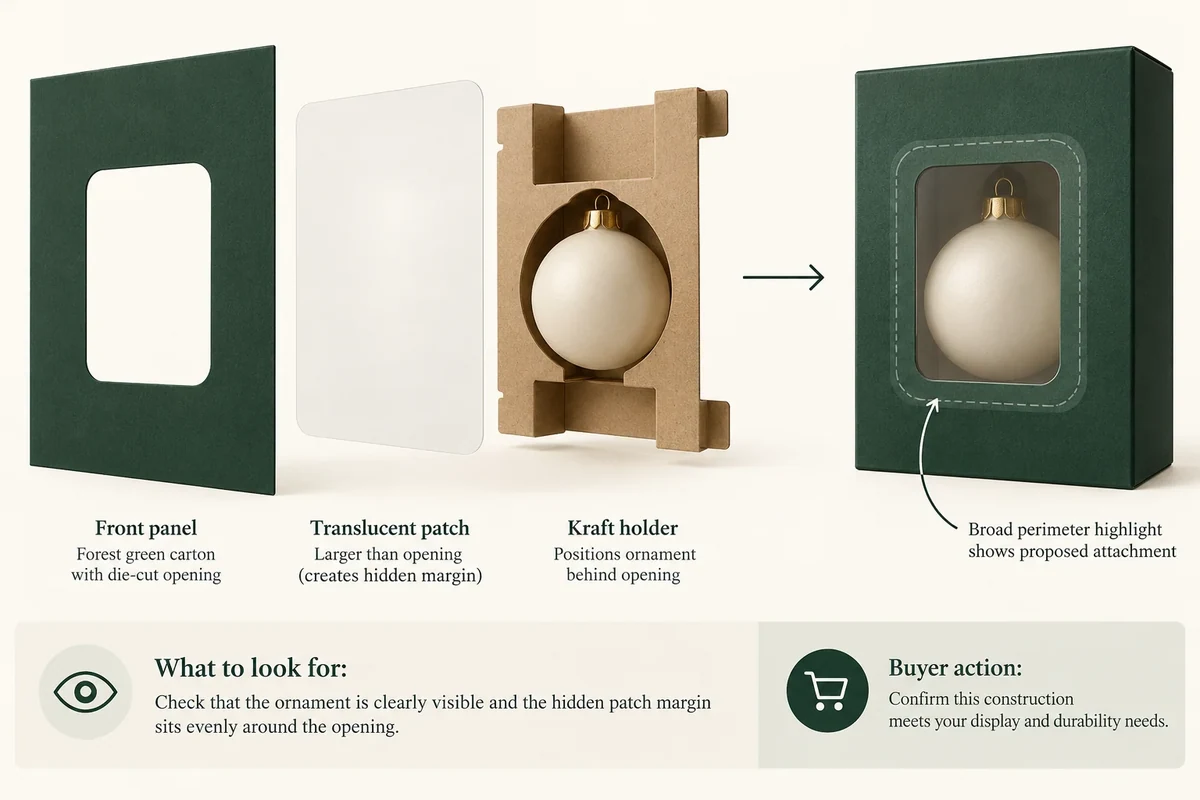
Locate a window patch by separating the die-cut opening, the patch perimeter and the product view behind it. Confirm the attachment layout with the supplier and review the formed loaded pack. A window outline on artwork doesn’t show which areas are visible, joined or obscured by the contents.
The useful question is what the customer should see through the opening. Work backwards from that view, then ask how the proposed patch is attached. Keep the display intention and construction response distinct.
Draw three separate boundaries
PakFactory’s window packaging reference describes a film applied to a die-cut window. This supports distinguishing the opening from the patch. The actual film, joining area and construction need confirmation for the proposal.
On a working template, show the cut opening, proposed patch outline and the product’s projected view. Use separate layers or line styles. A single thick rectangle labelled ‘window’ leaves all three boundaries ambiguous.
Ask the supplier to confirm where the patch meets the panel and which joining regions must remain available. Do not draw a universal attachment width into the artwork without the proposed process details.
Use a fixed panel reference, such as the front face reading normally. Give the opening and patch positions against that reference rather than an unlabelled photograph that could be rotated.
Place the product in its actual holder
Show the sale-ready item and any card or insert behind the window. Record which product face should be visible. If the product can move within the proposed holder, state that as a fit question before relying on a precise view.
For a hypothetical ornament gift carton, the customer may need to see the ornament’s face rather than the holder’s blank edge. A side section helps show how the holder positions that face relative to the opening.
The insert fit guide addresses the product’s location. This template handles the relationship between that location and the window panel, rather than repeating the whole insert brief.
Use a window and attachment template
Keep the three boundaries aligned to the same panel and revision. The table adds the questions that a visual layout alone may miss.
| Layer | Information to show | Confirmation |
|---|---|---|
| Cut opening | Shape, position and current panel | Supplier dieline revision |
| Patch perimeter | Proposed patch outline beyond opening | Material and construction proposal |
| Attachment | Supplier-marked joining regions | Process owner and confirmed scope |
| Product view | Visible face with actual holder | Loaded formed sample photo |
| Obstructions | Card, rim, seam or other hidden area | Located change request |
A joining area can be outside the visible opening yet still interact with artwork or a fold. Keep that location in the construction response, not only in the product photo.
Follow a hypothetical view correction
Suppose the first layout centres a window on the carton panel. The product holder places the ornament higher than that opening. The buyer draws the actual view boundary and records that the desired face is partly hidden.
The team can then discuss moving the opening, changing the holder or changing the desired view. Those are separate options with different construction consequences. The template records which option the supplier proposes rather than enlarging the window by guesswork.
If the patch shape changes, ask whether the attachment proposal also changes. A revised visible opening does not automatically establish a revised joining layout. Keep both responses with the same dieline.
Use fixed references to compare a revised window
Give the hypothetical panel a fixed front reference and identify the product’s desired visible face as PV1. In the first proposal, PV1 is partly below the opening. Mark that relationship on the loaded view rather than describing the entire window as too small.
Ask the supplier to distinguish an opening-position revision from a holder-position revision. Both can alter the view, but they change different components. If the proposal changes both, preserve both revisions in the aligned template so the next sample is not mistaken for a window-only adjustment.
A useful response request is: ‘Please show PV1 against opening W1 and confirm the patch and attachment layout for the revised panel.’ It links the desired view to the construction. A larger cutout drawing with no patch outline leaves the joining question open.
Compare the next sample using the same product orientation and customer view. Record the patch revision, holder revision and actual visible boundary. If the desired view is accepted while the attachment remains provisional, retain separate statuses. The template should close exactly the relationship supported by the evidence rather than presenting the whole window assembly as confirmed.
Review the formed loaded pack
Inspect the intended view from the agreed customer angle. Photograph the wider front panel as well as the window close-up. Record any obscured area and the sample state, without claiming optical performance from a concept image.
Send the aligned template, complete product position and unresolved joining questions through Packrivo’s enquiry form. Approval should connect the window position to the supplier-confirmed construction and the loaded view, not merely to a flat artwork outline.
Keep the starting geometry fixed while choosing which component moves
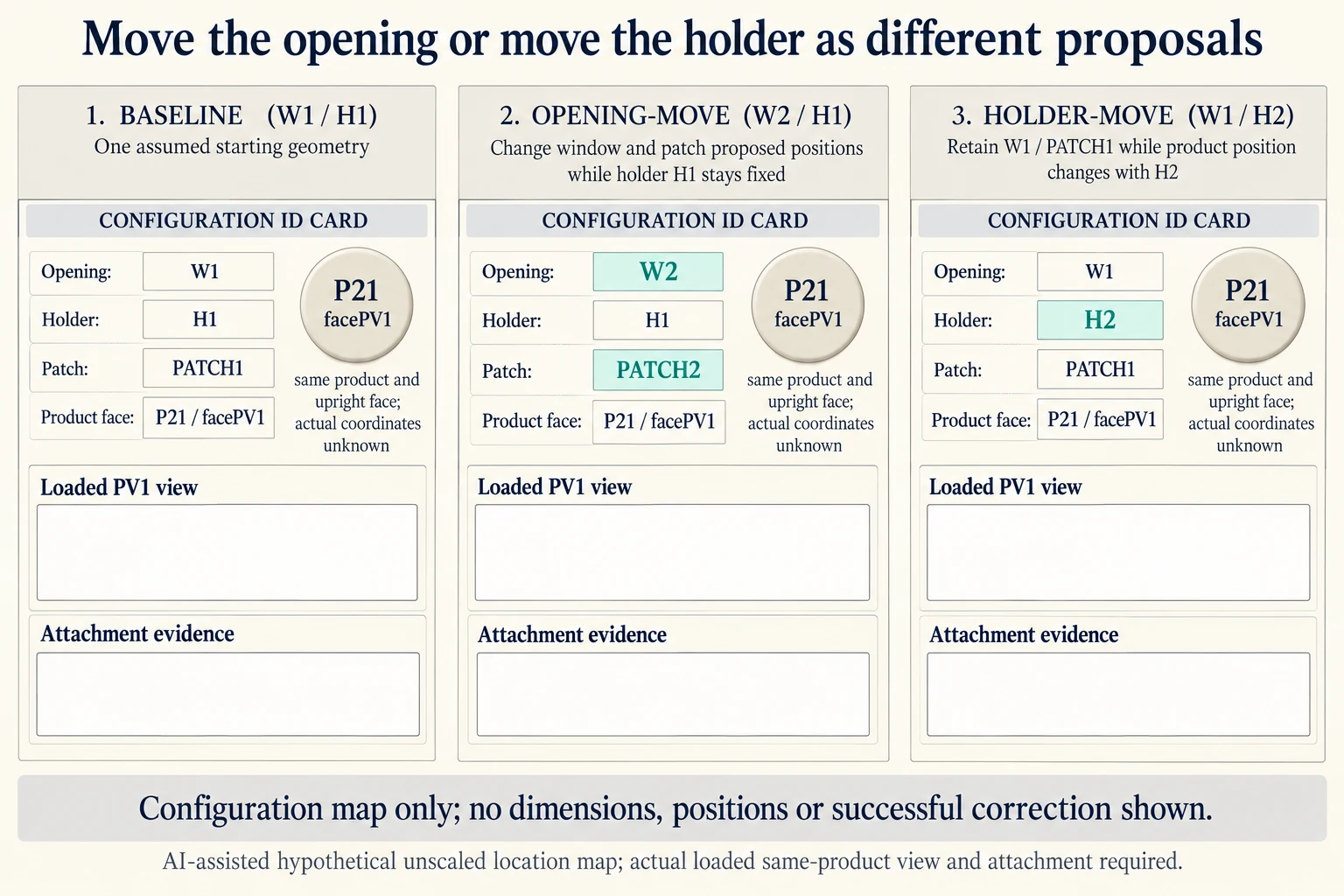
The original narrative contains two positional descriptions: the holder places the ornament higher than an opening, and a separate PV1 example lies partly below an opening. Treat them as different hypothetical starting geometries, not one measurement to combine. The download assigns HIGHER_EXAMPLE and BELOW_EXAMPLE separately. An actual brief needs the located relationship under one fixed front reference. W_HIGH_CASE/H_HIGH_CASE and W_BELOW_CASE/H_BELOW_CASE are illustrative aliases, not actual revision histories. If real records describe the same configuration in opposite ways, retain that description conflict for clarification instead of presenting two valid measurements.
Scroll horizontally if columns extend beyond the view.
| Hypothetical configuration | Named object | Relationship | Input or next scope |
|---|---|---|---|
| BASE21 | BASE21 | uses opening | W1 |
| BASE21 | BASE21 | uses holder | H1 |
| BASE21 | BASE21 | uses patch | PATCH1 |
| OPENING_MOVE21 | OPENING_MOVE21 | uses opening | W2 |
| OPENING_MOVE21 | OPENING_MOVE21 | uses holder | H1 |
| OPENING_MOVE21 | OPENING_MOVE21 | uses patch | PATCH2 |
| HOLDER_MOVE21 | HOLDER_MOVE21 | uses opening | W1 |
| HOLDER_MOVE21 | HOLDER_MOVE21 | uses holder | H2 |
| HOLDER_MOVE21 | HOLDER_MOVE21 | uses patch | PATCH1 |
The added comparison uses HIGHER_EXAMPLE only. BASE21 names W1, H1, PATCH1 and product P21's upright face PV1. OPENING_MOVE21 proposes W2 and PATCH2 while retaining H1 and the same product orientation. HOLDER_MOVE21 instead proposes H2 while retaining W1 and PATCH1. This compares which component changes; it does not say that either proposal now produces an accepted view.
Request the complete aligned template for the chosen candidate. An opening-position proposal still needs the patch perimeter and joining-region response. A holder-position proposal still needs the actual loaded face against the unchanged opening. If both the opening and holder move, record both revisions as another configuration instead of assigning the response to a window-only row. Redefining the desired view is another original option; it changes the requirement rather than demonstrating that PV1 became visible.
Keep product-view, patch-perimeter and joining-region decisions separate. A candidate may be visually preferred while its attachment remains provisional. The teaching configuration map supplies no actual positions, dimensions, joining width, visibility percentage or performance result. Use the same actual ornament, holder configuration and customer view in the next formed review, then close only the relationships supported by that evidence.
Download the window patch product view position record (.csv). It includes the original table fields and scenarios alongside the added relationships. HYPOTHETICAL rows are editorial examples or required review scopes, not actual records. Actual quantity, configuration, component and file identities, materials, process, specification, copy, method, condition, observation, owner, decision, evidence and dates are blank. ACTUAL_BLANK is a separate empty starting row; enter permitted project evidence before using an actual record. A blank means unknown.
Use the Jewelry Box Insert Fit: Seven Measurements Before Sampling for its separate question. Use the Packaging Dieline Changes Need an Impact Record for its separate question.
References apply to the materials, processes or guidance named in each source. Worked configurations and dimensions are teaching examples, not tested specifications or production limits. Use the project’s material specification, drawing and formed sample for approval.
Discuss this packaging specification with Packrivo. We coordinate independent suppliers. MOQ: 500 pieces per product/design; illustrative quantities are not production offers. Confirm materials, samples, price and timing for your project.