
Before approving QR codes on packaging, settle three decisions: what the scan will help the customer do, where the code and readable fallback will sit on the finished pack, and who controls and maintains the destination. Record the promised content, the proposed print area and the responsible website owner in the packaging brief. The printed symbol may remain in someone’s home long after a promotion ends or a website is redesigned.
For small gift, candle and jewelry brands, start with a practical customer task. Help someone find the right care instructions, understand an unfamiliar component or contact the correct support team. Then decide who will maintain that information for as long as the packaging is likely to be used.
Give the scan one clear purpose
“Scan me” asks for effort without explaining the benefit. A label such as “Jewelry care” or “How to use your refill” sets a more specific expectation. The landing page should deliver that information promptly instead of sending the customer to a homepage where they must search again.
Match the destination to the printed promise. If the pack says the code opens care instructions, do not later redirect it exclusively to a sale. You can add related information around the original content, but preserve the reason someone saved the box or card.
Decide how much product identification is necessary. A general care hub might suit a small collection with shared guidance. Where materials or product versions require different instructions, the page must help the customer identify the correct one. Avoid presenting one set of instructions as suitable for every item merely because one code is easier to print.
Control the address behind the symbol
The QR artwork contains data. When that data is a web address, the printed code continues to point to that address; changing the page or a redirect is what changes the customer’s destination. A service described as “dynamic” does not make the ink on the package change.
Prefer an address the business can continue to administer. Before relying on a third-party redirect service, check who controls the domain, what remains available if the subscription changes and whether you can transfer the arrangement. Keep the account under business ownership rather than an individual contractor’s personal account.
W3C’s guidance on lasting web addresses emphasizes keeping addresses stable through changes in website organization and underlying systems. Applied to packaging, this means discussing printed links with whoever manages the website before a redesign removes or renames their destinations.
A redirect can give you flexibility, but it still needs an operating domain, working configuration and maintained content. Treat those as ongoing responsibilities rather than assuming that a particular code type guarantees permanence.
Know whether you need a retail identifier
A QR code that opens a care page and a barcode intended for retail checkout have different requirements. If both functions are being considered, involve the retailer and the people responsible for product identification before creating the artwork.
GS1’s Digital Link quick-start guide describes a persistent product identifier that redirects to the current location of information about that product. It recommends separating that identifier from the changeable destination page. This is a standards-based approach for GS1 identification needs; a general website QR code should not be described as GS1-compliant or checkout-ready merely because it opens in a phone browser.
For a related retail project, Packrivo’s guide to confirming barcode data before artwork can help frame the separate identification questions. A successful consumer scan alone does not resolve them.
Keep a readable route beside the code
Print the purpose and a short, readable web address near the symbol. A customer may prefer typing the address, have trouble using the camera or want to know where the scan will lead. Make sure the printed fallback actually reaches the promised information; it does not have to reproduce a long technical destination.
Keep essential information available in the appropriate physical form. A QR code can provide additional explanation, but deciding what safety or product information must appear on the item or packaging requires its own review. Do not hide an unresolved information requirement behind a link.
Reserve enough space on the actual package
DENSO WAVE specifies a clear margin of four modules on every side of a QR Code. A module is one of the small square units that make up the symbol. That margin belongs in the reserved area; it should not be filled with a decorative border, text or background pattern.
There is no single physical size that this article can recommend for every packaging application. DENSO WAVE’s module-size guidance explains that the printed size depends on the symbol and module size, while readable limits depend on the scanning equipment. Its printer examples are not universal minimum sizes for all phones, materials and finishes.
Choose the position on a formed sample. As practical review questions, ask whether a seam divides the code, a fold distorts it, a glossy finish creates glare or another component covers it. A code on a removable card also needs to remain easy to find after the product is unpacked. Review the final-size printed result rather than relying only on an enlarged screen preview.
Assign a maintenance owner before ordering
A short ownership record helps the printed promise survive staff changes. Use it to connect the packaging version with the online destination.
Scroll horizontally if columns extend beyond the view.
| Decision | What to record |
|---|---|
| Customer purpose | The exact promise printed next to the code |
| Artwork and packaging edition | Approved file version, print position and the products that use it |
| Encoded address | The exact URL decoded from the final approved artwork file |
| Destination | The current page and the product versions it serves |
| Control | Named owners of the domain, redirect and content, with a backup contact |
| Fallback | The readable address and support route on the pack |
| Review triggers | Website migration, product changes, expired offers and service changes |
Include a check of the old printed address whenever the website moves. If a product is discontinued, decide whether to retain its care page, replace it with an archive or direct customers to clearly identified support. Sending every old product to the latest collection can leave existing owners without useful answers.
Complete the artwork and website handoff together
Use one record shared by the packaging reviewer and website owner. Keep both the printed address and the current destination in it: they may differ when a redirect is involved.
- Decode the URL from the final artwork file. Compare the exact decoded address with the approved link, including its path and any parameters. Do not rely only on the filename, a pasted preview or an earlier proof
- Type the printed fallback address independently. Confirm that it reaches the promised content without relying on the QR scan
- Check the destination against the actual product and version. Read the page, rather than treating a successful page load as confirmation that its instructions are correct for this pack
- Review scans from the finished printed sample at its final size, in its intended position and with the proposed material and finish. Record the phones and conditions used, problems found and changes needed; a screen test does not approve the printed result
- After a website migration or redirect change, test an older packaging version as well as the current one. Follow its encoded URL and type its fallback address, checking that the earlier product still has the intended information
- Obtain the named owner’s confirmation that the domain, redirect and content are under their control and that they will recheck printed links after relevant changes. Save that confirmation with the artwork edition and review date
Agree which physical print checks are needed with the printer before release. A passing review in the recorded conditions is evidence for that sample, not a guarantee for every phone or future condition.
A hypothetical jewelry care card
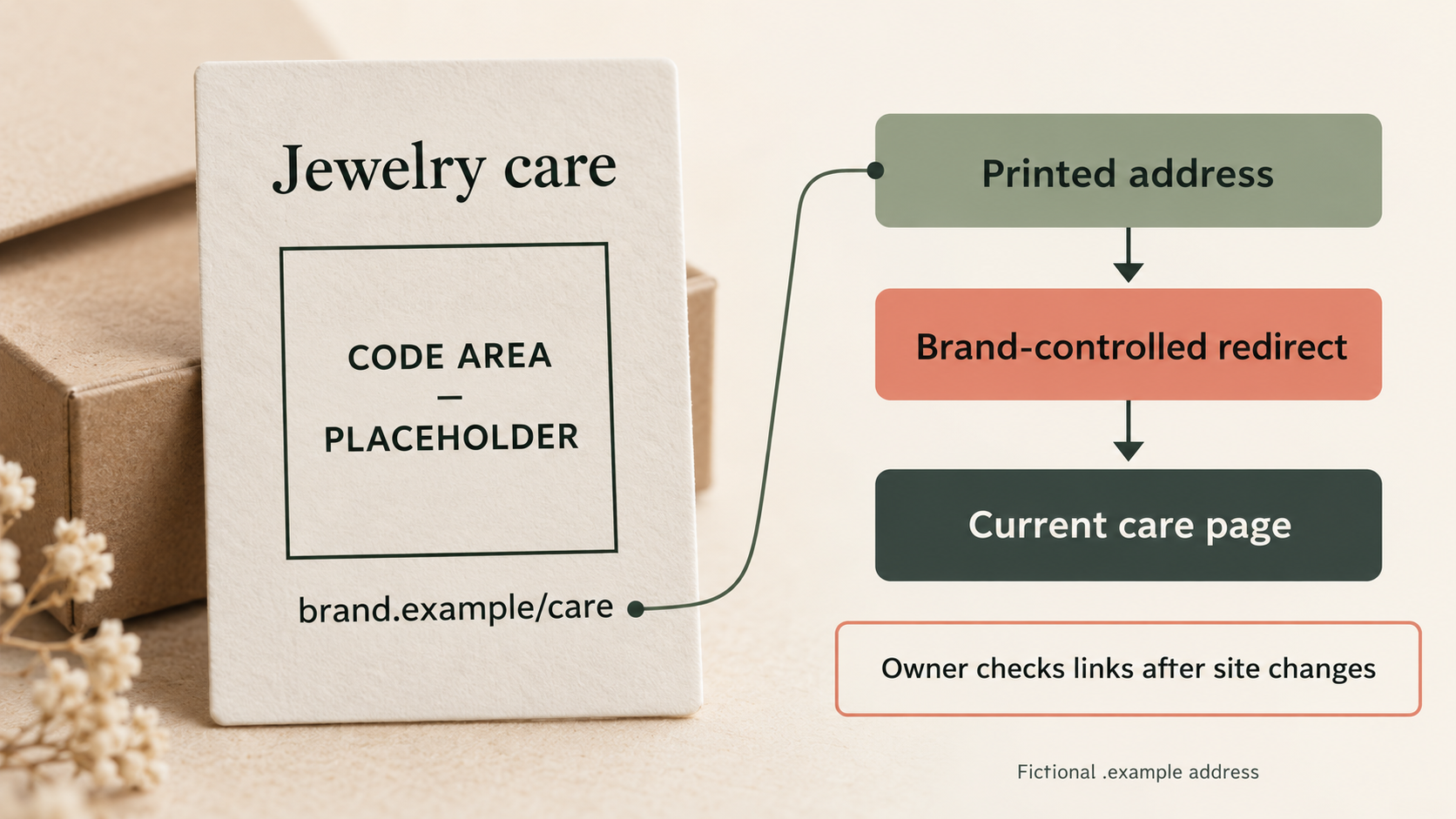
Imagine a jewelry brand adding a care card to a plated collection. The card says “Jewelry care” and prints a short address, “brand.example/care.” In this fictional example, the code would encode that same address. The intended path is: printed address, then a brand-controlled redirect, then the current care page. The diagram accompanying this article uses a labeled CODE AREA placeholder; it contains no QR code, and the example address is not a working customer service.
Later, the brand introduces an unplated collection with different guidance. The team would first decide whether to use a separate card or a landing page that clearly distinguishes the materials. It would preserve instructions for the earlier products and review the printed promise before reusing the artwork. Its named website owner would check both versions after the change. This is a planning example, not a claim about an implemented or tested Packrivo system.
Preparing packaging with a QR area? Send Packrivo the intended customer action and packaging direction. We can help organize placement and print questions within the packaging brief, while your website owner confirms the destination and its maintenance plan.
Sources and scope
All sources accessed 6 October 2026. Website maintenance and packaging workflow examples are editorial recommendations, not guarantees of scan performance, availability or standards compliance.
- DENSO WAVE — Point for determining the code area. Original QR Code technical guidance supports the four-module clear margin and the distinction between symbol size and total reserved area. No example millimeter dimension is presented as a universal minimum.
- DENSO WAVE — Point for setting the module size. Original technical guidance supports considering module size, printing and scanning equipment together. Does not validate a specific Packrivo substrate, finish or phone-scanning setup.
- GS1 — Quick start guide for GS1 Digital Link. Official 2024 guide, particularly section 5, supports the distinction between persistent product identification and a changeable information destination, using redirects. It is not treated as proof that an ordinary marketing QR code satisfies retail checkout requirements.
- W3C — Cool URIs don’t change. Original web-design guidance supports stable addresses despite site reorganization, file movement and changes in responsibility. This is foundational design guidance, not a claim that URLs or providers are intrinsically permanent.
Internal article links verified against live public pages: Confirm Barcode Data Before Sending the Artwork supplies separate retail-identification context; Packrivo inquiry is the packaging-project CTA. No QR code has been generated, commissioned, tested or deployed for this draft.
A working redirect can still serve the wrong product instructions
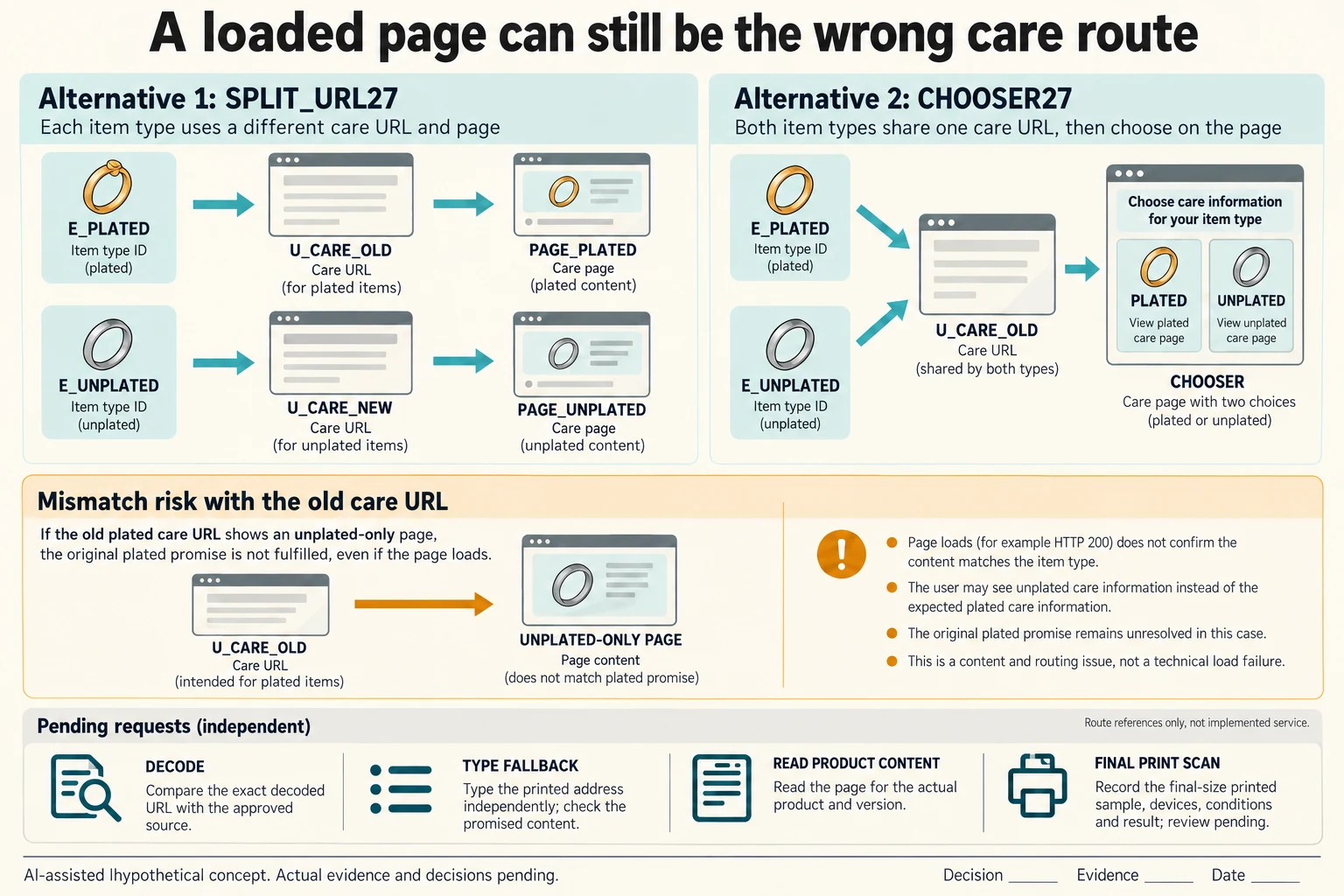
Extend the fictional plated and unplated collection example with edition references E_PLATED and E_UNPLATED. SPLIT_URL27 keeps U_CARE_OLD for the earlier edition and proposes U_CARE_NEW for the later one, with each route serving the corresponding material guidance. CHOOSER27 instead keeps one entry reference and requires a page that clearly distinguishes plated and unplated products. These are alternative maintenance plans, not deployed URLs or a rule requiring two codes.
Scroll horizontally if columns extend beyond the view.
| Hypothetical configuration | Named object | Relationship | Input or next scope |
|---|---|---|---|
| SPLIT_URL27 | E_PLATED | has material scope | PLATED |
| SPLIT_URL27 | E_PLATED | encoded address reference | U_CARE_OLD |
| SPLIT_URL27 | E_PLATED | requires destination | PAGE_PLATED |
| SPLIT_URL27 | E_UNPLATED | has material scope | UNPLATED |
| SPLIT_URL27 | E_UNPLATED | encoded address reference | U_CARE_NEW |
| SPLIT_URL27 | E_UNPLATED | requires destination | PAGE_UNPLATED |
| CHOOSER27 | E_PLATED | has material scope | PLATED |
| CHOOSER27 | E_PLATED | encoded address reference | U_CARE_OLD |
| CHOOSER27 | E_PLATED | requires destination | CHOOSER_WITH_PLATED_AND_UNPLATED |
| CHOOSER27 | E_UNPLATED | has material scope | UNPLATED |
| CHOOSER27 | E_UNPLATED | encoded address reference | U_CARE_OLD |
| CHOOSER27 | E_UNPLATED | requires destination | CHOOSER_WITH_PLATED_AND_UNPLATED |
| MIGRATION27 | U_CARE_OLD | assumed wrong content destination | UNPLATED_ONLY_PAGE |
| MIGRATION27 | E_PLATED | still requires | PLATED_CARE_OR_CLEAR_SUPPORT |
For every edition and route, keep four requests separate: decode the exact final artwork address, type the fallback independently, read the promised product content and review the finished printed scan under recorded conditions. U_CARE_OLD and U_CARE_NEW are reference tokens, not actual encoded strings. The original brand.example/care remains a fictional address and CODE AREA remains nonfunctional. No QR symbol or customer instructions are generated here.
A hypothetical migration mismatch directs U_CARE_OLD to an unplated-only page. Even if that page returned HTTP 200, loading it would not establish that the older plated product received the promised guidance. Retain the earlier material scope and ask the website owner to restore its relevant care route or clearly identified support. Domain, redirect and content responsibilities need named actual owners and a backup through the authorized project process.
The DENSO four-module clear-margin rule concerns a conventional QR Code; other formats such as Micro QR have different requirements. No module count, physical module size or universal millimetre size is assigned here. The GS1 Quick Start carries ©2024 and is an introductory resource, not the latest URI syntax specification or a retail acceptance. Its persistent-identifier distinction and W3C’s stable-address guidance do not guarantee availability, correct content or printed readability. Keep those real-use decisions separate.
Download the packaging QR edition destination maintenance map record (.csv). It includes the original table fields and scenarios alongside the added relationships. HYPOTHETICAL rows are editorial examples or required review scopes, not actual records. Actual quantity, configuration, component and file identities, materials, process, specification, copy, method, condition, observation, owner, decision, evidence and dates are blank. ACTUAL_BLANK is a separate empty starting row; enter permitted project evidence before using an actual record. A blank means unknown.
Use the Confirm Barcode Data Before Sending the Artwork for its separate question. Use the Review Retail Barcodes on the Finished Print Proof for its separate question.
Additional official reference: DENSO Micro QR distinction, GS1 URI syntax version archive. Conventional QR and Micro QR margins differ; the archive identified URI syntax 1.7.0 published 7 August 2026 at this check. No actual identifier, scan result or retail acceptance is supplied.
Reference dates and scope: the original source-access note dated 6 October 2026 records the check of the original references above. The additional DENSO Micro QR distinction and GS1 URI syntax archive, and the scope of the retained DENSO, GS1 and W3C guidance used in the new maintenance comparison, were checked on 17 October 2026. These sources inform symbol requirements, identifier routing and stable-address responsibilities; they do not demonstrate that a particular printed symbol scans, that a fallback can be entered, or that the destination contains the promised care for the right product edition. The maintenance routes are hypothetical. Actual owners, destination-content checks, final-file decoding and finished-print scan evidence remain unknown.
Discuss this packaging specification with Packrivo. We coordinate independent suppliers. MOQ: 500 pieces per product/design; illustrative quantities are not production offers. Confirm materials, samples, price and timing for your project.