

Confirm barcode source data with its responsible owner before placing a generated symbol into packaging artwork. Record the product identity, intended use, data version and artwork file together. Compare the decoded content with the approved source; a successful scan alone doesn’t establish correct data or printed-symbol quality.
Artwork work can move quickly once an image exists. The harder question is whether that image represents the right product and intended data. Establish the source record before the designer treats the symbol as a fixed visual element.
Identify who owns the data and its use
GS1’s retail 2D implementation guidance, release 1.1.0 ratified in December 2025, discusses selecting data with stakeholders and separately reviews barcode quality. Use the appropriate current guidance with the brand’s responsible barcode specialist. This worksheet does not prescribe a symbol type for every retail channel.
Record the product or trade-item identity and the intended scanning use. A retail unit, outer carton and consumer-information link can have different requirements. Ask the responsible owner to confirm which one this artwork carries.
Keep identifiers as exact strings in the handoff record. Preserve any leading characters required by the source. Avoid retyping data from a screenshot or asking an image generator to invent a barcode.
If the source data is unavailable, mark the artwork location as pending and keep a clearly labelled non-production placeholder in the working file. A realistic-looking invented symbol should not become the production handoff.
Trace the source through generation and artwork
Save the approved source version and identify the file generated from it. Record the tool or responsible service used to generate the symbol and the stated configuration. Keep that record separate from the designer’s placement decision.
Compare the decoded content from the generated symbol with the approved source using a suitable agreed method. Record the actual result and any mismatch. A visual inspection of the bars or squares cannot settle the encoded data.
Then identify the artwork file and revision carrying that symbol. If the data changes, regenerate and review the appropriate file rather than editing the human-readable text alone.
The artwork handoff checklist handles the wider file package. This sheet adds a specific source-to-symbol chain so the data decision remains visible.
Use a source-data validation sheet
Keep one row per symbol and packaging use. The prompts below contain no real identifier and are not production barcode data.
| Checkpoint | Record | Responsible confirmation |
|---|---|---|
| Source | Product identity, exact data and version | Brand data owner |
| Use | Retail unit, logistics or other named purpose | Relevant channel or barcode specialist |
| Generated asset | File, generation settings and date | Responsible generating service |
| Decoded content | Actual read result compared with source | Agreed data validation reviewer |
| Artwork | File revision and symbol location | Artwork owner |
| Printed quality | Proposed sample and verification scope | Printer and qualified reviewer |
Keep open cells visible. A symbol placed correctly in the design does not close the data-owner or printed-quality rows.
Follow a hypothetical two-product handoff
Suppose a gift brand has two similar ornament variants. The designer receives two approved source records and two generated assets. Their product names look similar, so the handoff sheet ties each asset to its exact variant before placement.
The artwork reviewer compares the decoded content with the corresponding source and records which symbol belongs to which file. If one asset was copied to both layouts, the mismatch becomes a located correction rather than a general request to check barcodes.
After correction, the printer still needs to review placement, reproduction and the relevant quality requirements on the proposed packaging. A scan from a screen image closes neither that physical review nor the channel’s acceptance requirements.
Keep a mismatch attached to the affected variant
In the hypothetical ornament handoff, call the variants V-A and V-B rather than using near-identical descriptive filenames alone. Each has its own approved source record, generated asset and artwork revision. Keep a mismatch on the affected variant row until the responsible owner confirms the corrected chain.
A decoded value that differs from the source should be recorded exactly in the private project record by the authorized reviewer. This public worksheet doesn’t need customer identifiers or real sample data. The correction request can name the variant and file versions without publishing those values.
Ask the data owner: ‘Please confirm the current source for V-B and identify which generated asset belongs in artwork A-B2.’ The designer should then update the asset, not merely the readable text beside an unchanged symbol.
After correction, keep data validation and physical verification as separate statuses. The first may be documented while the printer’s sample review remains pending. If the symbol type, placement or printing changes, ask the relevant specialist which review must be repeated. That preserves the chain without presenting a successful screen decode as a quality certificate.
Keep validation and verification separate
Data validation asks whether the encoded content matches the intended source. Printed-symbol verification asks a different quality question under the relevant method. Record the scope and responsible reviewer for each without using a casual phone scan as certification.
Send the source chain and unresolved artwork or print questions through Packrivo’s enquiry. The brand or its barcode specialist must confirm the data and applicable requirements; packaging coordination can keep those confirmations connected to the correct revision.
Separate the use scope before carrying a source change into artwork
Extend the fictional two-ornament example with two named use scopes: RETAIL and INFO. In this exercise the data owner keeps separate proposed asset records for each variant/use combination. That is not a rule requiring two symbols on a pack: a qualified owner may confirm that one actual asset serves multiple uses, in which case the map should reuse that exact reference rather than invent another.
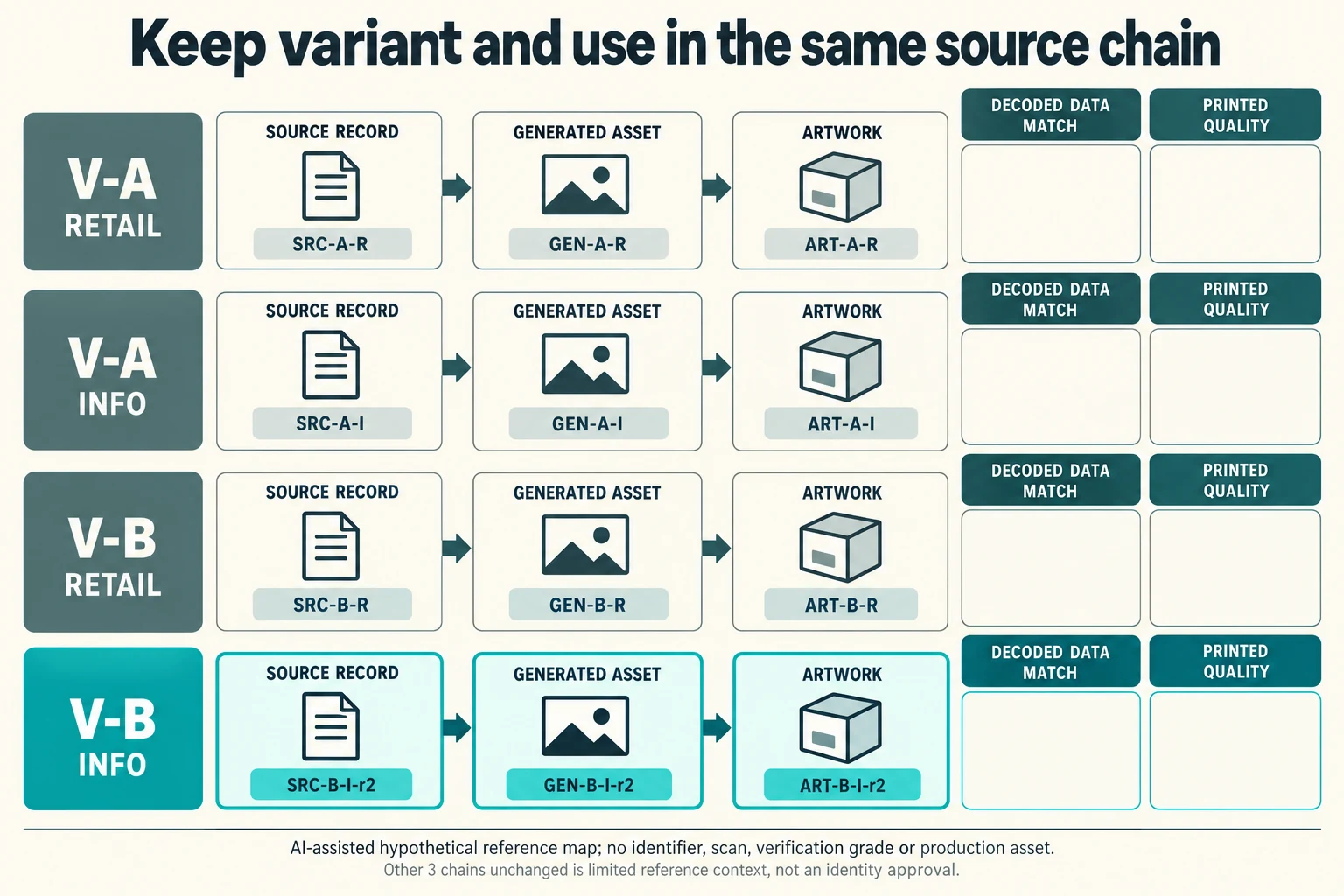
Scroll horizontally if columns extend beyond the view.
| Hypothetical configuration | Named object | Relationship | Input or next scope |
|---|---|---|---|
| A_RETAIL | A_RETAIL | uses source | SRC-A-R |
| A_RETAIL | A_RETAIL | uses generated | GEN-A-R |
| A_RETAIL | A_RETAIL | uses artwork | ART-A-R |
| A_INFO | A_INFO | uses source | SRC-A-I |
| A_INFO | A_INFO | uses generated | GEN-A-I |
| A_INFO | A_INFO | uses artwork | ART-A-I |
| B_RETAIL | B_RETAIL | uses source | SRC-B-R |
| B_RETAIL | B_RETAIL | uses generated | GEN-B-R |
| B_RETAIL | B_RETAIL | uses artwork | ART-B-R |
| B_INFO | B_INFO | uses source | SRC-B-I-r2 |
| B_INFO | B_INFO | uses generated | GEN-B-I-r2 |
| B_INFO | B_INFO | uses artwork | ART-B-I-r2 |
The new map has A_RETAIL, A_INFO, B_RETAIL and B_INFO chains. Assume the owner revises only B_INFO's source reference to SRC-B-I-r2. Its corresponding generated and artwork references become GEN-B-I-r2 and ART-B-I-r2. The other three reference chains remain recorded under their own scope. This invented source change is not a decision about assigning a real identifier, changing a GTIN or satisfying any retail channel.
Ask which generated file actually follows the revised source and which output carries it. A designer changing readable words beside an unchanged asset leaves that question open. Compare the generated content with the correct approved source through the agreed method, preserving exact strings and leading characters in the private authorized record. The public CSV contains only reference tokens; it supplies no actual payload, URL, identifier or scannable symbol. The CSV has separate blank exact-data and exact-decoded-string fields. Import them as text in a spreadsheet; automatic number formatting must not remove source characters.
Each of the four records has separate decoded-data and printed-quality requests. A confirmed source chain for B_INFO does not close B_RETAIL or any physical print review. If symbol type, print process or position also changes, identify that scope for the relevant specialist. The buyer's useful output is the precise affected chain, retained references and missing evidence, rather than a general statement that the barcodes were checked.
Download the barcode source data artwork validation record (.csv). It includes the original table fields and scenarios alongside the added relationships. HYPOTHETICAL rows are editorial examples or required review scopes, not actual records. Actual quantity, configuration, component and file identities, materials, process, specification, copy, method, condition, observation, owner, decision, evidence and dates are blank. ACTUAL_BLANK is a separate empty starting row; enter permitted project evidence before using an actual record. A blank means unknown.
Use the Correct Barcode Data Does Not Fix Printed Bar Width for its separate question. Use the Review Retail Barcodes on the Finished Print Proof for its separate question. Use the Gift-Set Barcode Identity Follows the Sold Assortment for its separate question. Use the Packaging Artwork Handoff Checklist for Print Approval for its separate question.
References apply to the materials, processes or guidance named in each source. Worked configurations and dimensions are teaching examples, not tested specifications or production limits. Use the project’s material specification, drawing and formed sample for approval.
Discuss this packaging specification with Packrivo. We coordinate independent suppliers. MOQ: 500 pieces per product/design; illustrative quantities are not production offers. Confirm materials, samples, price and timing for your project.