
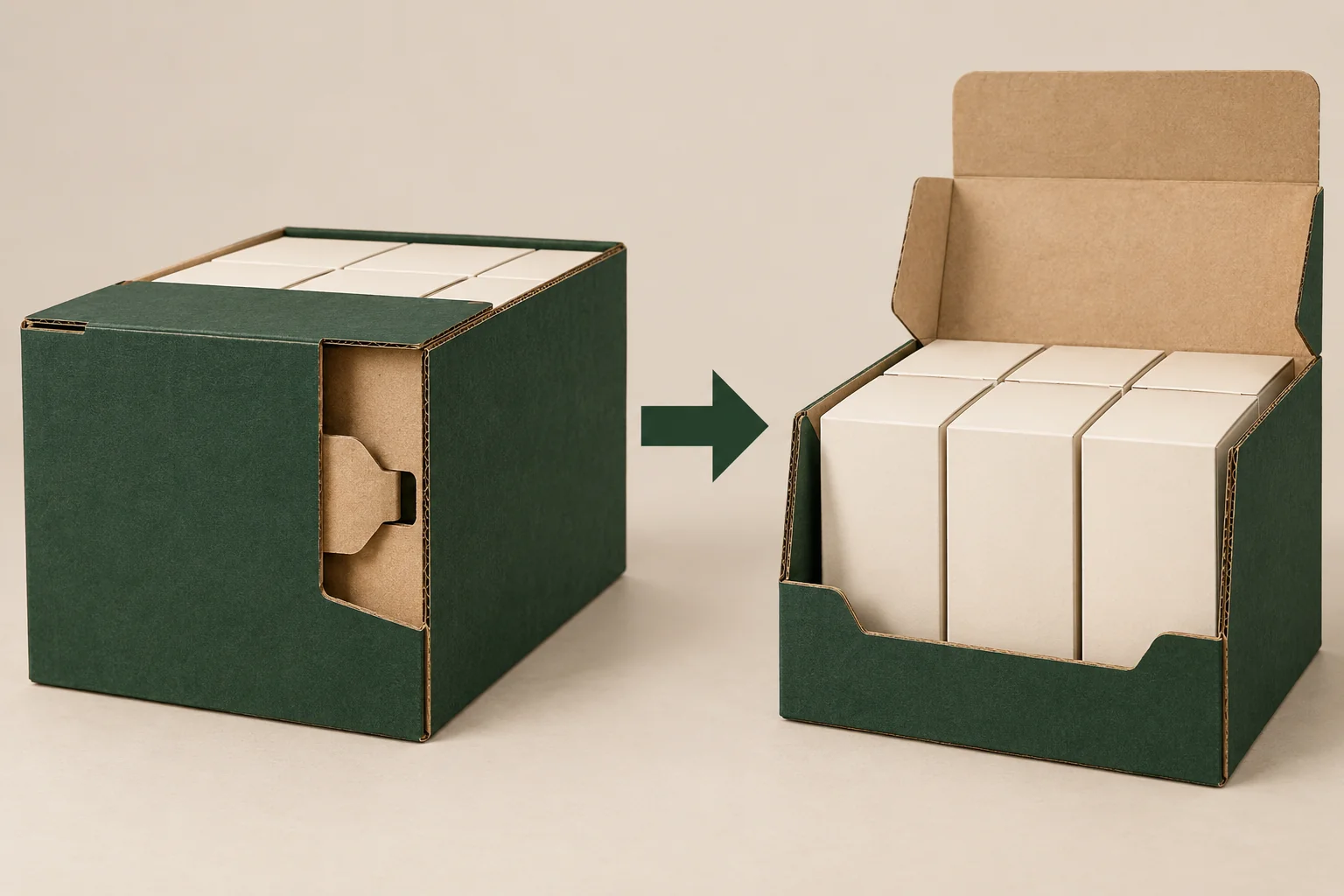
This option can be discussed when the pack has a closed stage followed by a retail display stage. Establish exactly what staff fold, tuck or remove during that change. Any shipping role still needs a separate complete-pack assessment.
Identify the side locks on the proposal
PakFactory’s side lock display reference names a transformable display with side locks. Use it to identify the structural option. Its promotional rigidity and shipping language is not evidence for your finished Packrivo project.
Request a drawing that labels both side locks and their receiving features. Show the engagement direction and final position. A side lock hidden behind a wall in the closed state should still be visible in the setup instruction.
Ask whether the locks are formed before or after retail units are loaded. That choice determines which parts staff need to reach and whether contents can obstruct the action.
Define the top-to-display conversion
Show the supplied, closed and display states as three separate views. Describe the action between each pair. If a panel is removed, specify the intended removal route; if it folds, show its resting position and the printed face that becomes visible.
A hypothetical counter pack of individually boxed ornaments might arrive closed and be converted by store staff. Keep the individual boxes in the planned layout throughout the conversion. An empty sample demonstration doesn’t show whether the same action is possible around the units.
Compare the auto bottom display option when the main question concerns base formation. Here, the extra work is side-lock access and the change into retail presentation.
Use a conversion record
Assign the panel and lock names from the actual dieline. Save a photo at each stop so the action can be repeated by another reviewer.
| Stop | Part to inspect | Decision |
|---|---|---|
| Setup | Left and right locks | Engagement order and visible final position |
| Loaded closed | Top and retail-unit arrangement | Clearance for opening action |
| Conversion | Panel being moved or removed | Staff action without disturbing units |
| Display | Full and half-full contents | Grip route and remaining presentation |
Record conversion debris or a loose panel if the proposed action creates either. The brief should say who removes it and whether it stays with the display, rather than leaving the answer to store staff.
Check the two uses on one sample revision
Confirm whether locks, side seams and conversion features arrive prepared. Specify material and complete unit weights. Any divider, insert or back support belongs in the loaded comparison.
Remove a front unit from the full display, then repeat with a reduced arrangement. Inspect the locks again after those actions. Record movement by location and stage without claiming a load rating from the observed appearance.
If the closed carton is intended to travel without another outer pack, ask for an appropriate distribution evaluation proposal. A successful display conversion doesn’t establish transit performance. Keep the review scope and any agreed tests written separately.
If the upper panel becomes a header behind the units, check the face that ends up visible after conversion. Record whether the printed information reads upright and whether the panel meets another part. The conversion record should connect that final header view to the same action staff will perform, rather than to a separate staged display image.
Submit both states together
Send the lock drawing, conversion sequence, complete unit details, quantity and destination through Get a Quote. The minimum is 500 pieces per design. The final configuration, samples, packaging responsibilities and commercial terms are confirmed for the project.