
Review small positive packaging type against the selected printer’s actual file specification, with the font, color and background identified. Keep the text object at its intended output size and record any exception by object and panel. A generic minimum font size cannot replace that process-specific review.
Define the positive text object being reviewed
The Glenroy flexographic specification gives different positive and reverse-type guidance and discusses vector type and color construction. It demonstrates that type requirements belong to a particular printing process. Its stated values are not Packrivo’s universal limits for every package.
List the small text objects on the current artwork: product descriptor, care statement, website or another supplied line. Record the panel, font, intended printed size and whether the text is live or outlined. Keep the actual copy with the object so a technical adjustment does not silently change its meaning.
Identify the print color and background beneath the text. Ask the selected printer to name the specification or accepted file rule used for this object. A specification reference is more useful than an informal statement that the font seems fine on a monitor.
Review at the intended printed size
Prepare the relevant artwork at its actual output scale and record how that scale was checked. Compare the small positive text under the printer’s stated rule and the intended physical reading conditions. An enlarged inspection view can locate a stroke problem, but should accompany the actual-size view rather than replacing it.
If the printer proposes a font, color or size change, record it against the named object. Ask whether the change affects panel space, adjacent copy or the accepted artwork version. Keep the response as a proposed exception until the designer and buyer have reviewed the resulting file.
Positive text and reverse text should use separate object records. If another paragraph is reversed from a solid background, route it to that task instead of assuming the same acceptance applies. The difference matters when the printer’s own file rules distinguish the two.
Use a positive-type exception map
This is an original Packrivo aid for matching a specific text object to the selected printer’s rule.
| Field | Hypothetical entry | Decision or next action |
|---|---|---|
| Object identity | Care text T1 on back panel B1 | Retain supplied copy and artwork revision |
| Font state | Named font, live text plus reviewed output | Designer confirms final handoff state |
| Print construction | Positive dark type on the offered board face | Printer confirms process/color rule |
| Rule reference | Selected printer’s specification/version | Use its actual relevant field |
| Actual-size review | Output file F1, scale checked | Record the observed reading/stroke question |
| Exception | Printer proposes adjustment to T1 | Buyer accepts/rejects revised output explicitly |
Resolve one illustrative text exception
Imagine a care paragraph that fits neatly on the back of a small gift carton. The printer asks for a change to its positive text treatment. Keep the request attached to that paragraph rather than redesigning all packaging typography without a reason.
The designer can return the altered object with its new artwork revision. The buyer reviews the copy and intended printed appearance, while the printer confirms the file conforms to its selected process. If the new text no longer fits the same panel, record that layout change as another decision.
Handoff the rule, exception and accepted output
Use the artwork handoff checklist to retain fonts and output identities. The drawing-change record helps when the adjustment affects the panel layout.
The designer owns the revised file. The printer owns the technical rule and process confirmation. The buyer owns acceptance of the supplied words and final appearance. Keep the named object and reference visible across those responses.
Bring the small-type object map, actual-size file and selected printer question to your packaging brief. MOQ is 500 pieces per design; the printing proposal, sample scope and commercial conditions are confirmed for the project.
Keep the same care copy visible across two technical alternatives
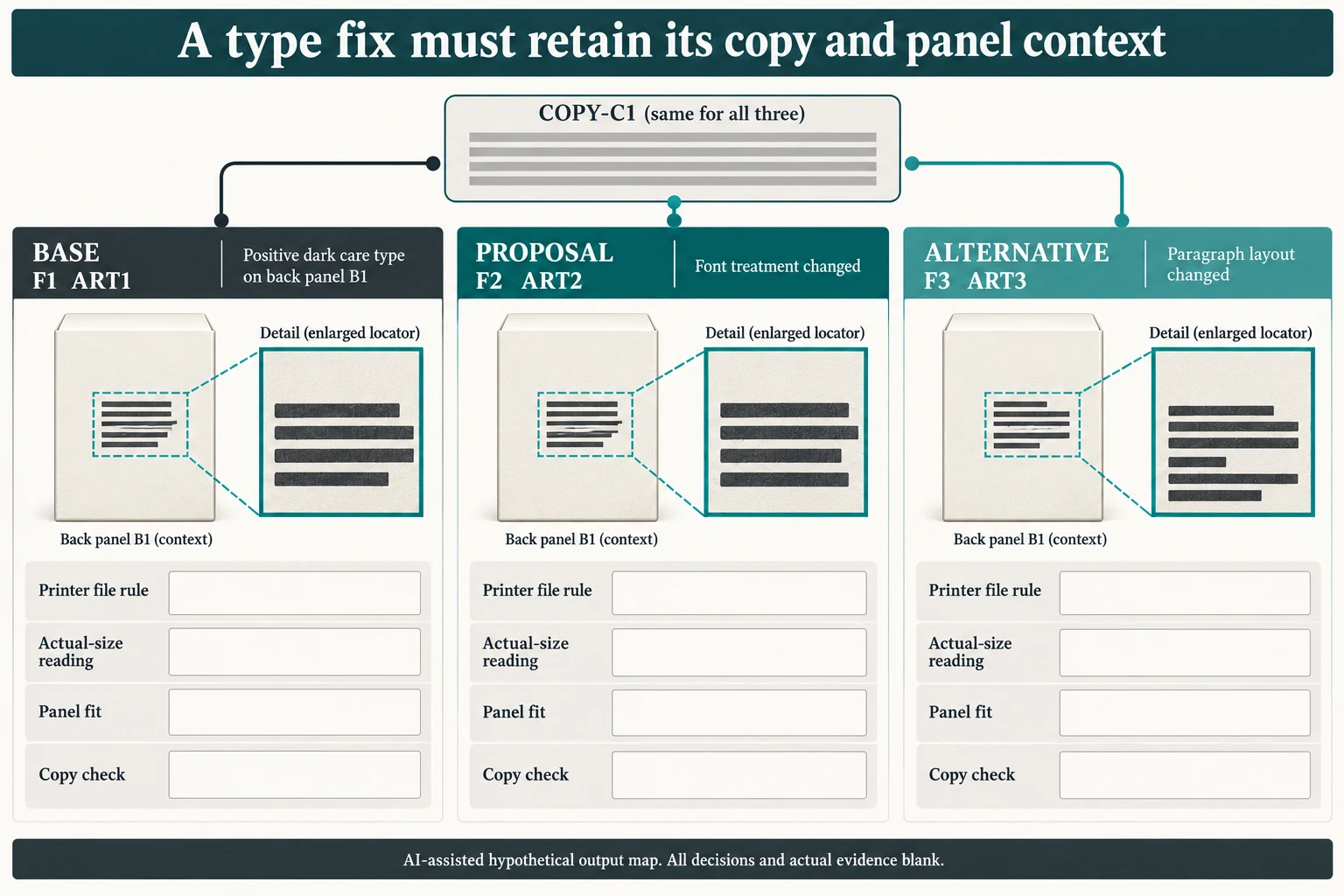
Give the original care paragraph a shared requirement COPY-C1. The baseline output F1/ART1 places text T1 on B1. Two hypothetical alternatives are F2/ART2 with a changed font treatment, and F3/ART3 with a changed paragraph layout. The copy requirement remains COPY-C1 in both. No care wording, font size or actual technical exception is invented for this example.
Scroll horizontally if columns extend beyond the view.
| Hypothetical configuration | Named object | Relationship | Input or next scope |
|---|---|---|---|
| F1 | F1 | uses artwork | ART1 |
| F1 | F1 | uses copy | COPY-C1 |
| F2 | F2 | uses artwork | ART2 |
| F2 | F2 | uses copy | COPY-C1 |
| F3 | F3 | uses artwork | ART3 |
| F3 | F3 | uses copy | COPY-C1 |
Check each returned output in four separate ways: conformity to the selected printer's actual rule, reading at intended output size, correspondence to the supplied copy, and fit within the named panel. A technically conforming revised font can still omit a sentence or change a line break into another artwork area. A paragraph that fits can still leave the printing question unanswered. Neither outcome follows from the filename or a monitor enlargement.
Ask the designer to identify what changed in F2 or F3 and retain the full B1 context with nearby artwork. Ask the printer to identify the exact specification/version and which object its response covers. The buyer then reviews the supplied words and intended appearance on that output. If a response changes B1 or the structure, create a new panel relationship instead of leaving the old fit question looking closed.
The CSV links each output independently to COPY-C1, T1, B1 and its artwork version. Actual words and real file/evidence references are blank until permitted project inputs are entered. An enlarged detail remains a locator alongside actual-size evidence. This positive-type record does not transfer acceptance to reversed text or supply a generic minimum size, stroke rule or readable-result guarantee.
Download the small positive packaging type printer specification record (.csv). It includes the original table fields and scenarios alongside the added relationships. HYPOTHETICAL rows are editorial examples or required review scopes, not actual records. Actual quantity, configuration, component and file identities, materials, process, specification, copy, method, condition, observation, owner, decision, evidence and dates are blank. ACTUAL_BLANK is a separate empty starting row; enter permitted project evidence before using an actual record. A blank means unknown.
Use the Packaging Artwork Handoff Checklist for Print Approval for its separate question. Use the File Names Need a Revision Convention and an Approval Cross-Reference for its separate question.
Source scope checked 16 October 2026. References cover only the named materials, processes or guidance. Added configurations and geometry are hypothetical, not supplier specifications, tests or production approval; they set no universal tolerances or machine limits. Confirm the actual material, process, drawing and formed sample for the project.
Discuss this packaging specification with Packrivo. We coordinate independent suppliers. MOQ: 500 pieces per product/design; illustrative quantities are not production offers. Confirm materials, samples, price and timing for your project.