
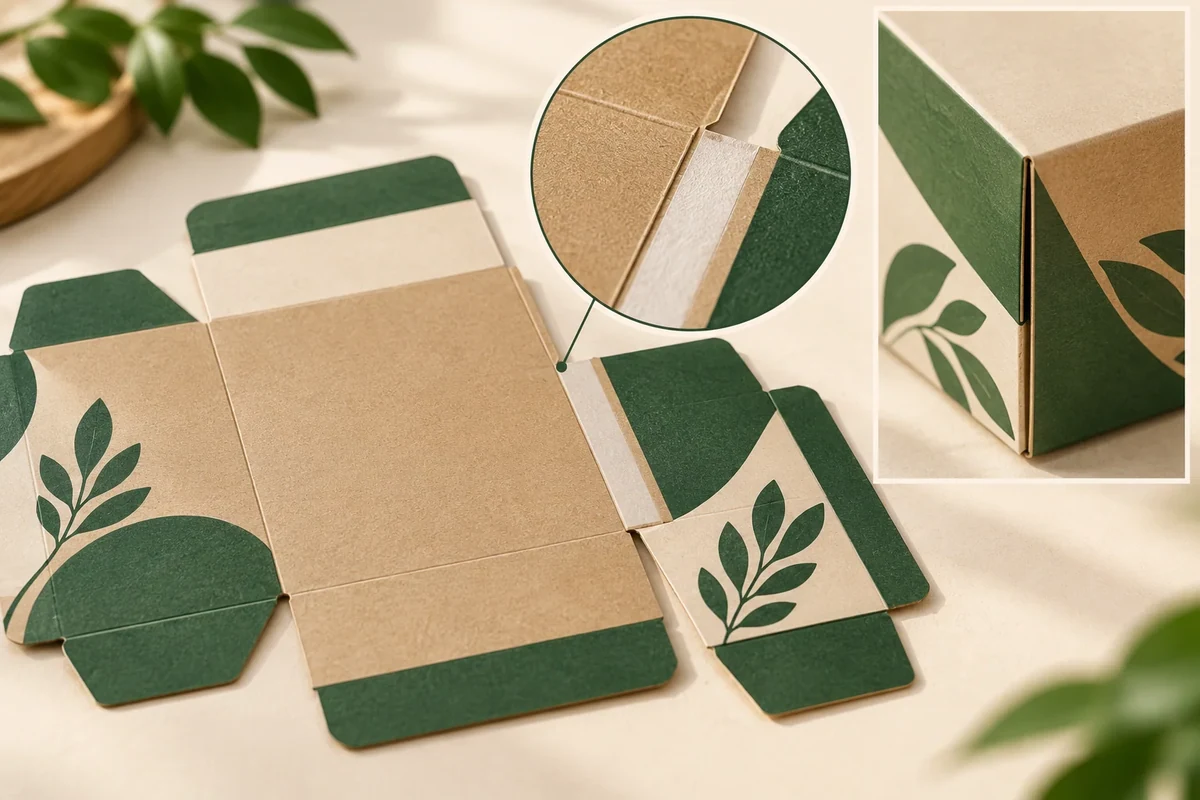
Place the current glue zones, ink, coating and film layers on one drawing before closing the artwork handoff. Identify the actual bonding faces and the responsible converter, then retain any grade-specific compatibility question. Trim and bleed rules do not settle the glue interface.
Identify the joint and its bonding faces
Henkel’s folding-carton bonding explanation identifies the side seam as the bond that forms the carton tube. Use that context to ask the converter which joint and substrate faces are being bonded in the offered design.
Label the glue zone on the current blank and the receiving face it meets after folding. Include the joint preparation and assembly order. The zone should have a stable identity that appears in the artwork review and the formed-sample observation.
Map the ink, coating or film proposed on both faces of the joint. A design layer can occupy a bonding location even when it appears outside the customer-visible artwork. The converter and printer should see the same layer map when answering that question.
Use actual grade information for the conflict
The ACTEGA coating grade reference explicitly identifies one coating as non-glueable. That is a grade-specific example of why a joint needs its actual layer proposal. It is not a rule that all coatings or all inks behave identically at glue areas.
Ask the printer/finisher to name the offered layer and the converter to name the adhesive/process proposal. Request their response about the identified faces and any required exclusion or revision. Avoid filling an unknown area with a generic clearance value copied from another package.
If the response proposes removing a layer, moving a zone or changing an adhesive, record the exact field and drawing revision. Retain the earlier proposal so a later artwork update does not restore the unresolved conflict inadvertently.
Use a glue-zone and layer conflict map
This original Packrivo worksheet uses a hypothetical side seam J1.
| Interface | Example input | Next owner or evidence |
|---|---|---|
| Joint J1 | Side seam and receiving face on BX1 | Converter supplies current joint drawing |
| Substrate faces | Named board/lining proposal | Supplier confirms actual bonding faces |
| Ink A1 | Artwork object crossing the offered zone | Printer identifies the final separation |
| Coating V1 | Named proposed coating on receiving face | Finisher supplies relevant grade reference |
| Adhesive/process | Offered application method at J1 | Converter returns compatibility/exclusion response |
| Revision | Changed zone/layer and sample S2 | Buyer records accepted configuration and open checks |
Review a hypothetical finished sleeve joint
Imagine a gift sleeve whose artwork and gloss layer cross the area proposed for the side seam. The immediate task is to identify the actual two bonding faces and grade stack. The buyer does not need to diagnose the adhesive chemistry to prepare that question.
The converter may return a drawing that changes the bonding zone, while the printer updates a layer boundary. Review those responses together with the formed sample and retain both revisions. A clean-looking outside seam should not erase an unresolved technical field inside the joint.
Keep the joint map in the final file handoff
Use the artwork handoff checklist to connect final masks and outputs to the drawing. The dieline-change record identifies which linked artwork and assembly questions reopen when a zone moves.
The converter owns the actual joint and bonding proposal. The printer or finisher owns the offered ink/coating/film information. The designer returns the revised file, while the buyer approves a named sample and layout. Record the remaining decision owner when those responses are incomplete.
Bring the joint map, layer identities and unresolved bonding question to your packaging brief. MOQ is 500 pieces per design; structure, materials, sample scope and commercial details are confirmed for the project.
Compare a layer exclusion, a moved joint and an adhesive change separately
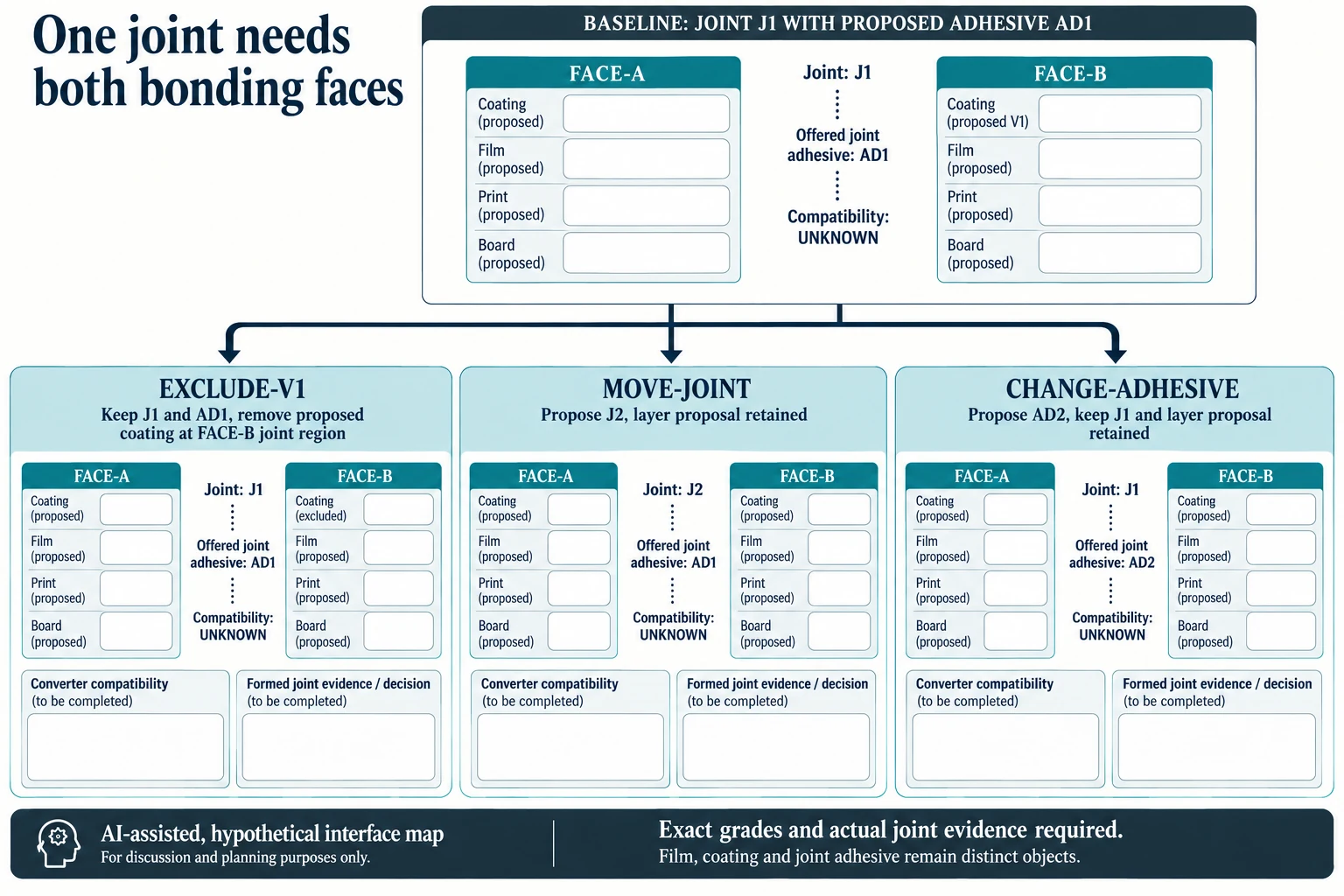
For a hypothetical J1, name FACE_A and FACE_B_RECEIVING before selecting a response. Record the board, print and any offered film or coating at each face separately. The original V1 proposal is on the receiving face; it does not establish the other face's construction. Keep the actual offered joint adhesive and process in their own fields.
Scroll horizontally if columns extend beyond the view.
| Hypothetical configuration | Named object | Relationship | Input or next scope |
|---|---|---|---|
| BASE21 | BASE21 | uses joint | J1 |
| BASE21 | BASE21 | uses joint adhesive | AD1 |
| BASE21 | BASE21 | uses receiving coating | V1_PRESENT_PROPOSED |
| EXCLUDE_V1_21 | EXCLUDE_V1_21 | uses joint | J1 |
| EXCLUDE_V1_21 | EXCLUDE_V1_21 | uses joint adhesive | AD1 |
| EXCLUDE_V1_21 | EXCLUDE_V1_21 | uses receiving coating | V1_EXCLUDED_AT_FACE_B_JOINT |
| MOVE_JOINT21 | MOVE_JOINT21 | uses joint | J2 |
| MOVE_JOINT21 | MOVE_JOINT21 | uses joint adhesive | AD1 |
| MOVE_JOINT21 | MOVE_JOINT21 | uses receiving coating | V1_PRESENT_PROPOSED |
| CHANGE_ADH21 | CHANGE_ADH21 | uses joint | J1 |
| CHANGE_ADH21 | CHANGE_ADH21 | uses joint adhesive | AD2 |
| CHANGE_ADH21 | CHANGE_ADH21 | uses receiving coating | V1_PRESENT_PROPOSED |
The new comparison contains three candidate changes alongside BASE21. EXCLUDE_V1_21 retains J1 and proposed AD1 but removes V1 from the named receiving joint region. MOVE_JOINT21 proposes J2 while retaining the layer and adhesive proposals. CHANGE_ADH21 retains J1 and the layers while proposing AD2. These labels define different source questions, not three validated ways to make a bond.
For the exclusion candidate, ask exactly which file boundary and face changes, including the intended visible appearance. For the joint move, identify both new bonding regions on the revised drawing and ask which artwork or assembly relationships reopen. For the adhesive change, request the selected grade's applicable compatibility and process response. A response naming AD2 alone leaves the actual two surfaces unresolved.
Each candidate has its own both-face identity, compatibility, formed-joint and appearance records. The illustration deliberately uses face information cards rather than depicting adhesive joining every layer's cut edge. Grade-specific non-glueability in a manufacturer's example explains why a source question is needed; it does not decide these candidates. A clean outside seam or complete trim/bleed file cannot close a missing layer or joint field. Select only the next proposal and review scope supported by the responsible converter and printer/finisher.
Download the packaging glue zone surface layer map record (.csv). It includes the original table fields and scenarios alongside the added relationships. HYPOTHETICAL rows are editorial examples or required review scopes, not actual records. Actual quantity, configuration, component and file identities, materials, process, specification, copy, method, condition, observation, owner, decision, evidence and dates are blank. ACTUAL_BLANK is a separate empty starting row; enter permitted project evidence before using an actual record. A blank means unknown.
Use the An Opened Hot-Melt Carton Joint Can Break at Different Layers for its separate question. Use the Packaging Artwork Handoff Checklist for Print Approval for its separate question. Use the Packaging Dieline Changes Need an Impact Record for its separate question.
Source scope checked 16 October 2026. References cover only the named materials, processes or guidance. Added configurations and geometry are hypothetical, not supplier specifications, tests or production approval; they set no universal tolerances or machine limits. Confirm the actual material, process, drawing and formed sample for the project.
Discuss this packaging specification with Packrivo. We coordinate independent suppliers. MOQ: 500 pieces per product/design; illustrative quantities are not production offers. Confirm materials, samples, price and timing for your project.