
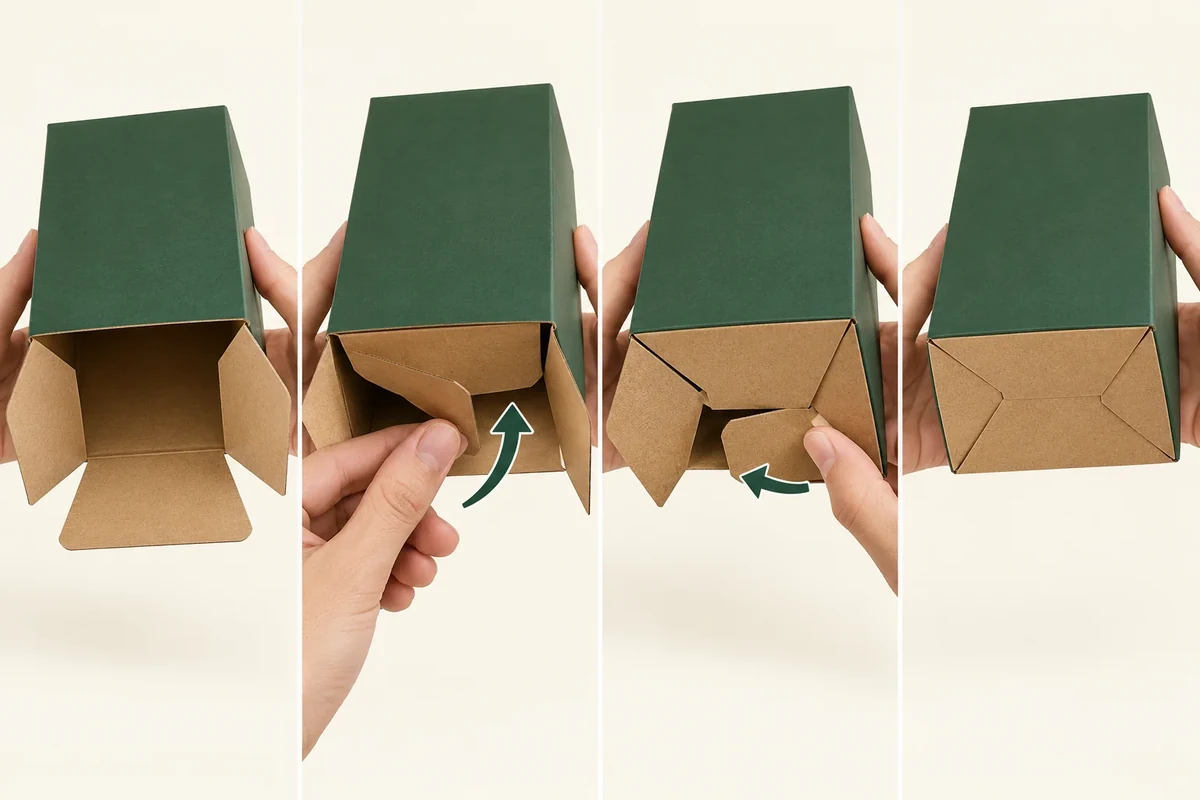
Write a manual bottom-tab instruction from the actual supplier-approved carton sequence, with one action and photo per step. Show the final engagement and the check required before loading. A ‘1-2-3 bottom’ label doesn’t give staff a complete work instruction or establish that every similarly named carton uses the same tabs.
The useful output is a short instruction another packer can follow on the same carton revision. Start with the delivered form, not a completed box that hides the tabs.
Get the confirmed tab sequence
Packhelp’s snap-lock bottom description identifies four interlocking closure tabs. This supports the interlocking-base direction. Ask your supplier to confirm the actual tabs and sequence for the proposed carton; the catalogue does not provide your work instruction.
Assign tab names from the supplier drawing or a clearly marked working copy. Keep those names on the instruction photos. If the drawing changes, review the sequence again before carrying over old photographs.
Record the supplied state and any prepared seam. Staff should know which parts arrive completed and which they must form. An extra adhesive or tape step needs to be stated if it belongs in the proposed process.
The delivery-state guide covers that handoff. This method turns one manual base sequence into a repeatable bench instruction.
Photograph one action per frame
Begin with an empty carton in the starting orientation. Use a consistent viewpoint that shows the relevant tab and receiving feature. Keep fingers clear enough that the action is visible.
Capture the state before an action and the state after it. Write a short verb-led instruction, such as fold the named tab into the confirmed position. The actual direction and order must come from the proposal, not a generic sequence copied from another carton.
Show the final engagement from the view staff will use to inspect it. Add an inside or underside view if needed, and label its purpose. A photo of the closed top gives no evidence about the base.
Include the point where loading becomes permitted. This prevents staff from covering an incomplete base before performing the check.
Use a photographed work-instruction record
Build the instruction around the actual number of actions. The example fields below are placeholders for your confirmed sequence.
| Instruction field | Entry | Image requirement |
|---|---|---|
| Starting state | Carton revision and orientation | Empty delivered form |
| Action step | Named tab, direction and next position | Before and after views |
| Final engagement | Confirmed receiving feature | Close view showing completed relationship |
| Before-load check | Observable condition and responsible operator | Inspection view without contents |
| Exception | Unresolved tab or changed action | Separate issue photo, no workaround hidden |
| Version | Drawing, instruction and sample IDs | Current approved reference |
Keep the instruction distinct from a load or transport evaluation. A correctly formed base can be a process requirement without proving the finished pack’s capacity.
Follow a hypothetical packing-bench handoff
Suppose a small gift brand receives flat snap-bottom cartons with a prepared side seam. One packer knows the forming sequence, while another has only seen the closed carton. The buyer requests the supplier-confirmed tab instruction and photographs the actual sample.
The instruction shows the starting orientation, each named movement and the completed base before the gift set is inserted. An independent reviewer follows it using the same sample version and records any unclear step.
If the reviewer needs an extra movement, the buyer asks whether it belongs in the sequence or indicates an issue. The team does not silently add a workaround and describe the original instruction as complete.
Review the instruction with someone using it
For the hypothetical bench handoff, give the confirmed carton revision a clear instruction ID. Ask a reviewer to follow the photographs without verbal coaching. Record which action is unclear and which tab or final position they cannot identify.
If the reviewer folds a different tab first, document that action and compare it with the supplier-confirmed sequence. Do not infer that both sequences are permitted merely because the empty base eventually looks closed. Ask the responsible source which sequence and final engagement should control the instruction.
A useful reply request is: ‘Please confirm the action shown in frame F3 and the inspection condition before loading.’ It gives the supplier one location to correct. A new closed-box photograph would leave the instructional gap unchanged.
Keep any approved correction in the photos and written verbs together. If the drawing changes, mark the earlier instruction superseded instead of leaving two apparently current versions at the bench. The review checks whether the instruction communicates the confirmed process; it does not establish assembly speed, capacity or a transport result.
Send the sequence and open steps
Use the snap bottom outer-carton direction when the instruction also belongs to a slotted outer pack with a separate top seal. Keep those two closing operations distinct.
Submit the tab drawing, instruction frames and unresolved steps through Packrivo’s enquiry. The next response should confirm the exact sequence and before-load check for the current carton revision.
Resolve an extra movement before issuing the next instruction
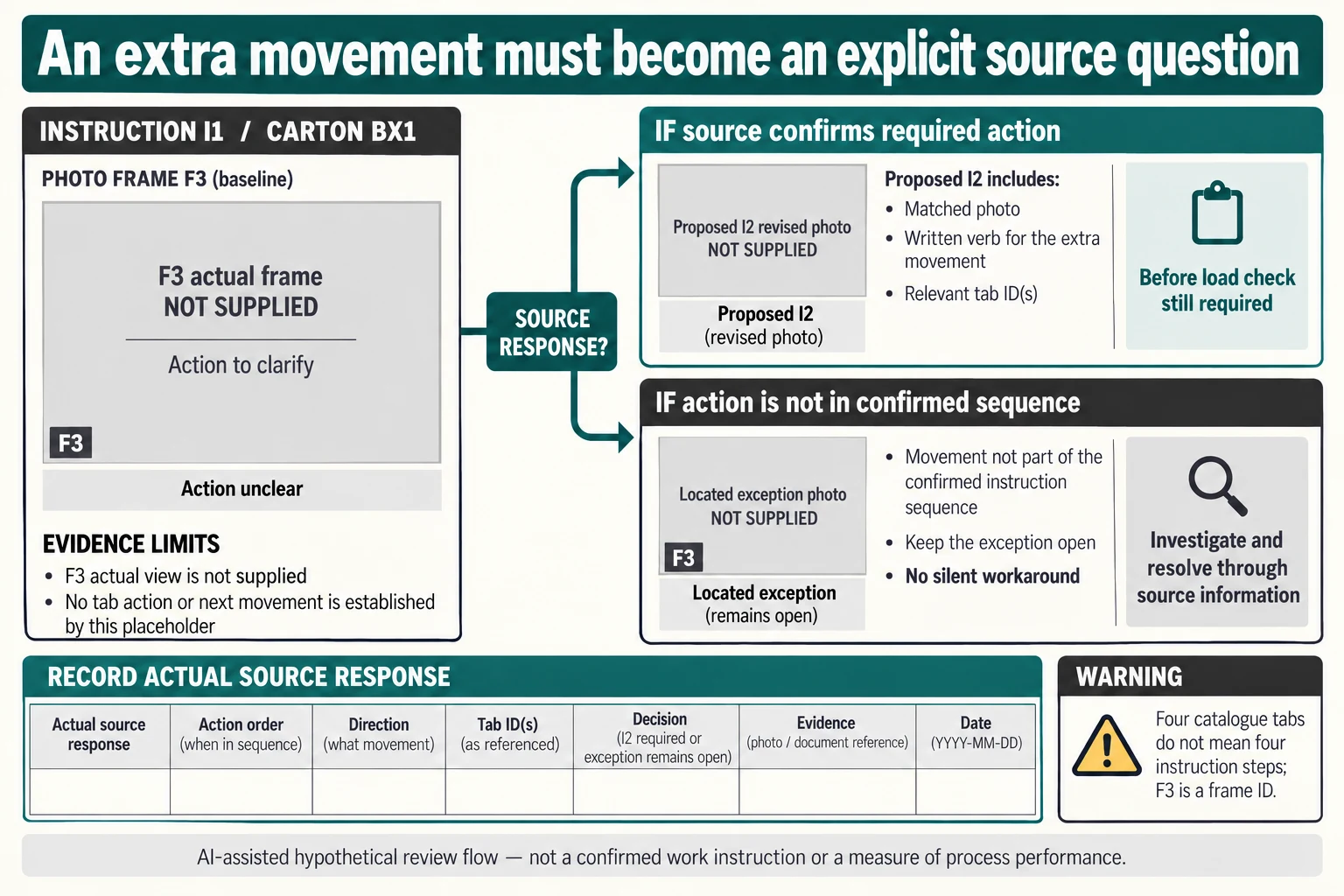
Use I1 for the original hypothetical BX1 instruction and F3 for the located frame question. F3 is a reference to evidence, not a command to fold a third tab. Likewise, the catalogue's four interlocking tabs do not establish that the actual instruction has four actions, four photographs or a universal order.
Scroll horizontally if columns extend beyond the view.
| Hypothetical configuration | Named object | Relationship | Input or next scope |
|---|---|---|---|
| REQUIRED_ACTION22 | F3 | conditional source response | SOURCE_CONFIRMS_REQUIRED_ACTION |
| REQUIRED_ACTION22 | REQUIRED_ACTION22 | next required scope | I2_MATCHED_PHOTO_AND_VERB |
| NOT_IN_SEQUENCE22 | F3 | conditional source response | SOURCE_DOES_NOT_CONFIRM_AS_REQUIRED |
| NOT_IN_SEQUENCE22 | NOT_IN_SEQUENCE22 | next required scope | LOCATED_EXCEPTION_REVIEW_NO_SILENT_WORKAROUND |
Keep two possible source responses separate. REQUIRED_ACTION22 assumes the responsible source confirms that a missing movement belongs in the actual sequence. The next requirement is a proposed I2 with the corrected photograph and written verb together, followed by the agreed empty-base check. NOT_IN_SEQUENCE22 leaves a located exception requiring review; staff should not add the movement silently and describe I1 as complete.
Ask the reviewer to identify which tab, direction or final position could not be understood, without verbal coaching. The source must confirm the actual action before a new instruction is issued. If the response changes the drawing or supplied preparation rather than just clarifying the communication, give that construction its own reference and revisit the relevant frames. Keep superseded I1 available as history while preventing two apparently current instructions at the bench.
The download preserves the original delivered state, prepared seam, tab-name, before/after and final-engagement requests and maps both new response branches structurally. Actual source reply, action order, method, photographs and decisions remain blank. The image is a review flow, not a snap-bottom assembly recipe. Clear instructions and an empty-base check still supply no load capacity, assembly rate or transport result, and the top seal remains a separate operation.
Download the manual bottom tab work instruction sequence record (.csv). It includes the original table fields and scenarios alongside the added relationships. HYPOTHETICAL rows are editorial examples or required review scopes, not actual records. Actual quantity, configuration, component and file identities, materials, process, specification, copy, method, condition, observation, owner, decision, evidence and dates are blank. ACTUAL_BLANK is a separate empty starting row; enter permitted project evidence before using an actual record. A blank means unknown.
Use the Define Flat and Assembled Packaging Delivery Scope for its separate question. Use the Write Mounting Instructions With Front and Back Views for its separate question. Use the Custom Packaging Sample: Approval Checks That Matter for its separate question.
References apply to the materials, processes or guidance named in each source. Worked configurations and dimensions are teaching examples, not tested specifications or production limits. Use the project’s material specification, drawing and formed sample for approval.
Discuss this packaging specification with Packrivo. We coordinate independent suppliers. MOQ: 500 pieces per product/design; illustrative quantities are not production offers. Confirm materials, samples, price and timing for your project.