
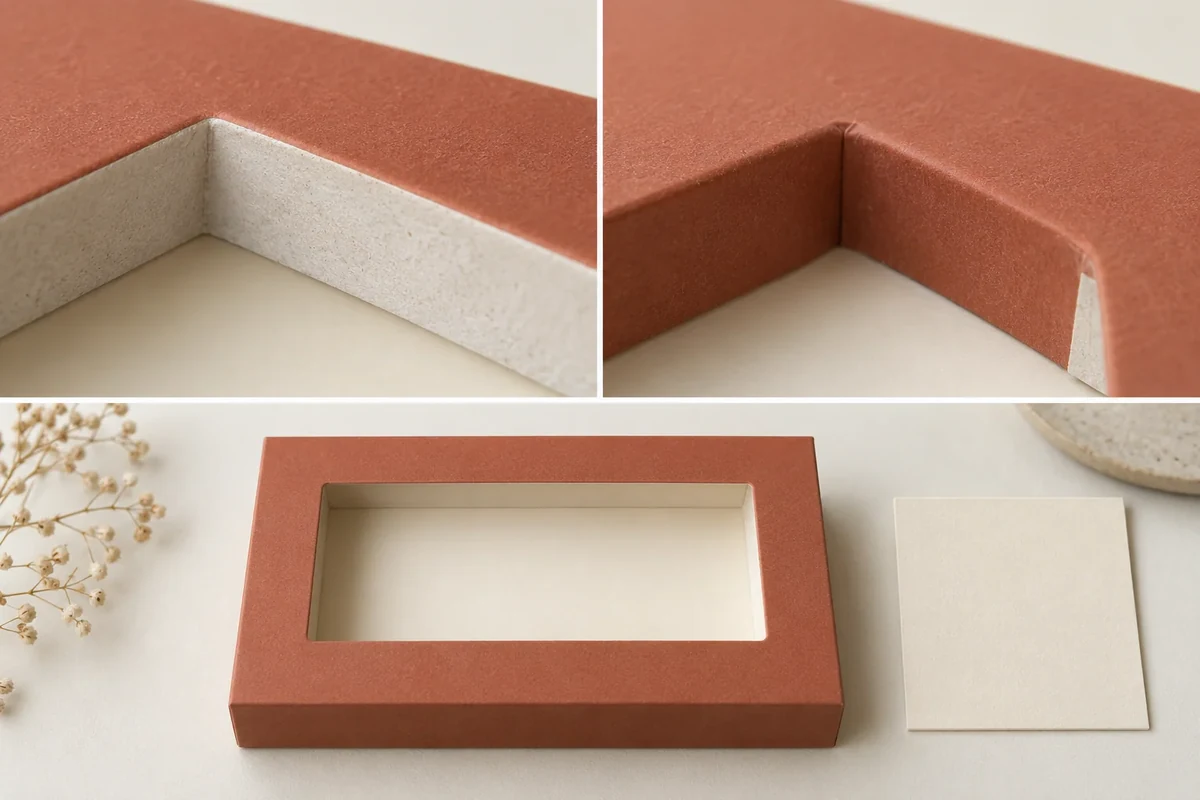
Give exposed cut and turned board edges their own color decision beside the adjacent finished face. Identify the actual core, wrap or substrate visible at each edge, then review the converted sample under the agreed conditions. This keeps an edge-color choice separate from general face-color approval.
Name the exposed edge and the neighboring face
This is an original Packrivo observation map. Its evidence comes from the actual offered material identity and converted sample; it does not claim a universal board-color or edge-performance rule.
Mark each relevant cut edge or turned wrapping edge on the current component drawing. Identify the adjacent printed or finished face and the material layer exposed at that location. A colored front face and a visible substrate edge may need different appearance decisions.
Ask the converter to identify the offered board/core and wrap construction. Keep a grade or surface description with the sample rather than assuming that a screen color or an outside finish identifies the inside substrate.
Review the actual converted state
Inspect the named edge beside its finished face after cutting, wrapping or the relevant converting operation. Record the sample revision, orientation and viewing conditions. Use a close-up to locate the edge and a wider view to show how it appears on the component.
The buyer can retain the visible edge color, request another material/edge proposal or keep the question open. Record which option is chosen and the evidence it uses. Avoid silently accepting an edge because the main face color has already been approved.
If another proposal changes the wrap, core or exposed boundary, keep those differences visible. Compare the same edge/face relationship on the new sample so a relocated opening does not hide a changed material appearance.
Use an exposed-edge color map
The hypothetical rigid-window lid below uses illustrative references, not an actual customer sample.
| Edge/face relationship | Example record | Decision or next evidence |
|---|---|---|
| Cut edge E1 | Core visible beside viewing aperture A1 | Converter identifies actual material layer |
| Turned edge E2 | Wrapping edge beside the same opening | Record finished wrap proposal |
| Adjacent face F1 | Accepted printed/finished face reference | Retain reference and conditions |
| Converted sample | Lid sample S1, drawing L1_r02 | Edge close-up and complete component view |
| Observation | Visible edge color beside F1 | Buyer records actual appearance observation |
| Disposition | Retain, change or review named edge | Named owner and next sample/reference |
Resolve an illustrative window-edge question
Imagine the finished face of a rigid lid matches the buyer’s reference, while its cut aperture shows a different substrate color. Keep the two appearance fields separate. Ask the converter for the material/edge identity and the proposed treatment or material option before deciding what should change.
The buyer may prefer the exposed edge as a deliberate visual detail. Alternatively, another proposed wrap/core arrangement may need a new sample. In both cases the decision should name E1 and the accepted configuration rather than being folded into a general statement that the lid color is approved.
Handoff the edge decision with its drawing
Use the physical color approval method for the reference and viewing conditions. The drawing-change record keeps a moved aperture or edge linked to the artwork and holder checks. The window-lid rigid gift box is a relevant construction comparison for core/wrap/patch interfaces.
The converter identifies the actual exposed layer. The observer returns the converted edge/face evidence, and the buyer decides the appearance or asks for a specific new proposal. Keep that decision with the same drawing and sample revision.
Bring the edge map, adjacent-face reference and unresolved material/appearance fields to your packaging brief. MOQ is 500 pieces per design; materials, samples and commercial terms are confirmed for the project.
Check core and wrap alternatives without carrying face approval onto the edges
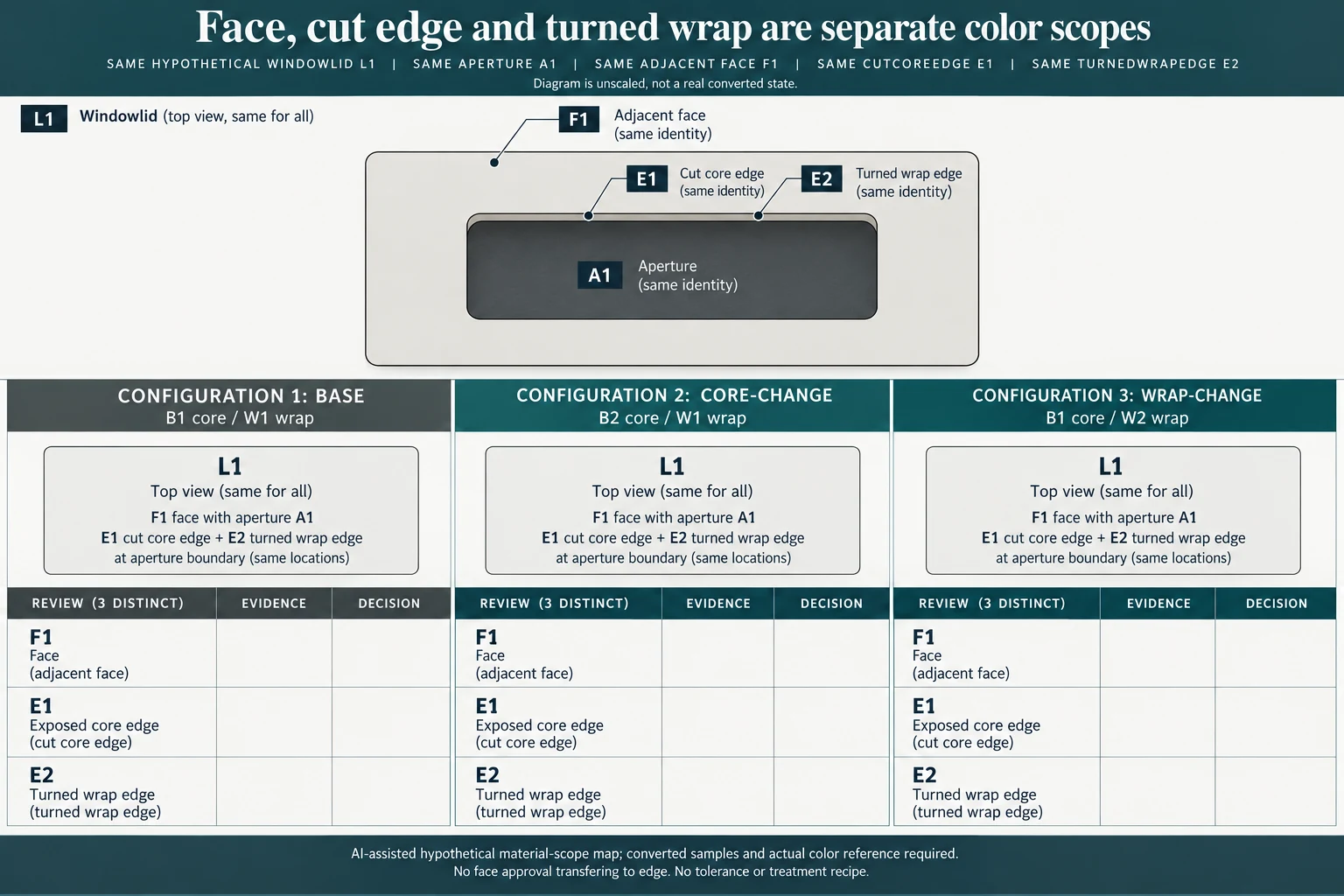
For the hypothetical window lid, keep aperture A1, adjacent face F1, cut edge E1 and turned edge E2 fixed as references. Compare BASE21 using B1 core and W1 wrap with CORE_CHANGE21 using B2/W1 and WRAP_CHANGE21 using B1/W2. These are material identities for a proposal, not observed colors or assumptions that a wrap hides an edge.
Scroll horizontally if columns extend beyond the view.
| Hypothetical configuration | Named object | Relationship | Input or next scope |
|---|---|---|---|
| BASE21 | BASE21 | uses core | B1 |
| BASE21 | BASE21 | uses wrap | W1 |
| CORE_CHANGE21 | CORE_CHANGE21 | uses core | B2 |
| CORE_CHANGE21 | CORE_CHANGE21 | uses wrap | W1 |
| WRAP_CHANGE21 | WRAP_CHANGE21 | uses core | B1 |
| WRAP_CHANGE21 | WRAP_CHANGE21 | uses wrap | W2 |
Review F1, E1 and E2 independently on each converted candidate. A core change may alter what is exposed at E1 while the same wrap remains. A wrap change can affect E2 and the face appearance even though the underlying core identity is retained. Ask the converter which layer is actually visible at each boundary before deciding what the photograph represents.
The original fictional face-color acceptance covers F1 only. It does not preselect retaining E1 or E2. The buyer may deliberately retain a contrasting exposed edge, request a different material or edge proposal, or keep the question open. Preserve the actual reference and viewing conditions with whichever scoped decision is eventually made. Screen hues in a diagram are not those physical references.
If the aperture itself moves, give the changed geometry a new drawing relationship rather than comparing unrelated edges under the same A1 label. The worksheet retains sample S1 and original drawing L1_r02 as baseline identities, then adds candidate-specific material and three-surface requests. No edge color, cover-up treatment, acceptable difference or universal board property is supplied. The useful next response identifies the exposed construction and returns converted evidence for the named edge and adjacent face.
Download the exposed board edge color decision record (.csv). It includes the original table fields and scenarios alongside the added relationships. HYPOTHETICAL rows are editorial examples or required review scopes, not actual records. Actual quantity, configuration, component and file identities, materials, process, specification, copy, method, condition, observation, owner, decision, evidence and dates are blank. ACTUAL_BLANK is a separate empty starting row; enter permitted project evidence before using an actual record. A blank means unknown.
Use the Packaging Color Approval Starts With a Physical Reference for its separate question. Use the Packaging Dieline Changes Need an Impact Record for its separate question.
Source scope checked 16 October 2026. References cover only the named materials, processes or guidance. Added configurations and geometry are hypothetical, not supplier specifications, tests or production approval; they set no universal tolerances or machine limits. Confirm the actual material, process, drawing and formed sample for the project.
Discuss this packaging specification with Packrivo. We coordinate independent suppliers. MOQ: 500 pieces per product/design; illustrative quantities are not production offers. Confirm materials, samples, price and timing for your project.