

Use a consistent filename convention and a separate approval cross-reference so each attachment can be traced to its component, role and revision. Keep the exact file identity beside the drawing, output and accepted evidence it belongs to. A name that says final should never substitute for the actual approval record.
Choose tokens that identify the file’s role
Define a short project/component token, a file-role token and an explicit revision. Add a status or date token only when its meaning is agreed. Use the same convention across the drawing, artwork, reference output and supporting files so their relationship can be seen.
The official Adobe Package guidance describes organizing documents, linked assets, fonts and a report. It supplies file-package context, not a mandated naming standard. The convention in this article is an original Packrivo method that a project can adapt.
Keep the exact filename and extension in the record. A PDF reference and an editable artwork file have different roles even when they share a component and revision. Do not rely on an abbreviated email subject to identify which attachment was reviewed.
Keep naming and approval as separate fields
The Glenroy artwork handoff specification illustrates printer-specific native/supporting/output requirements. Ask the selected printer which output and revision it expects. Your naming convention helps find those files but does not prove their technical acceptance.
Record the approval evidence and owner separately from the filename status. If the project uses a review or accepted token, define who changes it and which record supports that change. An attachment renamed final after sending still needs its actual content and approval relationship retained.
When a file is superseded, keep the earlier identity and indicate which accepted output replaces it. Record collisions such as two different attachments carrying the same name. A revised file should not silently overwrite the earlier record if its content or role changed.
Use a filename and approval cross-reference
These hypothetical names illustrate one possible convention; they are not an industry standard or actual project files.
| Role | Illustrative filename | Linked identity/decision |
|---|---|---|
| Structure drawing | BX1_DWG_r02_review.pdf | Component BX1, drawing revision r02 |
| Editable artwork | BX1_ART_r02_review.ai | Placed against the named BX1 drawing |
| Print output | BX1_OUT_r02_review.pdf | Generated from the stated artwork/package |
| Approval reference | Exact attachment name plus recorded evidence | Buyer and printer scope recorded separately |
| Superseded file | BX1_ART_r01_review.ai | Retained as earlier version, replaced by explicit reference |
| Collision | Two contents using the same filename | Resolve identity before confirming received output |
Resolve an illustrative same-name collision
Imagine two attachments named box_final.pdf arrive after a drawing update. Preserve both received files and their actual receipt context. Ask the designer or output owner to identify the contents and supply unique revision names, then link the accepted output to the current drawing.
The buyer should approve the specific appearance file and the printer should confirm its required technical handoff. A renamed attachment does not establish either decision. Retain the corrected filename, exact output reference and earlier collision so the next recipient can understand the accepted baseline.
Make the attachment reference part of the handoff
Use the drawing-change method to record what a revision changes, while this convention identifies the actual files. The artwork handoff checklist retains supporting assets and selected printer requirements.
The project coordinator defines the tokens and cross-reference. The designer names native files and assets, the output owner identifies generated PDFs, and the buyer/printer record the scope they actually approve. Keep the next owner visible whenever an attachment identity is unresolved.
Bring the exact filenames, linked revisions and missing identity/approval fields to your packaging brief. MOQ is 500 pieces per design; artwork, sample and commercial details are confirmed for the project.
The same filename can identify two different received contents
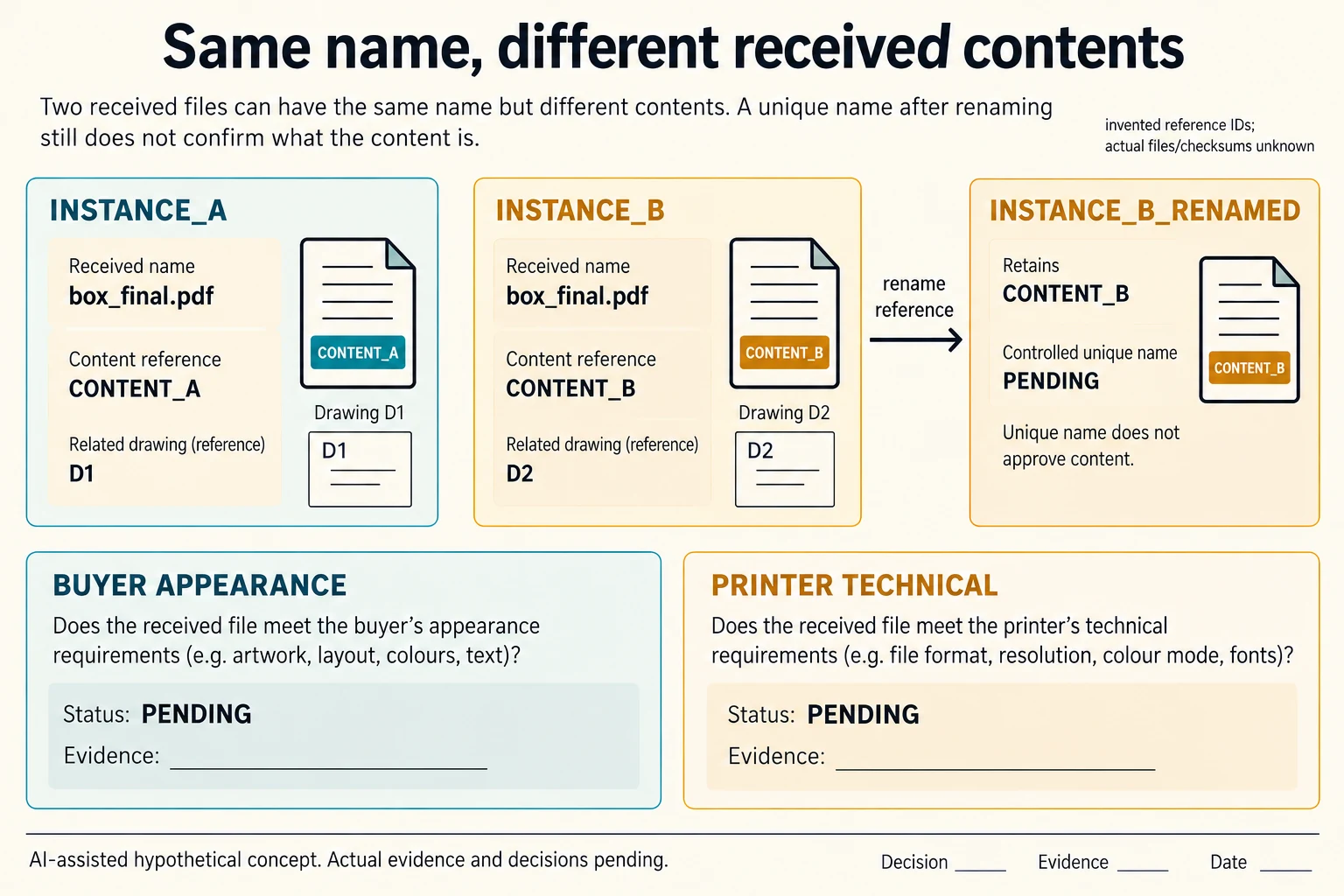
Imagine two received attachments both named box_final.pdf. Give the received instances separate record identities INSTANCE_A and INSTANCE_B without claiming that these are their source filenames. In this invented comparison A refers to CONTENT_A and drawing D1; B refers to CONTENT_B and D2. Keep each received name, source context and drawing association. A matching filename is not evidence that the contents match.
Scroll horizontally if columns extend beyond the view.
| Hypothetical configuration | Named object | Relationship | Input or next scope |
|---|---|---|---|
| COLLISION26 | INSTANCE_A | has received name | box_final.pdf |
| COLLISION26 | INSTANCE_A | has content reference | CONTENT_A |
| COLLISION26 | INSTANCE_A | has drawing reference | D1 |
| COLLISION26 | INSTANCE_B | has received name | box_final.pdf |
| COLLISION26 | INSTANCE_B | has content reference | CONTENT_B |
| COLLISION26 | INSTANCE_B | has drawing reference | D2 |
| RENAMED26 | INSTANCE_B_RENAMED | retains content reference | CONTENT_B |
| RENAMED26 | INSTANCE_B_RENAMED | requires | BUYER_APPEARANCE_DECISION |
| RENAMED26 | INSTANCE_B_RENAMED | requires | PRINTER_TECHNICAL_DECISION |
The CSV records each association as a separate typed relationship. Its actual file identifiers, checksums, sources and evidence remain blank because no real file was supplied. A checksum, when obtained through the authorized project process, can help identify exact bytes; it does not explain the design or supply an approval. Confirm the current drawing relationship instead of selecting whichever attachment was received most recently.
Renaming B under the agreed convention solves a reference problem only. The renamed candidate still needs the buyer’s appearance decision and the printer’s technical decision under their respective scopes. Retain the original received context beside the controlled name so an earlier reply can be traced. Do not relabel an old approval as applying to changed contents just because the new filename looks orderly.
Adobe’s Package files guidance, updated 17 July 2024, describes collecting an Illustrator document, linked graphics, fonts and a report. That supports checking the handoff package, including missing resources; it does not prescribe this naming scheme or grant permission to share fonts. The original drawing/artwork/output roles remain separate. Use the handoff checklist for complete delivery contents and this record for identity collisions before an exact-file decision.
Download the packaging file collision revision record record (.csv). It includes the original table fields and scenarios alongside the added relationships. HYPOTHETICAL rows are editorial examples or required review scopes, not actual records. Actual quantity, configuration, component and file identities, materials, process, specification, copy, method, condition, observation, owner, decision, evidence and dates are blank. ACTUAL_BLANK is a separate empty starting row; enter permitted project evidence before using an actual record. A blank means unknown.
Use the Packaging Artwork Handoff Checklist for Print Approval for its separate question. Use the Packaging Dieline Changes Need an Impact Record for its separate question. Use the Turn Supplier Replies Into a Clarification Matrix for its separate question.
Source scope checked 16 October 2026. References cover only the named materials, processes or guidance. Added configurations and geometry are hypothetical, not supplier specifications, tests or production approval; they set no universal tolerances or machine limits. Confirm the actual material, process, drawing and formed sample for the project.
Discuss this packaging specification with Packrivo. We coordinate independent suppliers. MOQ: 500 pieces per product/design; illustrative quantities are not production offers. Confirm materials, samples, price and timing for your project.